

 Add Comment
|
Add Comment
|
 Related Links
|
Related Links
|
 TrackBack
 Related Content
E:61:10 error message on DSC-T1
Does anyone understand the E:61:10 error message on the DSC T1 ? It just happened this morning (figures first day of school). The camera will not auto focus.
Please provide any feedback. It would be tremendously appreciated.
Thanks
Lance
Lance
Thu, 07 Sep 2006 08:51:31 -0700
Press the reset button on the bottom of the camera. Then power the camera off, and power it back on again.
"I have a DSC-P50 and was encountering the same problem. I went in to the camera set-up mode with the memory stick removed and changed serveral options (Don't remember which ones, although I do remember trying to change the "Format" setting) When I re-inserted the memory stick, the camera worked. "
E 61 00 Difficult to adjust focus Inspect the lens block focus reset sensor
E 61 10 Zoom operations fault Inspect the lens block zoom reset sensor
E 62 00 Steadyshot function does not work well. Inspect pitch angular velocity sensor
E 62 01 Steadyshot function does not work well. Inspect yaw angular velocity sensor
BORIME4KA
Wed, 27 Sep 2006 01:06:37 -0700
hit the mother fucker...i also have a dsc-w1 and i've had this error.after 3 hits the error vanished
mircea
Mon, 04 Dec 2006 10:59:26 -0800
pleace tell me how to repair my camara is a DSC-T1 because it apears on the screem "E:61:10" and i don´t know what to do , so if u know what i should do pleace tell me
gilberto hernandez magaña
Mon, 05 Feb 2007 20:48:09 -0800
Hi I had the same error I found a solution in a tech support site here is the page for it
Sony cybershot DSC-S50(not focusing)
Marcella
Thu, 12 Apr 2007 04:58:06 -0700
I had an E61.00 error on my Sony DSC-t7 camera. I tried the bumping on hard surface . I bumped it bottom edge down at the lens end about five times with increasing hardness of bump and then turning off and on again after each try. After about five times E: 61.00 error had gone. I can hardly believe it.
It really did work.
Bruce Winn
Thu, 19 Apr 2007 20:13:58 -0700
TO add to my comment above: The Sony manual for the camera says to reinitialise the camera to fix E 61.00 error. I had tried that several times and it does NOT work.
Bruce Winnb
Thu, 19 Apr 2007 20:18:03 -0700
Bruce Winn - you da man! I've also had an E61:00 error. I also found re-initialising like the instruction manual said did not work. I then tried the "5 hard bumps" method you suggested and my camera works again!!! - I can't believe it!!!
Paddy.
Paddy
Fri, 27 Apr 2007 12:58:19 -0700
I had that E:61:10 error message on the SONY DSC-T10 too. After looking online for a solution, just about everyone else said hit the camera. I'm as skeptical as anyone else about doing something like that, but after hitting the camera a few times and shaking it aroud a bit, the error message went away and the focus/zoom works fine. I'd hate to recommend it, but hitting or shaking the camera seems to have worked.
Andrew
Sun, 22 Apr 2007 10:05:42 -0700
We did it. It's work. Ha ha. =) Re: SONY E:61:00 ERROR
2 stupid
Tue, 08 May 2007 09:12:05 -0700
Bump tricked work for me as well. We'll see how long it lasts though.
-Dar
Dar
Mon, 21 May 2007 21:09:33 -0700
I forgot to add the camera model number. My camera is a Sony DSC-P200
-Dar
Dar
Mon, 21 May 2007 21:11:54 -0700
THANK-YOU!
I was afraid I was going to have to go through SONY-WHATROOTKIT? hell, but though it took more like 10 knee smacks, the DSC-T10 is back to normal!
Bruce
Thu, 24 May 2007 04:37:03 -0700
... same E:61:00 after camera got wet.
Zoom was working, but Autofocus stuck. Zoom indicator suck as well.
Followig above suggestion:
some ~5cm "drop-test" on wooden desk - E:61:00 is gone.
After Power-up focus is ok and Autofocus is operating.
Unfortunately after any zoom operation autofocus is off-track and does not come back to "normal".
Just switch of/on - Focus is o.k.
Any other "crazy" shiking/bumping idea how to solve this issue ?
Stefan
Mon, 28 May 2007 09:02:33 -0700
my DSC-T9 is just out of warranty and also has error code the screen is blurred and my code is E:61:10 it makes a whirring noise on startup so i assume again an autofocus code error. so annoying have tried hitting it and does nothing..maybe a hammer would work.?
Lee Kindell
Mon, 04 Jun 2007 01:50:14 -0700
gotta say guys the sharp tap on the knee worked for me. you don't get that sort of advice in a book of instructions. thanks a lot.
stewart
Mon, 04 Jun 2007 11:41:31 -0700
I thought that this was crazy but after reading that it was over $200 for Sony to correct the error E:61:00 on the old Sony DSC-031 I thought that anything was worth a try. I "Bumped" it twice against my knee and *magic* happened. That camera is as good as new. Thanks to all for your comments
Linda
Sun, 10 Jun 2007 17:54:51 -0700
WOW! Thiat really worked, Thanks so much.
Who would have thought that 4 good analog whacks woud fi a digital camer, Cool.
You should send the fix to SONY corporation, to include in their owner's manual.
My Camera is a DSC T1.
Danilo
Sun, 10 Jun 2007 20:35:05 -0700
it did not work can someone help me where do you kick/ drop
abe
Tue, 12 Jun 2007 18:20:42 -0700
i have a sony dsc-t5 and it will not let me take picture is says E:61:10 and there is no restart buttom is anyone nos how to fix this please write back or im me at Leisha224 thanks so much
tinna
Tue, 26 Jun 2007 23:24:24 -0700
I tried the wack method and it worked ... sony p51
drop check @ 3ft ...error E61:10 ... gone ...tks.
masik kaluchka
Thu, 28 Jun 2007 13:16:20 -0700
i havea dsc-t7 and it keeps coming up E:61:10 error and im not to sure what to do. any ideas?
dee
Thu, 28 Jun 2007 20:41:06 -0700
I whacked my camera on a book and it fixed it too!
Linda
Wed, 04 Jul 2007 05:08:11 -0700
I have a Sony P200 which decided to stop working at the 4th of July parade today. The lens would not close and I had the error code E61. I just got home and found out the "magic" cure for my problem here. With one smack of my camera on my mouse pad the error is gone and the lens now closes. Thanks for the suggestion as crazy as it sounded!
Cliff
Wed, 04 Jul 2007 10:43:47 -0700
Just had the E:61:10 error on my DSC-T1 for about 3 days. Tried everything sensible - reset, remove card, battery etc - nothing worked. I come to learn it's a problem with the lens setting itself into operational position. So, I turns it off, closes the cover and gives it a sold smack at the lens corner and voila - it's as good as ever.
Never underestimate the effectiveness of taking a fist to technology.
Johneee
Thu, 05 Jul 2007 06:39:26 -0700
why doesn't it work here?
dsc-s50
Loes
Tue, 17 Jul 2007 04:10:10 -0500
Hi, I have a DSC T5 camera and error 61:00 aperar and I do not know wath to do, any idea?????
Thanks
Pablo
pablo salazar
Fri, 27 Jul 2007 17:53:37 +0000
i bumped it and it broke it further...it now doesnt turn on...
leah Lefens
Sun, 29 Jul 2007 10:49:43 +0000
i have same problem with my dsc-t9. doesnt focus, wont take photos ec. have been in the desert and was working for half of it then gave up. have had this problem before after getting it wet and paid some photoshop 20 dollars to hit my camera and that fixed it! think i am acually going to break my camera after the amount of times i have hit it! any other ideas out there?
Thanks
archie
archie leeming
Sun, 29 Jul 2007 14:42:47 +0000
I have the dsc-T7 camera, and i used the bumping method and it took the E:60:00 away! But the screen and the pictures themselves are still extremely blurry, any ideas?
Jackie McKelvey
Thu, 09 Aug 2007 23:30:40 +0000
I have the DSC-P200 and was getting the E:61:00. I hit a couple times and it worked! Thank you for the sharing your ideas!!!
Cara
Sat, 11 Aug 2007 15:45:16 +0000
Wow. I hated to do it, but it worked for me too. Two smacks on the desk and the camera worked as good as new.
Ronnie
Tue, 14 Aug 2007 01:15:56 +0000
I smacked and dropped it several times and holy sh*t it now works!
dsc-T9
Jacko
Tue, 14 Aug 2007 04:51:55 +0000
Thanks a lot for the "bumping" tip!!! First i bumped my Sony P200 which had the lens retract stuck in extended mode, and it didnt work, but after i increased the strength of bump a little bit more than i would have done without reading the above comments it became ok suddenly :) it works as new, for now at least! A
ALF
Thu, 16 Aug 2007 09:17:28 +0000
the advices sounded so ridiculous but i was desparate and just tried it.....and it worked. after hitting it a few times and turning it on and off, the error message disappeared. crazy....
Paul
Sat, 18 Aug 2007 19:21:52 +0000
Tengo una camara Sony DSC-S50 y al prenderla me sale E:61:10 y no deja hacer zoom aparte de que las fotos las saca borrosas, alguien podria ayudarme? mi email es [email protected]
Sergio
Sun, 19 Aug 2007 19:36:14 +0000
ok - when i read the 'advice' i laughed so hard i cried. . . but after getting desperate, i smacked my camera silly and it works! unbelievable....
susanmct
Fri, 24 Aug 2007 04:41:35 +0000
I've tried bumping, resetting, and formatting.
No luck. I have a DSC-P52.
Heidi
Wed, 29 Aug 2007 05:08:35 +0000
parece increible pense que me tomqaban el pelo pero golpie la camara por ocaciones contra mi ridilla y el mensaje desaparecio
greacias
raul
Mon, 03 Sep 2007 21:32:51 +0000
I cannot believe hitting the camera actually worked! I thought this camera was a goner months ago so I left it in my closet. Today I started cleaning and decided to give it one last try so I looked up the error online and found this site.....THANK YOU ALL!!!!
Cynt
Fri, 14 Sep 2007 02:20:14 +0000
AMAZING IT WORKED! DO IT!
cliang
Wed, 19 Sep 2007 04:51:28 +0000
i bumped it twice while the power was ON-no changes. but when i bumped it three times on a mouse pad with power OFF then i put it ON, and the error has gone. Amazing!!!/Thank you so much to all who shared this idea.
yurex
Wed, 19 Sep 2007 06:01:58 +0000
Incredible.
At first after I read all the comments, I thought it must be some scam, it cannot work. But I decided to give it a try..
Works fine!!!!!!
Big thanks!!!
pezet
Tue, 02 Oct 2007 19:37:05 +0000
I had error 61 with my p-200. First I was a little bit suspicious about hitting my camera, but then I thought that I would give it a try.. And it worked like a charm! Thanks for good advice!
ioona
Sun, 07 Oct 2007 11:32:03 +0000
It totally did the work, instead of sony charging me $150 dollars...i smacked it a few time and totally worked for cybershot with E:61:10
Eva L.
Sun, 07 Oct 2007 20:50:58 +0000
hey it really works!!!!!!!!!! i had this 61 10 message for days on a brand new camera... can't ind my book of course but i read around and tried it i hit it.. didnt work hit it a 2nd time harder and it worked.. thanks a bunch.
bda4me
Sun, 14 Oct 2007 21:31:03 +0000
Asolutely amazing!!!!!!!!!
Tried hitting with palm of no good.
Tried dropping a few inches - no good
Eventualy dropped onto a book on a tiled floor from 3 foot, back sort of came undone, clipped together and fault gone - AMAZED!
Brian
Sat, 27 Oct 2007 16:06:13 +0000
i have the same problem E61/ with sony dsc p200 after hiting the lense gclosed and then there is written"turn on and off" and nothing is happening. what to do next?
shabnam
Tue, 06 Nov 2007 20:46:17 +0000
I would charge up the btty. Take a few good pics, then they would be blurry and/or the lens would get stuck and got the E61:00 message. I finally came online to look this up. Found this forum among several advising the tapping of the lens and IT WORKED!
Marti
Thu, 08 Nov 2007 15:46:24 +0000
so if i am reading this right, when i go to tap the camera i tap the LENS not just the whole camera??
marisa
Mon, 12 Nov 2007 18:18:15 +0000
I just 'repaired' my DSC-T9 with a few gentle taps on the formica counter top. Also, I did a few taps on my palm for good luck. Focuses fine now!
Note: it was stuck focused at about 1 inch distance. I used it for a day and my wife, Penelope, referred to it as an Impressionist Digital Camera. Took some great blurry shots of the autumn trees. :)
Rudy
Sun, 25 Nov 2007 22:08:45 +0000
I only want to report, that hitting on desk also works with DSC-T5 and E:61:00 error...
Thanks for hint :-)
Benjamin
Sun, 23 Dec 2007 11:20:10 +0000
marisa - No, you should smack the WHOLE camera on your knee or mouse pad. DO NOT hit your lens, as the lens is fragile and will probably break!
Michael
Michael
Mon, 24 Dec 2007 15:14:47 +0000
marisa - FYI, what worked for me was smacking the side of the camera near the len, rather than the back of the camera. A few sharp strikes and the len was able to retract and focus correctly on my DSC-P200. BUT, there was a faint cracking noise still present while zooming.
Michael
Michael
Mon, 24 Dec 2007 15:18:35 +0000
Oh crap im currently having the same problem with my Sony T9! E:61:10 is appearing. I really need help... im following the smacking advice, smacking the lens part, smacking it while it's on, or off, with the battery, without the battery... the smacking thing seem to have worked but only temporarily. once i close my camera and turn the power on again, the E:61:10 is back!!! and i have to smack it all over again for it to disappear.
Do you guys have any advice on how to make the E:61:10 disappear permanently?? :(
Stacy
Wed, 02 Jan 2008 08:50:12 +0000
i have a sony cybershot dsc t10 camera which shows error message E:61:10...i tried taking the battery out and tapping it on the sides..IT DID NOT WORK..i tried tapping it while zooming IT STILL DID NOT WORK..i dont know what else to do..any suggestions???
rochie
Mon, 07 Jan 2008 06:37:57 +0000
I have a Sony DSC T-30. I probably had dropped it once and had the same blinking E:61:10 error.
I tried reinitializing the camera through the Menu but to no avail. Finally I read about the "whack method" that is so strongly suggested. I tried it, hitting the battery side with increasing strength, removing the battery, removing the memory card, restarting it, reinitialising it etc. But it didn't work.
Finally, I removed the memory card, and whacked it 3 times very strongly on my knee (the battery side and the bottom side), and when I started it, it was gone. Everything is back to normal. Also, I noticed that the switch was in video mode this time when I whacked it. I am not sure if that had anything to do with it.
Whack, whack. It really works! I was so scared of doing this to my camera; but am glad I mustered the courage to do it.
Sameer Halai
Sun, 13 Jan 2008 06:47:41 +0000
IMPRESIONANTE. THANKS GOD THAAAAAAAAAAAAAAAAAAAAAAAAAANKS
saltosinred
Sat, 19 Jan 2008 22:45:01 +0000
Damn It! I am impressed..whacking it 3 + 3 times with my r + L palms did the trick..cant believe it but this forum saved me 450$ of a G9..thanks..
prescit
Sun, 02 Mar 2008 13:42:35 +0000
Hi, guys.
I just found messages above and tried crazy magic..
but it doesn't work..
unfortunately, my camera says zizizizizizizizizizizi when i turn on lol
anyway, how can I fix it?
Haruka
Tue, 04 Mar 2008 14:30:39 +0000
Dear suffering friends, I`m a happy owner of a DSC T100 and suddenly after a normal battery charge the camera started to show E 61:00 message. I have emediatly thougth of smack it a little bit, since I`m Brazilian this hi tecnology procedure seem to be the rigth thing to do. But the camera is Japanese and I wander, there tecnology is sligtly more advanced the ower`s that could damadge the optical block. With this in mind I purchased a camera mantenace manual in ebay and started to study it. Full of confidence I`have took it apart , and woooohh. The sony people lubricate the tigny screew type shaft of the two servo motor that drive the focus and zoom lens with a white waterprof greese like the ones used in guns. Look`s like that greese dryes out in time and the tigny axes get stuked so that the servo engines dont turn and focus cant ajust it self. I have assembled my camera again and smack the botom part of it in my palm and it works ok now. It look`s like it is a good idea to use it more often so greese will not get stuked in servo shaft. Thanks to you all for the hi tec tip it Work`s great. sorry for the poor grammar
Claudio
Tue, 11 Mar 2008 13:25:34 +0000
Unbelievable...Sony DSC-P200 - I hit it, hard, (Base of the camera on the base of my palm) and it fixed the E61:00.
Thanks for the help.
Scott
Scott
Tue, 11 Mar 2008 14:35:25 +0000
I have a DSC-T1. Error 61:10 flashing. So I read and tried all the non violent suggestions to repair and reset the code. A post by Mircea from Dec 2006 said hit the motherfucker 5 times with the bottom edge on a hard surface. Had to laugh...it works. Others have said the same in their posts. I can just see paying $50.00 or more at a camera repair place and they take it in their back repair room and hit the camera then charge you. Still laughing...wow...high tech repair. Also check your casing screws as they will work their way out.
Pierre
Pierre
Tue, 11 Mar 2008 19:44:23 +0000
Increible I tried it and work. Ang solid hit over the table in a thing lens side (where said DSC-T7 OPTICAL 3X) and the problem solved. Amazi
maxx!Sony DSC-T7
Wed, 19 Mar 2008 22:25:45 +0000
1. Versuch hatte Erfolg. Habe eine DSC P 50 - Fehler : E:61:10.
Hab das Teil aus der Hand einfach mit der Linse nach unten auf den Tisch fallen lassen. Sie hat vorher schon Zicken gemacht mit dem Autofocus.
Nun ist der Fehler weg und die Bilder wieder scharf.
Alex
Alexander
Wed, 26 Mar 2008 14:10:18 +0000
Wow, you guys... the analog bump method really does work! Thanks so much!!!
Michelle
Sun, 13 Apr 2008 16:39:42 +0000
I had an E:60:10 message as above. Fllowd instruction to bang the camera on a hard surface and it worked too. They're all right!!
RIck teachweb
Thu, 17 Apr 2008 07:58:45 +0000
UNREAL!!!!!! I have a cybershot camera - E61:10 - no solution from anywhere until this forum and the wholly gratifying BANG THE BASTARD HARD!!! fix. It's a durable bit of kit - so drop it, bang it on something hard until that annoying code and the blurry stuck zoom all disappears and the camera is fine!!!!!!! GO ON, GIVE IT A WHACK! (you know you want to ;-)
Robertson
Fri, 18 Apr 2008 12:40:40 +0000
Mine sony dsc-t70 works beatifully after couple of good bangs over the table! I was scared to hit it over the table and started shaking and hitting it of my hands it didnt help, then when i was really pissed of sony i bang it once hardly of then table and magic happened!
maxonchik
Sat, 19 Apr 2008 20:35:24 +0000
error E61:xx = zoom gear got stuck/off alignment (maybe due to moisture/dust)---> commonly for all sony camera -- google it yourself to see all comments!
whacking procedure is ezi fix but watchout for your lense...and may the force be with you
cheers
anonymous
Mon, 21 Apr 2008 03:30:57 +0000
Sony DSC T33 with 61:10 flashing (auto zoom not working properly)... With camera off and front of camera facing down, whacked camera in a downward motion against knee, striking camera near the lens area and ....It worked! No more flashing error and lens/focus seems to be back to normal! Thanks to everyone's input above for your help.
Sean Law
Mon, 28 Apr 2008 10:59:48 +0000
thanks for 5 hard thumps method.
i can vouch that it works.
thanks again! yay..
my camera is T20 and had E61:00 error
akirajamo
Mon, 12 May 2008 03:59:57 +0000
i smacked my P10 into the palm of my hand, hurt a bit - but works perfectly - no more error 61 or annoying bleeps, happened again so I threw it at the sofa - that worked too!!
haha!
stuckz
Tue, 13 May 2008 15:35:34 +0000
Its amazing ! The whacking technique still works! I had the sony DSC p52 camera which was showing the error message E:61:10 for the last 2 years. I had junked the camera and moved on. I wanted my children to use the camera as a toy and searched the net for possible methods of repair. The most recommended method was to give the camera several whacks. I couldn't believe it but all the same tried it as there was nothing to loose. Initially it did not work but after several whacks it worked! Now my children have a working camera as a toy.
gaurav joshi
Sat, 17 May 2008 02:00:38 +0000
My dsc-t70 crapped out with e61 error. Bitch slapped it twice , now it works. Thanks everyone. It really works.
Ray .S
Sat, 17 May 2008 23:12:15 +0000
These digital cameras are quite annoying. I paid $600 for mine and it stops working. The only bump I'll give my expensive paperweight will be a swift drop-kick.
Jimin
Sun, 18 May 2008 23:07:10 +0000
hi.I have a camera sony and not focus and zoom .message 61:10 .can help me
ditjon
Tue, 03 Jun 2008 13:14:19 +0000
I had the same problem at the weekend �ut of the blue. Just gave my camera several soft bangs on my knee and no luck. I then gave it 1 hard bang by the lens barrel and hey presto, my camera is working again!
mo
Mon, 16 Jun 2008 08:35:30 +0000
smiler over hele fem�ren,,,,,,;-)var til le-mans,tabte mit T100,med det resultat at det meldte E:61:10,,,,fulgte r�dene herinde om at sl� lidt p� det,,,det blev s� til at sl� med bogryggen af en tyk bog,mod bunden af sonyet
og det hjalp!!!!!
morten nielsen
Sun, 29 Jun 2008 20:46:24 +0000
Sres. buenas tardes tengo una camara Sybershot de sony, modelo DSC-S30 que presenta una falla de enfoque y en la pantalla alerta como E:61:10. por favor podrian indicarme de que se trata, como puedo solventarlo. ayudenme a resolver.
Gracias. Edgar Miquilena
EDGAR MIQUILENA
Mon, 14 Jul 2008 19:53:31 +0000
I don't believe it. It really work! When press or bump it, the error is gone. You just need to try it harder. Thanks!
Philip
Fri, 25 Jul 2008 15:17:36 +0000
I had the same error prob with my sony dscp200 and in the google search i got to see this info...
it worked.. i hit the camera 's bottom on my palm for jus 3 times and tried..its working..
thanks guys
indian folk
Wed, 06 Aug 2008 02:32:31 +0000
Unbelievable. On the knee works the best. I tried my palm, a book, the table but by the 2nd or 3rd time on my knee, it's good as new. Japanese technology..... pure genious.
PK
Sun, 10 Aug 2008 11:22:36 +0000
I had the same problem with my DSC-T10 on holiday August 2008 - out of focus when switched on. tried everything on the official sony website then in desperation tried google and found this site. HITTING IT FIRMLY ON A BOOK SEEMS TO WORK!!!!!!!!!!
I would never have believed this and would not try it unless I was desperate not to pay out money to SONY for repairs.
Thank you to everyone out there for the advice.
Norman Hull
Mon, 11 Aug 2008 13:38:39 +0000
Thanks
You saved my holiday an a lot of money. Same Problem (E:61:10) with my Sony DSC T9 and the "violent method" worked perfect!
Never say again that violence is no solution... ;-)
PM (Switzerland)
Mon, 11 Aug 2008 17:40:16 +0000
Hi guys/gals
Have a Sony DSC T1 Developed the E:61:10 fault 3 days ago. Tried the manual reset advice. Tried tapping/banging it ...no help I'm afraid ...anyone else got any ideas for me ... PLEASE
Cheers
Rick
rick jarrams
Sat, 23 Aug 2008 17:42:54 +0000
I have a DSC-T20 with the E:61:10 problem. With some online research I believe I was able to come up with a pretty easy fix.
I called Sony and they said that this was not a common failure problem (what a crock!!!!) and that there is no standard recall on it. They are usually a fine and upstanding company, but in this case I've been really cheeseed off about it.
It seems to be a mechanical problem that can be fixed by placing a bit of pressure on key points inside the cover. Mine was completely inoperable and now has been working fine for a few weeks. This may seem daunting, but anybody with decent technical hands and a small screwdriver should be able to pull it off if they're careful.
open the battery cover
take the battery out
take the memory stick out (inside the battery case)
leave the battery cover open
carefully remove the 7 small silver screws (put them in a cup so you don't lose them!!)
slightly pry the front cover away from the camera starting at the bottom
wedge something in the side to 'pop' out the top retaining tabs towards the top
the front cover should now pop off the camra
Make small paper spacer #1:
Cut the adhesive strip off of a post it note.
Fold it over again about 5 times so that it has some thickness to it.
Approx final dimensions are 1/8in x 1/4in x 1/32in(??) thick
Stick it in the upper right corner of the black plastic lense housing.
See photos attached.
(There is a nice flat rectangle at that spot about the same dims.
This spacer should fit neatly right over that space.)
Make small paper spacer #2:
Cut the adhesive strip off of a post it note.
Fold it over again about 5 times so that it has some thickness to it.
Approx final dimensions are 1/4in x 1/4in x 1/32in(??) thick
Stick it in the bottom left corner of the black plastic lense housing.
See photos attached.
(There is a nice flat rectangle at that spot, but you want the spacer
to be a bit bigger so that it covers the vertical line in the plastic.)
Put the front cover back on the camera.
Make sure it is mechanically secure, but don't install the screws yet.
Put in the battery and memory stick.
Try it. You may have to play with the spacer thickness to get it to work.
Once it is working well again, then put the screws permanently back in.
Attached Image: 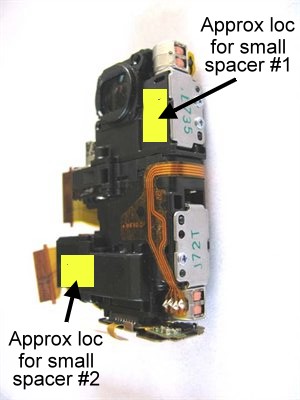
Sony DSC-T20 CameraSpacers.jpg
Monty Onwalkabout
Wed, 27 Aug 2008 02:01:54 +0000
Ok - Never do I respond to these chat boards, but let me tell you - after reading these notes for a while, I decided - what do I have to lose - this camera is worthless at this point. So I dropped it and hit it repeatedly...and nothing happened. Then, I said what the heck, and I whipped the camera at the wall and presto - it now works. Amazing.
JB
Tue, 09 Sep 2008 02:58:00 +0000
�� ���� �� ����! � ��� ������ � �� ���������!! i'm crazy russian girl
Snezha
Wed, 01 Oct 2008 09:48:26 +0000
i had the e61:00 message. I was laughing at your replies of whacking the camera. So I turned the camera of, whacked the left side of the camera 5 times, turned it on, and it worked. No Kidding. Thanks.
doc
Thu, 02 Oct 2008 01:01:06 +0000
Fantastic!! Thanks to all, the good old whack-bang works!
My T10 is working again, no more out of focus with E61:10. To execute a whack-bang I decided to employ the drop technique. Switched OFF and dropped onto carpet from about 30cm to land on either side about 3 times, then to land on bottom, no improvement so moved up to 60cm. 1st time drop to land on bottom and as it bounced the lens cover slid open to reveal a focused view!!
Raef in England
Sat, 04 Oct 2008 10:45:12 +0000
Insane. I have the DSC-T75. After dropping it hard on the floor, it lost focus and gave the E:61:00 error. Whacked it a couple of times. Focus almost came back. Whacked it again 5 times. Focus was completely lost again. Whacked it again. Nothing happened. Whacked it more. Focus is back! yeaaah... there is some kind weird noise sometimes though when focusing in and out. Guess there is some jam some where.. anyway it works for now... :)
Johan
Sun, 05 Oct 2008 22:07:31 +0000
Thanks everyone for a very great suggestion. It works!!!.... for my t200 sony after hit with hard cover text book.....
Tina
Sun, 12 Oct 2008 05:12:34 +0000
The Whacking and Smacking worked for me too. I dropped the camera from 1 feet above the carpet floor and had camera base hit the floor. Turned it on.....Wow it worked.....
Thank you for the suggestion it did save me $200 in case of repairs and $400 in case of buy.
Christopher
Tue, 21 Oct 2008 13:26:47 +0000
oh my gosh it actually worked!!!! I cant believe it. I thought this was a big joke!
emma
Fri, 31 Oct 2008 03:58:15 +0000
Try to drop the camera from 1 feet above, then broke lenz Oh my god!
Tomtom
Sun, 02 Nov 2008 13:05:03 +0000
My camera had the 61:10 error, I got it to go away (not sure what I did to make it go away) but now it will not zoom in or out nor will it focus. Any help out there???
Rob
Sun, 02 Nov 2008 19:12:40 +0000
Amazing, I had the E:61:10 problem on my DSC-T5 camera, I follow the instructions on this forum, I drop my camera few times in a 30 cm Height, and nothing, the error was still there, then i drop it to the carpet at a 60cm aprox of height, and it works,the error is gone.
Ricardo Baigts
Mon, 03 Nov 2008 17:35:08 +0000
i had sony t10 had a shakking at the camera,does any one know how to solve it?thank's
yerri
Sun, 23 Nov 2008 20:15:00 +0000
yeahhh ..
i used to get this problem before and i would just hit it and shit and it would start working again
but i got it again ..
and i've hit it and such and it just wont work
dropped it..
smacked against the knee ..
against the desk ..
i even tried reading it bedtime stories
it just doesnt want to focus .
daniel cc
Fri, 28 Nov 2008 00:30:00 +0000
it worked!!!! i have the sony dsc-t70. i took the battery out and the memerycard,palmed it a acouple of times and it works now
tino
Sun, 30 Nov 2008 06:04:04 +0000
I have a sony dsc t5. my camera did not work but after whacking the darn camera it started working. E: 61:00 message still there though. maybe i shouldn't complain. weird.
Gregorio
Fri, 26 Dec 2008 20:39:38 +0000
I actually cant believe I tried the hitting therapy on my camera!!! After so much reading who would have thought ... Thanks guys, amazing!!! Still cant belive it, at first I just thought this suggestion was pure nonsense, well:
Hit it 5 times and hit it hard!!! It does work!
Thanks
Mother
Sun, 04 Jan 2009 07:06:18 +0000
i have the exact same problem. it isnt going. ive tried everything.
amy
Sun, 04 Jan 2009 23:48:44 +0000
i have tried hitting my camera several times but it hasnt seem to work. I think i will take it to a shop and see what they say.
anonymous
Sun, 04 Jan 2009 23:52:19 +0000
wow. I was really amazed by this. I was taking pictures this morning with some friends until it came up with the error. I was reading all this for about 10 minutes. i kept on hitting my camera but it wasnt working for me. I went through every bit of settings and it didnt seem to work. I took the battery and memory card several times. I was reading more about it. I hit the battery three times, the memory card three times and the camera on all the sides it had.. including the lence. I was happy to see the error message had gone! Thanks alot for this tip! it would have cost me a lot and im happy to beable to use my camera again!!!!!!!!
anonymous
Sun, 04 Jan 2009 23:59:17 +0000
this really does work.. i thought it was some sort of joke especsially when i was trying it for about 20 minutes. It did eventually work. Just try it.. nevermind how long it takes. it does work!!!!
anonymous
Mon, 05 Jan 2009 00:18:43 +0000
Ik had ook de foutmelding E:61:10 op mijn Sony Cybershot camera. De instructies op de site gevolgd. Resetten hielp niet. Een paar tikken met de camera tegen een harde tafel wel! Probleem opgelost. Ongelooflijk maar waar!
Kees
Thu, 08 Jan 2009 07:34:25 +0000
OMG. I cant believe this works. Picture this. I work with a load on online experts and when I said what I was going to do to fix my camera, they all took the P**s. So imagine there surprise when it worked. I love the internet and I love you all for this tip. Thanks heaps.
Paul
Tue, 27 Jan 2009 00:04:25 +0000
it's really hard to to that...i tried all of the above methods, but failed~~
lastly, it did work, what a stupid method to fix my T20 of focusing error.
recommended method, so simply indeed.
1. face your lens down
2. drop it hardly from 10cm height to your seat (eg. sofa or office chair with spongy)
3. the error message E61:10 disappear at once
Anson
Thu, 29 Jan 2009 05:04:30 +0000
HIT CAMERA. IT SERIOUSLY WORKS. i felt really stupid hitting my camera..but then the error went away and it could focus perfectly.
sam
Sat, 14 Feb 2009 22:47:52 +0000
DSC-T10
E:61:00 Error code. I tried 3 hard hits on the palm of my hand, with lens closed and turned off, now it works.
At the begining I couldnt believe it, but it works.
Thanks for your help.
Eren
Mon, 02 Mar 2009 15:09:02 +0000
OMG! It felt REALLY wierd hitting my camera, but with the lens closed it works!I seriously cant believe it!
someone
Thu, 05 Mar 2009 16:59:44 +0000
so i had a sony w1 like 5 years ago and 3 years ago i got an error e61:00. i tried reseting it, tried to open it myself(too complicated), brought it to the store and told me it cost $80 just to see what the problem was. No thanks. ended up buying a new one and putting this away to collect dust.
finally saw it again in a box few days ago and said might as well tinker with it. still had the same problem. then i hit the barrel when it was stuck out and the camera off. i hit it all around with a plastic ruler pretty firmly. turn it on and lo and behold.. it was normal again. wish i done that years ago. well its too ancient for me but it will be good for one of my young niece or nephew for a first camera.
oldbut still works
Wed, 11 Mar 2009 09:41:52 +0000
WOOOOWWW I couldn't believe it but it really worked !!! God I hated to SMACK my camera but the E:61:10 message disappeared and my focus works perfect again !!!
THANKS SO MUCH !!!
aNNELIES
Wed, 08 Apr 2009 17:19:35 +0000
i have a sony t10. i have banged it against the wall, against the coffee table, against the wall, against my knee cap, my thigh, and the floor and i cannot make the E:61:00 error go away. any suggestions? it is driving me crazy. i have already taken it apart yet i'm too scared to touch anything for i might cause it irreversible damage. PLEASE HELP.... :)
michelle Mondigo
Tue, 14 Apr 2009 16:21:57 +0000
I have a Sony CSC-T10 I droped it and i had the E:61, Taking to memory card out and putting back in works a treat also tapping the lense on your knee cap a couple of times can also do the trick, b4 i new this i sent away 2 get it fixed and it came back exactly the same so DIY!
Carley
Fri, 17 Apr 2009 07:38:01 +0000
My DSC P150 displayed the E:61:00 error code and did not focus. I could fix it without any bumping, just by turning on the camera and then pressing the reset button with a pencil (next to the memory stick slot).
Daniel
Thu, 21 May 2009 11:51:24 +0000
UnF*ucking believable! This morning i was watching some youtube videos trying to find out cellphone with best video camera. And i thought of mine Sony P200, and how good it is, even after 3 years. I turned it on and "BAM" E:61:00 error, no focus and lens assembly wouldn't hide as i turn it on and off. Hit it hard technique did work just fine... Thanks a lot. Thanks god these things still have moving parts in them :)
Igor
Mon, 25 May 2009 20:06:28 +0000
Has it occurred to anyone that there might be a seious design flaw with the Sony cameras everyone it talking about and that Sony might want to take reponsibility for making LEMON cameras? Does anyone know of any litigation going on around the E:61:10 Error message? I have tried all the tap, smack and bang methods people are raving about on-line, without any success. I'd love to hear from others for whom the bang-fix does not work. Have you discovered and alternative aproach to getting it fixed?
Jack Dryak
Mon, 20 Jul 2009 13:42:49 +0000
WOW I have a SONY DSC-T170 and I did what everybody said and dropped it and smacked it a few times and my E:61:00 ERROR is gone! Thanks! It worked!
ADunn
Tue, 21 Jul 2009 05:18:53 +0000
DSC-T1,
It fell in the water a year ago, dried it out and go the E:61:10 error, I tried whacking it several times but it didn't fix it, I took it apart and opened the servo hatches where the focus is controlled, (If your looking at the picture posted above for putting in paper shims, then it is the lower right metal cover below the lens assembly with J72T written on it) There is one screw holding it on, you need to carefully peel back the tape that is covering it. Inside is a long screw that drives a small plastic gear up and down. When you whack the camera this drive gear gets moved and gets back on track, if whacking it doesn't work for you, then open the camera, remove the cover and slide the gear back and forth to free it up. This would be a good time to put some gear grease on the drive screw. I simply moved it a few times then put the cover back on and put the camera back together and it started to focus again.
If this doesn't fix your error then it either means the servo is bad, the screw and gear are no longer making contact (broken plastic pieces) or there is an electrical problem.
If the problem is your zoom doesn't work then the zoom gear is under the top right cover with "L735" written on it and you'll need to open it and free it up.
You can tell if it's just the focus that is stuck if after the camera boots up and the error shows, you are able to get it to focus on an object by using the zoom buttons. By moving the zoom on the lens you change the focal length and eventually will get it to focus.
Hope this helps!
Attached Image: 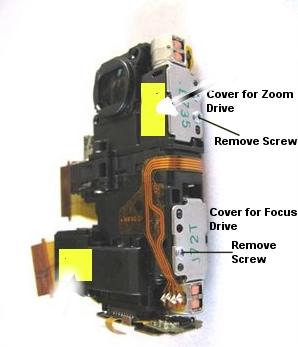
Image1.jpg
PaulyKilkenny
Wed, 19 Aug 2009 16:14:52 +0000
gosh that smacking the lens idea actually works! i have a p200 and got that error and now its gone!!! THANK YOU!!!!!!
sophia
Sat, 22 Aug 2009 22:48:35 +0000
Just hit my Sony T1 a couple of times because of the 60:10 error message... and it`s fine now!! Amazing! thanks!
erika14
Thu, 27 Aug 2009 12:10:49 +0000
Whacking work for too with just 2 smack by the len side.......LOL unbelievable.......Thanks for the hints:)
Patra
Sun, 06 Sep 2009 09:10:29 +0000
I have enjoyed the "Whack" treatment. After many tries, it DID help, but does not stay fixed. I called the camera company in NY from which I purchased the DSC T100 in June 2007. It has been a WONDERFUL CAMERA. That company told of RepairTech going out of business so my 5-year warantee is no good. However, they said another company, at http://www.warrantyresolutioncenter.com was taking the RepairTech company calls and would likely service my camera for a minimal fee. I called that "Warranty Resolution Center" at 866-414-2629 and got "due to the high volume of calls" . . . I left a message and hope for a reply on getting my E:61:10 fixed, probably by a lube job, from what I have read on this site.
I'm hoping for the best. Next best will be to buy a new camera . . . same, except much advanced technology, a DCS T90 touch screen technology, etc. Saw one in a Sony store and price was $299. Online found same item for $256. Will wait to see what I hear from Warranty Resoluiton Center for a few days, and go from there.
Larry Lindemann
Fri, 11 Sep 2009 18:56:29 +0000
holy grail! it worked!!! the smacking thing works! actually, i banged the camera on the table lightly.. 2 hits, turned the power on, and tada!!!!!
Sixteen Ramos
Sat, 19 Sep 2009 16:13:41 +0000
oh. my. god.
i didn't think it would actually work!!!
i have a sony cyber shot DSC-T2 and after a few
smacks on the table (lens end) works perfect!
macro's as good as new! thankyouuuu!!!
btw, i had the error "E:61:00"
:)
danielle
Thu, 24 Sep 2009 08:14:07 +0000
kicking camera's ass really helped...thanks for the info/.....weird but works,,,,,,
akm
Mon, 28 Sep 2009 19:22:34 +0000
WOW- I am laughing outloud. Called sony, estimate $211 for repair for a camera I purchased 13 months ago ! And it would
take 30 days. Read thru here, hit is hard against my hand 3 times and ....voila! Thanks everyone!
CM
Mon, 28 Sep 2009 23:13:01 +0000
Your probably reading the banging solutions and like me thinking....seriosly???!!! After trying everything else I thought what have I got to loose. So closed the slide on my DSC T-10 and gave it a sharp tap on the table jst once and belive it or not The Error message E61:10 has gone and it focuses as sharply as ever. IT REALLY WORKS!!!!!!
Rob
Mon, 19 Oct 2009 22:45:37 +0000
Wow, it did work. Just keep hitting harder & harder. You have nothing to lose by that point. Just when we were ready to give up, it worked!
Kev
Sat, 31 Oct 2009 15:57:49 +0000
omg...i was skeptical at first about banging the camera because i got the 61:10 error on my T20...but I did and it worked!!! I bang it on the floor like about 5 times.lol. omg I can't believe it actually worked..thanks guys!
kristi
Sat, 28 Nov 2009 04:14:13 +0000
Banging it really worked..unbelievable! It took 6 smacks on the lower edge of the lens after I'd tried EVERYTHING else! Thank you!
JW
Sun, 13 Dec 2009 00:44:57 +0000
Praise the Lord! I took the advice of dropping the camera several times and now it works.
Queen
Mon, 14 Dec 2009 15:39:19 +0000
My girlfriend's Sony DSC-T10 autofocus and zoom stopped working last night (New Years Eve!) Found this funny and helpful website, so i decided to give it a real BANG on the side of the lens. Voila! Really did the trick, and everything works perfect again =)
Simply amazing trick haha
Peter M
Fri, 01 Jan 2010 11:45:06 +0000
3 drops onto a soft book from waist level has fixed up the e61:10 error. Thanx for the advice! Now I just need to tell my husband who "dropped" our gift of 3 weeks that he does not need to call Sony. Poor thing was quite stressed about breaking the camera on the last day of our holiday. I am so happy for people like all of you with practical advice. Thanx again :)
So happy
Fri, 15 Jan 2010 16:04:20 +0000
WOW PEOPLE.... I no S**T just bought a hdr-cx100 camcorder today and it had that error and I was all set to send it out for repair when I found this site and hit it on my desk a few times (3) and it work great now. When I was reading this post I was like this is some silly stuff.... LMAO but it worked..
CJ
Thu, 04 Mar 2010 19:46:49 +0000
I thought this forum was all shit!!! but damn!!! it works with my sony DSC-T7!!!
I threw it on a book with about 3 feet height!! thanks to all of you.. sony service center estimated my cam for about 200+dollars! this site is amazing!!! Godbless everyone!
charles dionglay
Fri, 12 Mar 2010 09:36:51 +0000
I had to whack my T20 about 30 times to fix it. The last 5 times it was off and i hit it hard onto a mouse surface near the lens. Works great so far.
Phubai
Sat, 20 Mar 2010 20:44:08 +0000
Mine was an E61:10....I think. I read on a thread that it was a lens barrel issue that could be fixed with a smack, so I closed the lens cover, turned the camera on and gave it a whack with the bottom of my wife's vintage wine glass....I picked the camera off the carpet and turned it on to find that the error message was no longer active and the wine glass was still in one piece. I rule!
Jason
Sat, 03 Apr 2010 03:51:34 +0000
HAD THE SAME FAULT ON MY T10 DID WOT IT SAYS ON HERE TOOK BAT OUT AND MEMORY CARD THEN BANGED IT HALF DOZEN TIMES AND WOT DO YOU KNOW IT WORKED WELL FUCK ME I THORT HOW DOES THAT DO THE JOB
ARTHUR
Sat, 10 Apr 2010 22:29:00 +0000
Omg hitting it on the ground actually work!!
Amanda
Tue, 20 Apr 2010 21:13:21 +0000
It works.... save some money!!!
trabaja, increile
WWL
Tue, 27 Apr 2010 05:51:54 +0000
My DSC-T20 had the E:61:10 error which made the focus all fuzzy and wouldn't take a picture. I solved the error by doing the following:
Dropped it onto my wooden bed frame 3 times with the battery and memory card removed from a height of 50cm then it was fixed!
Thanks for the tips on this site, saved me alot of money!!!
Craig
Sat, 08 May 2010 12:29:17 +0000
once again the 5 strikes technique works.
Same fault as described by others, Sony service poor so resorted to striking camera 5 times on base with palm of hand.
Fault cleared immediately and no recurrence.
p mills
Mon, 07 Jun 2010 22:06:47 +0000
Unbelievable! I was on Plattsburg Beach yesterday, dropped the camera on the sand a couple of times. The next thing I know, it's making a buzzing sound, focus totally whack. Googled today, fixed the problem by tapping the back of the camera a coupled of times. It's fixed! Thanks everyone!
Aashee
Tue, 06 Jul 2010 01:31:50 +0000
Got sand in my Sony cybershot dsc-t70 and got the e:00:61 error. Tapped it gently a few times on a hard surface (sand came out) and hey presto camera now works perfectly. Thanks a million for the advice.
Mark
Sun, 11 Jul 2010 16:22:23 +0000
E:61:00 error camera not working cannot take pictures or zoom nothing....
july 2010 just did the tap lense firmly like 5 times and who could believe my E:61:00 error has stopped appearing and camera lense zoom now working again takes pictures fine even the rapid shot sequence works again sweet!!!
tytyty so happy no cost to repair unreal!!!!
anonymous
Tue, 20 Jul 2010 12:38:27 +0000
alright beating the camera isn't gonna fix the problem its going to cause more problems simply reset your camera there should be 3 little dots on the bottom of the camera press the first one and it will reset all the setting if you are smart u wont have your memory card in there or all of your information on it will be reset which is what the camera does master resets everything and now you are back at default settings with a working camera so camera abuse isn't needed thank you and that is for alllll sony dsc-t100 users
isaiah s
Wed, 21 Jul 2010 05:17:34 +0000
Fuck me. I work @ reputable electronics store. Had a DSC T30 with the error code E61:00, dropped it from 3 inches and it works. Previously it has cost the customer anything from R1000 to R1800. Amazing, well done sony
Andrew
Wed, 04 Aug 2010 13:45:48 +0000
Thanks for the tips everyone! I can't believe hitting my camera against a table could actually help it, but you're right....the zoom works again. :)
Laura
Sat, 04 Dec 2010 09:22:43 +0000
hi pls dont take it to any sony retailer just beat ur camera on ur hands and on it c ur error will be gone for 100% m sure, save ur money
abdulkareem
Sun, 19 Dec 2010 10:14:03 +0000
I also had the error on my sony t10. This method worked for me. I only had to hit it once. Thank you for solving this problem. I love this camera and did not want to replace it!
groof
Mon, 24 Jan 2011 01:22:34 +0000
GUY SONY WANT $200 FOR REPAIR I BANGED MY CAMERA ON A HARD SURFACE FOR THREE TIMES DISCONECCT THE CAMERA BATTERY VWALLA THE EROR GONE AND MY CAMERA BACK 100% IT WORKS JUST HIT ON AHARD SURFACE AND E:61:10 IS GONE
NOEL QIQIEH
Thu, 12 May 2011 04:30:55 +0000
I tried the whacking solution three times and it worked fine! Fabolous! I have a DSC-T700 and the E.61:10 error is now gone.
Marie
Sat, 28 May 2011 08:50:46 +0000
Thanks
The follow solution is working, I did it!
From Andrew
Sun, 22 Apr 2007 10:05:42 -0700
I had that E:61:10 error message on the SONY DSC-T10 too. After looking online for a solution, just about everyone else said hit the camera. I'm as skeptical as anyone else about doing something like that, but after hitting the camera a few times and shaking it aroud a bit, the error message went away and the focus/zoom works fine. I'd hate to recommend it, but hitting or shaking the camera seems to have worked
Bib
Mon, 13 Jun 2011 19:05:20 +0000
The E61:10 message came up while on safari in Namibia. Tried the drop test from 30cm - No luck, but the 60cm drop test did the trick. Amazing! Thanks for all the advise.
Grant
Fri, 24 Jun 2011 07:12:15 +0000
Ready to toss my DSC-T90 after $230.00 repair quote for error 61:00. Can buy a new one for that. 2 whacks on my knee worked. DSC-HC52 - "...I refuse to make this thing worse" Stop your stupidity from getting worse and buy a new one, then take a breath and ask yourself who is crazy. Or, read -ADunn 21 July 2009 post- take the fucking thing apart and play camera repairman instead of bitching. Then post a resolution.... That's called initiative you dumbass.
Billy
Wed, 31 Aug 2011 06:03:56 +0000
Fantastic! Love it, did it for my dsc-t2 and wha la - it is working - had to give it a pretty hard whack! Thanks a heap, off to FIJI very shortly, thought I was going to have buy another camera for the kids! Whoo hoo! thank you!!!
Angela
Thu, 01 Sep 2011 06:14:46 +0000
I hit my dsc p1 5 times on the carpet quite hardly..... This worked..... Not the error has gone.... Thanks to the inventor.....
Hashim
Wed, 07 Sep 2011 12:05:44 +0000
thank you so much! It work for me also. I have a DSC p150 camera. Thank so much
clipsy
Wed, 07 Sep 2011 13:26:34 +0000
OMFG it really works! Here is how I very specificaly did mine, it is a DSC T100. I was getting an E61:00 message. I didn't want to drop it on a table like some people online had recommended as I was worried about braking it. What did it for me was 3 hard smacks against the palm of my hand (lens side down) just after I had turned the camera on and while it was loading up. Problem solved ! ! Ta daaaa !
ElGreco
Mon, 12 Sep 2011 21:06:56 +0000
OMG! Hitting it on a table just once worked for me!! Crazy!
Jacquie
Thu, 03 Nov 2011 07:01:08 +0000
guys, whoever gave the idea of whacking the camera, thanks a lot....I swear to God it worked :) saved me donno how many $$
everyone needs a whack sometimes :)
whacker
Mon, 19 Dec 2011 16:02:58 +0300
Can't believe it, but whacking my knee with the camera (twice) fixed the problem.
Bette
Wed, 24 Aug 2016 01:21:09 +0400
Hi , I had the same problem , what fixed mine : while camera was on I have removed the memory card . There was no error after that , I was able to zoom in out take pics and video . After I have put the same memory card back in to the camera same thing , the camera worked perfectly .Maybe this can help
Terri
Fri, 04 Nov 2016 10:48:02 +0300
Still works - Bash it 5 times on a firm surface. Works fine now.
Steve
Fri, 23 Mar 2018 03:48:54 -0700
We had the error E61:10 while on holiday and lost the use of the camera. Very annoying. Thought we would have a look for a solution and found this post. Eldest son laughed his socks off (a real tech head) very sceptical but hubby and I decided to go for it anyway. Amazing. Problem seems to be solved. Wish I had spent a few minutes searching while on holiday.
Thanks
Gail
Thu, 26 Apr 2018 13:45:20 -0700
I'm using a cybershot TM5 my kid poked the lens in trying to clean it. gI closed the lens cover and gave it a few solid whacks and it's OK again. Honestly can't believe this worked!!!
Josh Anderson
Mon, 24 Apr 2023 21:27:29 -0700
Add Comment
|
Related Links
|
TrackBack
Related Content
Did your message disappear? Read the Forums FAQ.
TrackBack
TrackBack only accepted from WebSite-X Suite web sites. Do not submit TrackBacks from other sites.
Send Ping |
Spam Control
Title: Handycam E:61:10 Error Message
Weblog: Camera Hacker
Excerpt: I have a sony DCR-HC52 and have tried this "whacking it" approach and you guys are full of shit or something. DOES NOT WORK FOR ME AND I REFUSE TO MAKE THIS THING WORSE! horrible advice, you people are crazy.
Tracked: Wed, 16 Mar 2011 04:25:32 +0000
Title: Disabling SteadyShot on Sony Cyber-shot DSC-T30
Weblog: Camera Hacker
Excerpt: DSC-T30 After initialisation picture wobbles violently and camera produces a fluttering sound. This is the steadyshot system out of control. The fluttering is the floating lens making extreme movements. Error E62:10 is displayed. To disable Steadyshot system. Tools:Jewellers screwdriver set. Small b . . .
Tracked: Mon, 12 Dec 2011 09:22:29 +0000
Add Comment
Messages, files, and images copyright by respective owners.
522 Users Online
|
Get Our
$10000-above 
$5000-$9999
$2000-$4999
$1000-$1999
$500-$999
$200-$499
$100-$199
$50-$99
$25-$49
$0-$24
Gift Certificate

|
|