

 Add Comment
|
Add Comment
|
 Related Links
|
Related Links
|
 TrackBack
 Related Content
E:62:10 on DSC-T9
Same problem with my Sony T9 Camera, as it keeps flashing with the E:62:10 Error code. I have no idea what it means though it does not seem to interfere with the camera's functions. Anybody know what I should do?
Freddie Cheng
Sun, 18 Feb 2007 17:29:20 -0800
I have the same problem. I contacted Sony and they want to charge $180 to fix it. I got the message almost the same day my warranty was up.
Kim
Mon, 26 Feb 2007 06:24:42 -0800
I have the same error flashing on the screen. The camera appears to be making a clicking noise only in the taking photos mode. The LCD screen starts to shake. It doesn´t do it all the time. I am on vacation and I would like to get this fixed as soon as possible. Should I take it to a camera shop or can I fix this problem????
Thanks!!!
Michelle Ewell
Sun, 04 Mar 2007 12:05:37 -0800
Anyone out of the USA when this problem started?
Kim
Mon, 05 Mar 2007 12:54:03 -0800
I hit my kamera on the side once gently and it fixed the problem!?!?
Mika
Tue, 06 Mar 2007 09:41:13 -0800
and it works mika haha but stil its not sharp:(
aldert
Fri, 09 Mar 2007 08:54:15 -0800
I have (had) the same problem with my DSC-T30.
It started after i dropped it... hitting on the battry cover's side seems to slove the problem. wierd.
dude
Thu, 15 Mar 2007 21:44:57 -0800
E:62:10 means don't buy this camera.
I too just recently developed the same problem with my DSC-T9. The error message is
annoying as you cannot seem to shut it off. I have been through ever menu option, and there is nothing related to it. It is not on Sony's site, and reading they would charge to fix it is just annoying, given all of the many Sony digital cameras I've already invested in and I suspect it is their error.
E:62:10 means
Fairfield CT
Fri, 16 Mar 2007 10:14:22 -0800
hey i have a t30 from sony - the error message e:62:10 was (thank god it isn't anymore) flashing on my screen. i hit it on the battery side of the camera's case and now it works fine. funkytown.
Monty
Tue, 20 Mar 2007 15:03:52 -0800
E:62:10 flashes on my DSC-T9, too. I should hit the thing, huh? I took it back to the store I purchased it at, they reset it (I could do that!) and it stopped for a short while. It is still under warranty, guess it goes back again?
Linda
Sun, 25 Mar 2007 14:35:38 -0800
Yes i had the same error message E;62;10 on DSC-T9 I took it to the Sony repair agent on the Gold Coast ,he advised that the lens -focus gear?? had to be replaced
$255.00 parts and $55.00 to fit it
I dont think so ,will wait and buy a new camera !!!!!!!!!!!!!!!!
paul
Mon, 16 Apr 2007 01:14:50 -0700
Just had the same problem after dropping the camera. Instruction manual said to "initialise" the camera- did this twice and it didn't solve it. Then took battery out twice and hit the camera on the battery case opening with my palm. Seemed to solve the problem.
User
Fri, 18 May 2007 00:13:39 -0700
The E:62:10 and camera vibration problem is just shown up in my camera, and i googled the error code and saw the comments above me and then i hit the camera gently, it solved the problem, thanks for ur posts and thanks to google.
Thirumal
Sat, 02 Jun 2007 02:58:11 -0700
Same for me. Am on a holiday in Shanghai and it's too inconvenient for me to visit a Sony store. Saw your comments here and I hit my camera and now its working fine!! Haha. Thanks guys :)
Clara
Sat, 02 Jun 2007 07:03:55 -0700
Darn! I have the same problem! I am going to Paris tomorrow and I cannot take pictures with my Sony DSC-T9 because of this flashing error message and a little shake everytime I turn the camera on.
Somebody should sue Sony over this.
Manuel Diaz
Thu, 14 Jun 2007 09:49:21 -0700
I had this problem for a week now and tried resetting it twice but this didn't dolve the problem, but after reading your comments, although I was very skeptical, I thought I'll try hitting it on the side!! and guess what what?? It worked!!
Thank you all so much. Sony should hire experts like you:)
Sally
Sat, 23 Jun 2007 01:20:35 -0700
Well, guess I'm glad to hear that I'm not the only one with this annoying problem! I'm not as fortunate as the rest though since tapping my camera has done nothing to fix the problem. If anyone has any recomendations please let me know.
Paul
Sun, 01 Jul 2007 20:21:41 -0700
I had the error message as well on my DSC-T9. I tried tapping the camera and it worked. Here's the process I went through. I turned the camera on and while in photo mode I tapped all of the sides gently. I did all sides just to make sure. Then I turned the camera off. When I turned it back on the error message was gone! I'm happy. I hope it works for everyone else. Good luck.
matt
Thu, 05 Jul 2007 12:43:15 -0700
I have a T30 and it's happening to me. I rarely see the E:62:10 text, but the lens often vibrates, making the picture shake. Tapping/shaking it gently will make it stop, but only for a short time. Sometimes only for one picture before it starts again.
:(
Charlie
Wed, 11 Jul 2007 16:42:02 -0500
Just had that same E:62:10 error message appear on my T9. Didn't seem to affect the image capturing process.
Fixed it like the Fonz would fix the Juke Box worked back on Happy Days. Just hit it gently and poof.
Jeff_DC
Tue, 17 Jul 2007 10:14:24 -0500
got the same problem, it only appears when you drop the t-9 on the floor or it gets dropped a lot. lucky i had boaught the warenty for it. so it should be free. i jsut have to send it out to CT though.. sucks
neil_ California
Tue, 17 Jul 2007 19:18:02 -0500
Alright so I have a SONY DSC-T20 and I haven't dropped mi camera once!
So one day I just turned it on and it made this clicking noise for a while until the camera mode popped up
(It was obviously the zoom)
And It's zoomed in all the way and it dosent letme un-zoom or take picture's
This has happend to me 2 times!
Once while I was at camp so I had only like 2 picture's!
By the way; this is mi moms camera she got for her birthday and she trusted me with it and now she's going to shoot me
Thanks SONY!
Please Email me if you find a solution.
BTW; the little "hitting" consept does not work!
Attached Image: 
IMG01631.JPG
nicole
Sat, 21 Jul 2007 20:46:49 +0000
Hey guys, i had this E:62:10 error message flashing in my screen too.
I just took the battery off, gently shaked the camera by the battery side and message dissapeared. I hope it doesn't appear again, no misfunctioning was noticed, either.
Thanks for the advice mates!
Spaniard
Sat, 04 Aug 2007 17:17:16 +0000
I had this annoying warning too after i dropped my t9 to the floor. What I noticed that turning on time was increased 2 or 3 seconds. I've just applied hitting on battery side after reading the comments in here. Now it seems problem is solved.Thanks! :)
Murat-istanbul
Sun, 05 Aug 2007 10:55:07 +0000
I have the same problem too, and it was 1 week before my 1 yr warrenty expries!!! I'm soooo pissed off!!! Have any of you noticed that after the message showed on the LCD, the camera seems to shake everytime you turn it on??
Elaine
Thu, 09 Aug 2007 07:47:34 +0000
hey!
is true!
it really work!!
first put out the battery from camera, then put mode picture and then
a little hits in each side from the camera, and now you put the battery inside the camera,
put on the camera...
and EUREKA !!!!!!
the message is lost!
MIGUEL DIAZ
Sun, 12 Aug 2007 09:14:46 +0000
E:62:10 i put cam in picture mode, tap it a couple times firmly while zooming, fixed the problem after a few knocks (cam was dropped hard previously)
random guy
Wed, 15 Aug 2007 00:48:35 +0000
Hey thanks to google i found your comments and *matt* thanks for your suggestion.
I too dropped my camera and had the error code appear. tried hitting on the side of the camera but it didn't work....thats until i hit all the sides and then switched the camera off.
Once i switched it back on again - bobs your uncle and its working fine! Thanks!!
ellie
Wed, 22 Aug 2007 20:58:11 +0000
frustrating with this error message !. Googled the error code found this side & read the comments . Was very suspicious of hitting the camera .... but needed it working now & no time for repairs etc. Followed the comments & with Camera switched on Hit all sides with small Mag-Lite ( Just seemed right ! ). Error Code still flashing. Turned off camera. Turned back on straight away & amazingly .. its fixed. Tried again & again to get error message back !.. Its definately fixed !. Many Many Thanks for helping me out of a bind
Stan
Mon, 27 Aug 2007 23:11:22 +0000
Well i never I have had a erroe code E61.10 just developed on my t9 . So i give it a few bangs on the side and low and behold ... IT WORKED SO .. give you camara a good bang on the side turning it on and off and it should be ok
GO FOR IT ... IT WILL WORK
dego
Sun, 02 Sep 2007 14:47:31 +0000
I have the same problem. I'm doing all the recomendation but without succes. Only I can say the DSC-T9 is a MIERDA and I think so all the models of the family as I can see here. Imagine a product that it�s necesary to hit them for function. It�s a camera High price or a horse?
I bought an Panasonic Lumix now and all is OK
Fernando
Sun, 23 Sep 2007 02:18:21 +0000
I droped my camera like 5 times one night cause i was soooo drunk and the next day it was flashing E:62:10. SMACK IT ON THE BATTERY SIDE and it goes away??
ADAM CRAIG
Sun, 30 Sep 2007 08:08:11 +0000
The tapping worked... for now! I did notice malfunctioning with mine -- the pictures were sort of cloudy, but not necessarily blurry. My warranty is also up (got the error about a week AFTER it expired, go figure!). I have NEVER dropped my T9 though, not sure why it was happening!
Thanks for the tapping tip, hope I don't see that error again and I hope my pictures turn out alright.
Laura
Mon, 01 Oct 2007 14:35:17 +0000
hi, i have the problem too.
the error message came out before my warranty ended, sent it for repair, and they said that the warranty doesn't cover this.
that was about 4 months after i bought the camera.
then i sent it for repair, they want to charge me RM750.00 for the repairing. which is about USD $200+. -_- i bought it for RM1200 .00 ........
occasionally the error code goes away but the autofocus will keep moving non-stop when i need to take photos at night. when lights are blaring in clubs and all. and it's annoying. :(
help :( i'd gladly pay ... half the amount of the repairing fees to have it fixed... :(
Rileen Chua
Mon, 08 Oct 2007 05:19:26 +0000
same problem to me!
And the repair cost need more than ��1000.OO,The sony shop said if open then carema,it need about ��200��00��
MY GOD��
BAD��
allyqi
Wed, 07 Nov 2007 07:05:43 +0000
Going to Playboy Mansion tonight. Camera worked yesterday. Today, got the humming and error. Hitting did NOT solve it. It is 1 hour until I have to be at this party.
F!
Mike
Sat, 17 Nov 2007 01:48:56 +0000
Mi c�mara presentaba el mismo problema E:62:10, con un golpe suave de la c�mara sobre la palma de mi mano dej� de aparecer el mensaje en la pantalla. �Funcion�!
Muchas gracias!
NLMC
Sun, 18 Nov 2007 21:49:43 +0000
Thanks Guys...Had the same problem with the E:62:10 error code...just take out the battery and replace it and smack it on the battery side and it goes away.
Ray
Sat, 24 Nov 2007 19:17:49 +0000
I tried hitting the sides of my camera numerous times and it still doesn't seem to work.
but on the battery side of the camera on the top corner i notice damage from being dropped.
i guess this is the problem...
my camera also takes a few more seconds to turn on, and to take pictures.
considering there are fees to get it fixed, should i just buy a new camera or get this one fixed?
katie
Tue, 27 Nov 2007 04:31:38 +0000
Hey i had the same problem with my DSC-T30 and unbelievably taking the battery out and hitting that battery side with your palm works! Thanks guys :)
Rach
Mon, 03 Dec 2007 20:51:38 +0000
Wonderful!your advices have been very useful!!!Just hit the camera &!it is repaired!!!ahahahah tnx a lot!!!
from Rome...kisses!
frafri
Mon, 17 Dec 2007 12:44:05 +0000
I have the Sony DSC-T9 and also get the E62:10 error message. Read the comments on hitting the battery side and thought that this can not work..?
Tried to initialize it and go through all the settings, but this did not fix it.
In desperation, I tapped the battery side twice and guess what...it fixed it.
How Bizarre.. :-)
Rupi
Tue, 25 Dec 2007 08:18:50 +0000
I just read the forums because I have the same error present for 3-4 weeks. I just took out the battery, hit the case twice on that side, and viola, it is back to normal! Thanks for the advice. Bear in mind I did this knowing I had the extended warranty and if it broke, I would send it back to get fixed hopefully under warranty.
Kitchenaid
Tue, 25 Dec 2007 22:11:05 +0000
HAHAHA i type in the error message E:62:10 onto google, saw this....
i read all the comments about hitting it and thought i'd try it. AND IT WORKED!!
I took the battery out and hit it 2 times. Toooo funny.
Jackie
Sat, 05 Jan 2008 21:23:11 +0000
i had the same problem this morning with my camera, tried changing all the settings to get rid of the flashing message, but nothing worked, finally i tried google hoping sony would offer me some advice, when i found this page, tapping the casing on the battery side didnt seem to work, i turned it off and on again and tapped each side of the camera on my desk gently- and hey presto.
all i needed to get the thing to behave itself was to give it a little hit, just like my bitch ass girlfriend!
Cory
Mon, 07 Jan 2008 12:20:05 +0000
Hey guys,
I had the same problem with my T30. My camera was vibrating like crazy and eventually the E:62:10 message would pop up. I followed the advice here and hit it a couple times with the plastic handles of a pair of scissors, but after repeated taps it didnt have any effect. As i filled with anger that my 1.5 year old camera was now broken, i started banging it against my wooden desk. Lo and behold, after a number of 'hearty' bangs, the vibration and message are gone! I have never really been a fan of the 'smack it until it works' repair strategy, but it seemed to work this time. Thanks!
Matt
Tue, 08 Jan 2008 00:40:15 +0000
Same problem. Took the battery out and tapped the battery side on my desk a few times. The Message is gone. Thanks everyone.
Marina
Tue, 22 Jan 2008 00:12:49 +0000
It worked for me , really funny!
Jajja
Wed, 23 Jan 2008 18:30:30 +0000
Hitting the camera on the side does work! Thank you
Dena
Thu, 31 Jan 2008 01:22:01 +0000
I have a Sony T10 and it was working fine yesterday. I charged the battery because the power was low. Remember, it was working fine last night with a little bit of power it had! Now fully charged and I didn't drop the camera. The camera started to vibrate and I had the error message flashing. I tried everything, shaking it, zooming it (it does zoom back), taking pictures (some of them came out crystal clear, despite the vibration!), resetting it, take the battery out and back in, tapping it! Nothing works! I don't want to spend a fortune just repairing it.
Any suggestions?
Take care!
Chris
Sun, 03 Feb 2008 02:06:38 +0000
i have same issue with my T10..do whatever i read here..nothings work! i hate it so much!!!!!!!!!!
ferrazo
Sat, 09 Feb 2008 15:17:36 +0000
I'm in China, as the same problem occured with my T9 camera, and I suspect this was a fault in design of all T-series cameras.
It seems this problem can be solved by repeatedly turning on and off the camera.
Wecan
Sat, 16 Feb 2008 15:38:39 +0000
I had this error on my T10. As ridiculous as it seems, I took out the battery and replaced it and smacked it on the battery side and it went away. CRAZY!
Jared
Mon, 18 Feb 2008 16:51:23 +0000
My T30 sold in Japan has the same problem (E62:10), and also its screen is shaking.
These symptoms appear while turning the camera on and off many times, but don't appear after resting the camera for a while (more than a day).
I heard that E62:10 means there is dust inside the lens unit of the camera.
Sony support center said it costs more than JPY20,000 (US$187) to repair this.
However I suspect this is a defect of T series according to a lot of reports above.
So I haven't repaired it yet. I have to smack my T30 every time!
NRT
Wed, 20 Feb 2008 08:32:14 +0000
I have the sony DSC-T30 and error code E62:10 was appearing on the screen blinking. On vacation, my younger cousin spilled sprite all over my camera and after that it would make wierd noises when it was turned on its battery side. I tried the hitting technique and it worked but does anyone know what exactly that error was?
Gianna
Sat, 22 Mar 2008 19:20:46 +0000
thanks guys...it worked ...smack it on the side where the battery goes. The error number went away.
Ronny
Sun, 23 Mar 2008 03:34:09 +0000
Hitting the onboth sides works like magic.try it;it works.thanks guys for all your posts.
BIBI
Tue, 15 Apr 2008 03:42:39 +0000
This is an amazing trick. I have a T9 and it developped the same error code e:62:10. A simple Google search came up with this page and I was sceptical of the recommended method. I tried once and it didn't work. So I tried again 2-3 times, with the battery in, then the battery out. Tapped it on all sides in the palm of my hand and would you believe it??!! Problem solved! No more stupid error code and I am back to using my good old T9. Phew!! For a minute there I was already thinking of buying another camera...
Thanks for the great tip guys!!
Ambrose
Tue, 15 Apr 2008 22:15:15 +0000
Thank you for your help! It really worked for me after some tapping. It is surprising that Sony repair does not tell you that...
Silvia
Tue, 29 Apr 2008 20:09:14 +0000
Hahaha really funny
I am in Hawaii now for vacation too. My camera shown error e:62:10. First time i dont know how to stop it. = =" i feel bad. ( My mom will kill me, it's my second camera. First one was broke by me) So i got idea to search it on google...and wowww many people got same problem. = ="
Thanks for every comment about how to fix it. it work now, but it still take many minute to open.... hrrr
Bifox
Sun, 04 May 2008 07:36:54 +0000
Worked for me on a Sony T10 pink. I had to hit it in my palm 3 heartly firm times. The first 4 tenative taps did not do it.
Got to love a kick the tire to fix it method.
Thanks.
Wayne
Thu, 08 May 2008 01:08:21 +0000
I just got this e:62:10 message yesterday and googled the error and led me to this forum. I took out the battery and hit the camera like people have said, but it doesn't work for me. I guess it is fucked. This one has worked fine for a year and a half. Time for a new one I guess as the images seem less focused. Not sure if I'll get another Sony or not. This is my second one. I like them overall and have a lot of memory stick pros, they have suckered me into buying more Sony's just because I have gigs of memory stick pros.
Nazz
Sun, 11 May 2008 17:53:21 +0000
Hole. Ee. Crap. That was awesome.
I took the battery out, smacked the side of the camera twice and voila! E:62:10 gone.
Thanks for the write up. It helped me tremendously.
Robert
Mon, 12 May 2008 00:50:53 +0000
I was skpetical... tried several times... no ways!!! The I hit stronger, as last chance, and.... it worked!!! F@#$ YOU Sony!!!
Calab
Mon, 12 May 2008 13:27:47 +0000
This is bizzare..THE FLASHING E:62:10 went away by following the "Tapping and Hitting and Slapping Camera" method. I THINK SONY SHOULD MAKE IT PART OF TROUBLESHOOTING SECTION OF EVERY ELECTRONICS GADGET.
When all else fails, kicking the tire or whatever is broken DOES WORK. Please don't try this on living beings !!
Bafana
Sat, 24 May 2008 00:21:48 +0000
My Sony DSC T50 gave problem when my mom brought it to Korea - mom called me and told me about the vibration and shaky images but i told her i dont know why it is like that.
that was about 1 month ago.
I took my camera out for shots in the mornig yesterday, 24th May, and it was alright, and when i got home , and switched it on, it happened , the camera started to vibrate violently once it was switched to SHOOT/VIDEO mode with the E:62:10 error.
I took out the battery and let it rest for the whole nite and i just restarted it - the lens vibrates a bit and now its okay.
Wow i thought this it not a common problem until i googled it. Good recommendation to hit it gently :) that would be my 2nd resort it taking out the battery doesnt work.
I attached the image i have shot when the camera vibrates
Attached Image: 
E6210 Sony DSC T50 error.jpg
PinkyC
Sun, 25 May 2008 00:50:41 +0000
I really cannot believe this. I have been kicking, smashing, hitting and dropping my DSC-T9 on to and from all sides. Battery side, top, bottow, soft hard, harder, and VERY hard. Nothing worked. Then, angry and dissapointed I smacked the camera really EXTREMELY hard on the table, so that if it wouldn't have been broken before it would be now.
And wonder what, this solved the problem. Shoot me (or better, SONY)
JOhn
Sun, 25 May 2008 14:35:53 +0000
Just have to add to my previous comment that I did NOT drop the camera when it started the 62:10 error (and failing focus). I was just taking nice pictures and suddenly the focus failed and the error code came up.
And now I don't trust the thing anymore, what if it fails again next holiday when I am on a beautiful mountain in Switserland next month.
I think so many people run into this error due to the design of the camera. Every time when you switch it on by opening the cover, the cover clicks open with quite some force and this clack could damage the focus mechanism I guess. Wonder what SONY has to say about that. I will send them an email on it and t*let you know the outcome..
John
Sun, 25 May 2008 14:46:51 +0000
Hi all!
I also had the same problem with the E:62:10 flashing on the screen of my DSC-T30, however, there was no problem with the focus or the pictures taken. I had the error flashing for more than a month until I got annoyed with it. I then decided to check the net for any clues. After reading the comments above, I tried hitting mine gently but nothing happened, I hit it more and guess what, no more E:62:10 flashing!!! Couldn't believe it myself but anyhow, it's back to normal now. Many thanks for the comments above. I hope all electronic gadgets are easy fix like this!
Ryan
Sun, 01 Jun 2008 14:15:17 +0000
Hry guys same as above i,e, Ryan had this thing here for 1 month searched the net and tapped it and yest it went away bt the it came back and i literally did nothing all i ddi was switch it off and on. lol and now tapping it doesnt seem to make it go away !!! sooooooooooooooo annoying ... Sony should have a feature to switch of self diagnosis. i think people can tell when theres something wrong with thier camera i.e. it makes noise or stops taking good picture or stops alotgether... this is fine actually 1 thing i did notice that when the thing went off it started up really quickly bt when it came back it took like 2 seconds longer ... shal i keep tapping ????
Tim Ngwena
Sun, 01 Jun 2008 20:17:35 +0000
I tried the hitting method too and it worked fine for me. I turned the camera on in picture mode, then I hit the camera from each side, turned it off und on again. Cool, the error message is gone, great!
TheTudz
Tue, 03 Jun 2008 15:18:34 +0000
My Sony T9 showed an all black or white screen when in video or camera mode. It was ok to display old pics. After trying the "remove battery and tap twice" fix the camera still didn't work. Tapped again in camera mode and the display came back. Thanks for the fix
Nasim
Tue, 03 Jun 2008 21:52:25 +0000
it really works! just bang it on a battery side. thx for advise
olee
Wed, 04 Jun 2008 21:25:47 +0000
E:62:10 flashed on my DSC-T9, too. so i tried the hitting method. wierdest thing i heard but it worked. nice one!
T.J
Fri, 06 Jun 2008 12:48:17 +0000
WE need to start boycotting Sony stuff..It sine good anymore.
I for sure will never angain buy anything marked SONY
Nicholas Jeria
Sat, 07 Jun 2008 21:01:49 +0000
OMG!!! I am so glad to find this on google search! This really works, I have a dsc-t50, vibrating and shacking badly. I had to hit mine pretty hard on both sides though, but..........It worked. It beats the $180 repair charge sony quoted me to fix it. hats off to this page, i just hope everyone stumbles upon it that has this irrating problem.
Rich Hart
Sat, 14 Jun 2008 03:38:51 +0000
Hi,
had the same problem on my SONY - error message E:62:10. It woooooorked - hiting it.
THANKS
Zuzana M
Sat, 14 Jun 2008 20:31:17 +0000
gracias por los mensajes yo tenia ese error e:62:10 lo unico que tienen que hacer es votarla de la misma altura .. a mi me resulto y estoy muy contento ... ojo pero no la voten por el lado de la pantalla por que se puede quebrar chaoo y muchas graciasss
diego_rass4
Tue, 17 Jun 2008 06:48:28 +0000
Just give it a little tap! a little tappy tap!
yesssiry bob... worked like a charm.. thanks guys
Amun
Thu, 19 Jun 2008 19:23:06 +0000
Too many people with same problem, I think Sony made camera defective. Sony must repair with no cost!!!
maxlf
Fri, 20 Jun 2008 22:14:15 +0000
I have a W80 with the E:62:11 error. Showed up sporatcally after a couple hard hits. It wasn't a problem; i didn't notice any lower image quality and it would still let me take pix, just with that error message being obnoxious. The only annoying part was the really long load times to turn the camera on... At first it would only happen every now and then, then all the time. Tried the "tapping" (it actually took a decent whack on each of the sides-while the camera was on and in picture mode-to get the error to clear, and the startup time back to normal). I guess the most old fashioned method of fixing things still applies to modern technology, haha!
alex
Sat, 21 Jun 2008 11:33:13 +0000
Wow... i got the E:62:10 error on my DSC-T9 as well and googled it. Glad i ended up here cuz hitting it did work.
Hopefully it'll stay that way or else i'm going to have to purchase a new camera.
Sadly tho, it seems to take longer for my camera to turn on and lens seems to make a lot of noise when i turn it on. sadly, the fact that we have to hit it in order for it to work, really gets you thinking; WTF SONY...
Thanks for the advise guys it helped.
Tea
Sat, 21 Jun 2008 17:18:04 +0000
Brand new camera DSC-T50 and I only took 4 pictures before the girlfriend dropped it and dented the case on the top battery side. I also had the E:62:10 flashing code. Being the handyman that I am with electronics repair I took the case apart. I noticed that the lens mechanism has a plastic pin that slides into the cover to align the lens.
And the same on the case a pin to align on the lens mechanism. Well one of them was broke. Anyways when I reassemled it it still flashed the same code.
BACK TO THE OLD METHOD JUST BANG IT ON THE BATTERY SIDE WITH A RUBBER PLIERS HANDLE GENTLY AND IT NOW WORKS AGAIN!!!!!!!!!! AMAZING HUH
Pissed off Boyfriend
Sun, 22 Jun 2008 19:52:29 +0000
Amazing indeed!
I had the same problem with my DSC T-30. Initializing, taking off the battery or even the slight tapping suggested above did nothing. Finally I got so annoyed I hit it a couple of times on the floor (carpeted okay..) - and, you got it, the problem solved!
I was just about to buy a tv from Sony. Makes you think twice, though.. But thank you guys, you saved my day (and I saved a nice sum of money, obviously)!
Karla
Sat, 28 Jun 2008 22:58:06 +0000
I would like to add my T50 to the E:62:10 club, the error code appeared from nowhere a week ago while I was on holiday. I did everything the handbook said but to no avail. Then I read the old "hit it" trick which you guys have perfected. Have to say I was very sceptical (being an engineer) but it worked! I really should know better, the first thing that I was taught many years ago was "if in doubt, give it a clout", but that was not on an expensive piece of electronics! Thanks everybody.
Martyn RV
Sun, 29 Jun 2008 14:41:54 +0000
I had the same problem with my DSC T-9! I also had the E:62:10 flashing code (allway during camera turn-on) and had some noise inside.
Anyone can help me to fix it? Thks everybody!
I think Sony made camera defective. Sony must repair with no cost!!!
If they don't, we will boycott Sony!!!!
Jason
Wed, 02 Jul 2008 02:31:55 +0000
Fantastic. I cant believe that this trick really worked, but it did!
Sceptic about SONY products though!
Eirik
Fri, 04 Jul 2008 22:18:38 +0000
I had the error message as well on my DSC-T9. I tried tapping the camera and it worked. Here's the process I went through. I turned the camera on and while in photo mode I tapped all of the sides gently. I did all sides just to make sure. Then I turned the camera off. When I turned it back on the error message was gone! I'm happy. I hope it works for everyone else. Good luck.
NJ
Sat, 05 Jul 2008 19:34:55 +0000
My DSC-T30 showed E:62:10 frequently. When smacking it, the error disappears tenporarily. However the error is shown again after turning on and off few times.
So I decide to repair my T30. Sony Support Service placed near AKIHABARA said the phenomenon is caused by the function trouble of adjusting lens position. To repair it, the lens assembly must be exchanged for a new one. It costs 10500Yen(JPY). After repairing, my T30 starts quickly and no error appears.
I get free from smacking my T30!
NRT
Mon, 07 Jul 2008 03:09:42 +0000
The "hit side with palm" method works, absolutely amazing!! Many thanks, mate.
JW
Fri, 08 Aug 2008 18:02:51 +0000
NICE. What a freeking POS. Mine is also just out of warranty and did this. A smack fixed it for now, but I'm sure it's on the way down the drain. T
I bought the sony because my cannon's movable lens finally quit after 4 years, this POS barely lasted a year.
NO more sony for me.
Robin
Sat, 16 Aug 2008 22:58:37 +0000
i really doest not believe what happened i did what you said first of all gently it did not work but finally i made a great push and incredible it worked
soly
soly
Fri, 29 Aug 2008 09:36:10 +0000
Ok I had the same Error of E:62:10 on my Sony Camera DSC-H2 and was there for more than 6 months, very annoying! So I googled to see if I could find anything, and most places said it was a problem and would cost 200-300 smakers. So I read this site and many said hit the camera. We'll I'm a little more intelligent than that to hit something to think it will make it work or stop the error. We'll feed up, I did it. I shut it off and hit gently with my pocket knife. Turned it on, IT WORKS! No kidding, it worked. It's been 2 weeks and no sign of the Error message. Thanks for the help, I would have never believed if I didn't try. Thanks!
steve iz
Sat, 13 Sep 2008 15:55:22 +0000
!SORPRENDENTE!! He sufrido durante varios meses por este error que no permite fijar la imagen. La vibracion duraba hasta 1 minuto, ahora despues del "suave golpe" lavibracion solo dura 1 ó 2 segs y luego trabaja bien. Me pregunto:¿por cuánto tiempo funciona esta solución?
LEONARDO
Tue, 23 Sep 2008 13:12:39 +0000
Mine hit the floor pretty hard and then started flashing E62:10. I found you, and tapped it without battery (pretty hard) and it went away. Hope it won't come back, though it didn't afterr on/off several times. BTW, another battery didn't help.
Krull
Tue, 30 Sep 2008 23:39:37 +0000
As mentioned by many, just tapping the camera gently on the palm of your hand, at the battery door, will take care of the problem. Such an easy fix.Thanks to everyone for the straight talk.
Greg
Greg Horine
Tue, 21 Oct 2008 21:39:33 +0000
My sony camera has had the shakes for 1 1/2 years.......gets the code 62:10....vibrates like crazy.i hit it works sometimes and sometimes not....sony wants 250.00 to look at it ...yeah right.seems to me like they are not very upfront about this issue given that soooo many people with the same problem..sends me a clear message............about future purchases
carol
Tue, 28 Oct 2008 13:07:45 +0000
My camera had the same error, it did not fall or anything it started after i placed the battery after recharging.
I was just on holiday in Greece. I tapped it a few times and the message is gone for now. Thanks!
sonja
Tue, 28 Oct 2008 22:31:30 +0000
I had this problem and was just about to find my instruction manual to see if there was a solution but then thought to search the internet first and hey presto I am absolutely amazed at the amount of people with the same problem with the Sony digital camera!
I am also very thankful to everyone who suggested the gentle knock on the battery side of the camera, to which I did twice and hey presto again its fixed! no more E:62:10 error flashing!!!
Denbo Tyson
Sat, 08 Nov 2008 14:08:34 +0000
hi, i have the problem too. E:62:10
maiste
Sun, 14 Dec 2008 14:59:52 +0000
i just got the message today after the camera was left in the car and was cold.i took the battery out and warmed the camera and the battery up and put the battery back in,now the message is gone.never see it or heard of it before.
camera still seems to be working OK.
maybe a sign for a new one,it is 2 years old..............
craig
Tue, 16 Dec 2008 22:52:24 +0000
I have a dsc-T50 it fell & I got the 62:10E flash, smacked it on the side and presto its fixed. Thanks to all!
captadam
Wed, 24 Dec 2008 03:56:19 +0000
I live and purchased my DSC-T9 in the UK. I had the error message E62-10 on my camera for ages but it still worked fine. The day before my son's wedding and fearing that it might break down I telephoned Sonuy support. Described the problem but said it does still appear to be working. The Sony guy says "well if it aint broken dont fix it just buy a new one when it packs up!" I then searched the error message E62-10 nad found this forum. Gently Tapped the sides as recommended on here and hey presto no more error messages! Thanks you guys! Amazing!
The Masher
Wed, 31 Dec 2008 12:32:13 +0000
I can't believe it- my message started after I dropped it (although I had sadly dropped it before without subsequent issues) and hitting on the battery covered actually made it go away!! Hitting it with my palm wasn't enough though- I had to use a slightly more solid surface with a little more force(arm of the couch). Thanks!
Lindsey
Sat, 10 Jan 2009 20:52:56 +0000
OMG THAT HITTING THE CAMERA THING REALLY WORKS... HAHAH THANKS ALL
LIEN
Sun, 18 Jan 2009 01:53:22 +0000
Hitting it gently in the battery side WORKS!!!! that's odd but it's ok
Carlos
Tue, 20 Jan 2009 15:24:40 +0000
I had the same problem with my DSC-T9 (4,5 years old) and, unbelievable, taking the battery out and hitting the battery side on the table works! Thanks very very much all guys who put this solution on this forum! Internet is so nice, just typing "sony dsc-t9 e:62:10" in google, and I found this website with solutions!
Eric Zwb
Fri, 06 Feb 2009 10:29:29 +0000
Yesterday I dropped my DSC T-9 about 4" from my hand onto the table. The flashing E:62:10 began. Looking for a solution I was amazed to find this long list of the same problem. Today after some gentle taps the flashing is gone. I home that SONY has noticed and fixed this bug.
StephenD
Tue, 17 Feb 2009 15:33:59 +0000
as i read the comment above. which is hitting the camera at the battery side.
so i did it and IT REALLY WORKED!!!!!!!!! THANSK!!!!!
zee
Tue, 24 Feb 2009 16:09:22 +0000
I had the "E62:10" problem with my DSC T10 camera. At first I didn't believe on the "hitting" technique but it really works. I took out the battery, hit the camera twice on the battery side (not so gently) with my own hands and guess what? It worked. I chatted with the Sony's on line help but they don't even know what the E:62:10 error means. I got really disappointed with Sony. Thank you all again.
Doug
Wed, 25 Feb 2009 01:16:01 +0000
Oh I hit camera like what u guys said and it was work!
memi
Sun, 08 Mar 2009 21:29:16 +0000
i hit my one and its fine now :)
Slay
Sat, 14 Mar 2009 12:36:16 +0000
I had the "E62:10" problem with my DSC T10 camera. At first I didn't believe on the "hitting" technique but it really works. I took out the battery, hit the camera twice on the battery side (not so gently) with my own hands and guess what? It worked.
David
Sun, 15 Mar 2009 19:19:30 +0000
Incredible, but true. Remove battery, whack on battery side (hard) - it worked! I used to like Sony stuff...
Tim
Mon, 16 Mar 2009 20:27:54 +0000
In my point of view,the reason why E:62:10 error appeared is because of the camera design as mentioned by a person 2 years ago.Most people like to slide the lens's cover which gives a strong click every time because it was design to do that.However some people didn't notice that every clicks after every slide gave a slight vibration to the lens.Thus,in long term there is a possible chance that the lens might not be align thus the error appear.Technical maintenance is the most recommended way but it is costly but doing it the OLD SCHOOL(smacking the camera),there is a 95% success.So its your choice
One of the prevention is try not to use the slide technique but if u still want to use the slide,try not to slide so hard.Use the power button efficiently however this will expose the lens so make sure u have a case for it.
Omed
Tue, 17 Mar 2009 11:59:27 +0000
My DSC-T9 just started vibrating today, while at the Atlanta Botanical Gardens with friends to take pictures of the spring flowers. So I started hitting it multiple times, hasn't worked yet. Hmmm! I'll keep trying...but this is convincing me to never again buy a Sony camera.
J Picture
Sat, 04 Apr 2009 22:27:31 +0000
Hello, just bought the H-10 ad got the blinking E-62-11 on the screen from the first turn-on!!! Thought it is normal. Hitting from a side might be a solution though since it is on warranty I guess best it to service it. a Question: after successfull fixing of the camera with the tapping - has the problem popped back again for any of you?
thx
marcin
Mon, 06 Apr 2009 07:12:00 +0000
Thank you guys. We have a Sony DSC-T30 with the notorious E:62:10 popping message. I switched it on, at 10cm above the ground I dropped it on the battery side! Miraculously, the trick worked!!!
Again, thanks!!!
Mahmoud
Tue, 07 Apr 2009 19:35:36 +0000
Well the errormessage just appeared in my DSC-T9 after a robberyattemt in Rosario, no hard violence from the robberers but seamed to be enough to scare the shit out of my camera that has worked without any problem since may 2006. searched on google and found this thread and it worked :) Thanks all of you. Good luck if it dosent work
Bj�rn
Sat, 11 Apr 2009 03:36:46 +0000
With E:62:10, the camera function works just fine. However, the anti-vibration function seems to be out with the message. Guess the accelerometer SONY is using for stabilizing the image just got stuck. Hitting will release the accelerometer that Analog Devices produced.
WTH
Tue, 14 Apr 2009 03:35:18 +0000
When switching on the camera, and the vibration occurs - I do only need to shake it a bit ... and the vibration stopped immediately and no error is coming.
I assume, that this is not only an software failure!
Pls consult Omed's comment too:
"... Most people like to slide the lens's cover which gives a strong click every time ... every clicks after every slide gave a slight vibration to the lens ..."
In my opion sony has to investigate in this problem ... they may got such problems during warrantry time in the future.
I think during reparation, they will only change the lense or stuff arround it.
regards
jens
Jens Ullrich
Thu, 16 Apr 2009 11:55:48 +0000
Hi, I've tried to hit almost everywhere of my device.
The below advice solved my problem.
"Hey guys, i had this E:62:10 error message flashing in my screen too.
I just took the battery off, gently shaked the camera by the battery side and message dissapeared. I hope it doesn't appear again, no misfunctioning was noticed, either.
Thanks for the advice mates!"
Melih
Thu, 16 Apr 2009 19:03:03 +0000
i am traveling round the states and i had this error message I took my bat and SD card out and smacked it on the bat side a couple of times ( against a desk) and guess what
FIXED!!!
thank u guys!!!!
gEORGIE
Wed, 29 Apr 2009 05:01:36 +0000
I had this problem, and bought a repair manual off ebay for a few pounds... the way i fixed it for my W-80 was remove the front cover (4 screws), remove the ribbon cable x2 connecting the lens to the PCB, clean the contacts of the ribbon cable, reconnect them; and boom, done :D
the hitting/tapping must temporarily fix it by vibrating the ribbon cable inside.
hope this helps, if you're good at taking things apart (don't try if you're not!)
Tom
Wed, 20 May 2009 13:24:11 +0000
I have the Sony Cybershot DSC T30. A couple of months ago on holiday the camera starting vibrating violently with the E:62 message flashing on screen. Got back home - worked fine. Have just been away again, and again the whole holiday is without photos as exactly the same thing happened. Tried tapping it, and taking battery out, but didn't work. Took it back to the SONY shop we bought it from today, and they claimed they had never heard of any such problem. Miraculously, the camera seemed fine again today. I have a load of blurred photos on there (from trying to use it), but that's not good enough proof. They told me I would have to pay �115 to get it repaired (it is 5 months out of warranty) but did recommend that I bin it and buy a new one instead - now I know why!!! This is shameful. I rang the SONY reapir centre and they claimed they had never ever heard of such a problem either!!!! Clearly this is not just me with a vibrating dysfunctional camera. Who can expose this? Clearly they think they can get away from accepting responsibility by just denying that there is a problem. Spread the word!
Suzy Barnett
Thu, 21 May 2009 22:10:23 +0000
I got E:62:10 after dropping the camera on a concrete floor. Followed every hint above, but the problem still exists. Aside from the annoying blinking message, the camera is still functioning OK, so I guess I'll just have to live with it. :(
Gies
Tue, 02 Jun 2009 16:05:39 +0000
I dropped my DSC-T9 camera on hard rocks from about 1.5 metres, since then have had the flashing E62:10 error and slow to start-up but no other noticable problems. I found the hitting instructions a little difficult to believe but after only a few tries of hitting firmly it worked a charm - thanks guys and no thanks to SONY.
Timbo
Wed, 17 Jun 2009 03:38:51 +0000
Had the same problem after the camera dropped 1m. But the hitting work fine for me, too. Thanks.
Wolfgang
Sun, 21 Jun 2009 13:47:50 +0000
Hi all,
I just look for the Error E:62:10 inside the web, which on my DSC-T9 appear during my last week holiday. I�m really surprised,sumarizing your threads it seems, Sony has real technincal problems and end customer has no chance to regress for the complaint, isn�t it. 3 years old, the T9 is not a low cost product, my service guys told me to buy a new one because repair might cost up to 250$!
I�m sure SONY is are aware of this technical mass production failure but as long there is no obligingness frpm Sony side, than this will be my first but also last SONY.
Wolfgang
Wed, 24 Jun 2009 19:16:34 +0000
Aussi bizarre soit-til ! J'ouvre la batterie et secouer un peu l'appareil, et l'erreur dispara�t. Peut �tre un connecteur est l�ché un peu?
victor
Sat, 27 Jun 2009 20:22:03 +0000
wow!!!!
IT DID worked!!!
i had a same problem with my T50 in Jap.
im so happy its fixed now!!!!
���꤬�Ȥ��������ޤ�����
Amy
Mon, 13 Jul 2009 07:56:09 +0000
No body can solve this error without chaining lens ?And sony should advice for this error for their customers. For me, this is the last one with Sony.I hate it.
naing
Fri, 31 Jul 2009 09:21:11 +0000
the same problem is occuring on my DSC G1 Sony Cyber Shot camera. It went back to Sony under garantee March this year 2009, came back they could not find a fault, hardly used since but the problem is still there, shuddering etc. Been in touch with Sony, says I will have to pay to have this looked at as the garantee is out. So beware of buying Sony cameras.
M Humphries
Wed, 12 Aug 2009 09:04:14 +0000
hey how do i open up the lens? because i tried hitting it but it did not work.
needhelp
Thu, 13 Aug 2009 17:35:26 +0000
Yup -- sure enough. Striking the battery side of the camera against the palm fixed 'da problem. Miracle enough.
DKA
Tue, 25 Aug 2009 01:50:04 +0000
hey ohk. i tried everything.
this error has also increased the turning on thing.
the hitting didnt work.
the dropping didnt work.
the shanking didnt work.
I WOULD RECOMEND:
INSTALIZ IT (menu, all tha wae down,instalize...)
THEN HIT IT ON ALL FOUR SIDES UP DOWN SIDE SIDE.
this worked for me. try it!
rachel
Tue, 01 Sep 2009 05:40:01 +0000
ok the hitting didn't work so I kept doing it in different ways while the camera is in pic mode. Then switched it off n on the vibration has gone! Cheers guys?
pali
Sat, 12 Sep 2009 12:03:56 +0000
my wife was taking a timed delayed picture of us when one of those towel art figurines you find in your hotel room fell over on our sony. yes, the camera fell onto the marble floor from a 3.5 foot drop. thinking the camera was a trashed, a blinking E:62:10 appeared on the screen. i removed the battery over night and still displayed error. the camera opperated just fine through out the rest of the trip while flashing error code. i came to terms that i was either going to get the camera repaired or simply just buy a new one. today, upon our return, i thought i would try to do an internet search on this code, found this site. after reading a few of the so called solutions, i thought that this is just a cruel joke for people to severly break their expensive cameras, and decided that tomorrow, monday, taking my sony to a camera repair shop. i do not know what came over me to just try hitting my camera on the baterry side with it powered on anyway. well i did, and it worked! i am truly shocked and amazed, in a very grateful way!
thanking you, camera hacker.com
wolfie
Sun, 13 Sep 2009 19:44:55 +0000
I brought my T30 to the SONY Service Station at AKIHABARA, Tokyo.
The service engineer said, "Your T30 needs to be repaired. The lens unit is broken, so it has to be replaced with new one. It costs 10,000 Yen."
I ordered to repair my T30, and then it was returned to me within two hours. Now it works perfectly.
I wrote here the cost of repairing this symptom (E:62:10) was more than 20,000 Yen in Feb. 2008, but now the cost is 10,000 Yen in Tokyo.
NRT
Mon, 28 Sep 2009 03:21:51 +0000
my t10 started shaking today. Il try everyones advice tonight and will update you guys if it works hehe
Jerome
Sat, 10 Oct 2009 16:09:41 +0000
http://monitor.espec.ws/section21/topic104421.html
A magnet came in the block of stabilizator unstuck (superglue rules ). Photo in down of page.
Good Luck
Minostirit UA
Sun, 11 Oct 2009 08:05:03 +0000
hi, i had the shaky problem with E:62:10 on my t30 sony. i follow the advise from above. take the batt. out, hit the cam on a plastic water-bottle - and thanks - it works again. super!!!
rudolf
Fri, 06 Nov 2009 10:33:51 +0000
E:62:10 Error on a T50
Same problem, camera is about 2 years old. Followed the above tips. Seems to be okay now, the error code stopped appearing. The most odd solution! Thanks everybody!
David T.
Thu, 26 Nov 2009 15:47:57 +0000
I tried everything to get rid of that stupid E:62:10 msg. and finally I found this post!! I gently tapped the battery side against the table, just 2 light taps, and it was gone when I turned the camera back on!!! THANK YOU SOOOOOOOOOOO MUCH! This was a lifesaver!!! :)
Jennifer
Fri, 27 Nov 2009 01:18:28 +0000
i tried tapping the camera and it worked!!! thank you!!
anonymous
Thu, 17 Dec 2009 22:51:09 +0000
Thanks for you advice! I tried hitting it too it works! :D Yay tried 6 times or so with the battery out, turning it on each time in between. :)
Linda Nhu
Thu, 24 Dec 2009 10:52:28 +0000
Hitting the camara lightly against a desktop did the trick. THANKS .
Bernardo
Fri, 01 Jan 2010 12:03:28 +0000
Just had the same problem after dropping the camera. Instruction manual said to "initialise" the camera- did this twice and it didn't solve it. Then took battery out twice and hit the camera on the battery case opening with my palm. Seemed to solve the problem.
User
Fri, 18 May 2007 00:13:39 -0700
I did this ..and result ++++++
Thanks All.....
kay
Sat, 09 Jan 2010 16:27:32 +0000
My T50 started shaking and the E:62:10 msg came up last wk while on vacation so we found this thread while trying to find a solution for this problem. Gave it quite a few smacks, hit it against the table, dropped it on the floor then hit it around even more, but eventually it stopped. Never agreed with this theory, but u can't argue with all the feedback here.
joh
Tue, 12 Jan 2010 10:21:46 +0000
Thanks guys, I tapped the battery side of my camera and it seems to have got rid of the Error code. I still have a problem with the size of my video clips. Since the error occurred, my video clips are about a quarter of the size of the screen and I can't get it any bigger even once downloaded onto my computer. Any ideas on how to fix this problem???????????
Angie
Mon, 25 Jan 2010 14:28:25 +0000
I've never before found a practical solution to a digital problem !!
I gave my T30 a hard knock on my table: I smacked the bottom flat against the table, and the error has gone. I tested the auto focus and zoom, and they still work.
Thanks for the suggestions.
SaffaJay
Tue, 02 Feb 2010 19:00:21 +0000
well, I bought on eBay for 3� (about 5$) this fully-working-except-for-the-E62:10-error-message-issue CybeShot T9, just imagine... people have to learn from DIY solutions;
grazie to you all! ;-)
Simeone
Thu, 04 Feb 2010 17:35:25 +0000
ok so i had the same problem as everyone else,
after my friend dropped her camera, it came up with the same error code,
and could not focus or zoom at all.
so what did i do? i carefully took the camera apart, by taking out the 6 screws on the outer case, then gently pulled the front cover off. after you have the cover off, you will see the lens/sensor assembly. from what i gather, there are two stepper motors, one for zoom, one for focus, the focus one was playing up on this camera, it was jammed.
so what i did was unclipped the two ribbon cables going to the lens/sensor assembly, and gently removed it from the camera, and undid the two screws holding in each motor, and rotated the motors, the focus motor in particular, with some pliers, until it became unjammed. then put it all back together, and presto, it works fine.
you must remember, the ribbon cables will tear and break if you are not gentle with them, be VERY carefull with them, especially the ones on the motors, and the ones connecting the lens/sensor module to the rest of the camera.
i expect this problem will happen again, probably a design flaw. i dont know where to get these motors from, nor do i know why they are so sensitive to shock.
cameron20020
Mon, 15 Feb 2010 05:56:55 +0000
Not really sure if people read this any more but the error code's are normally related to the ribbon cables coming lose inside (bad connectors). In this case the brown cable pleas let me no how you get on
Attached Image: 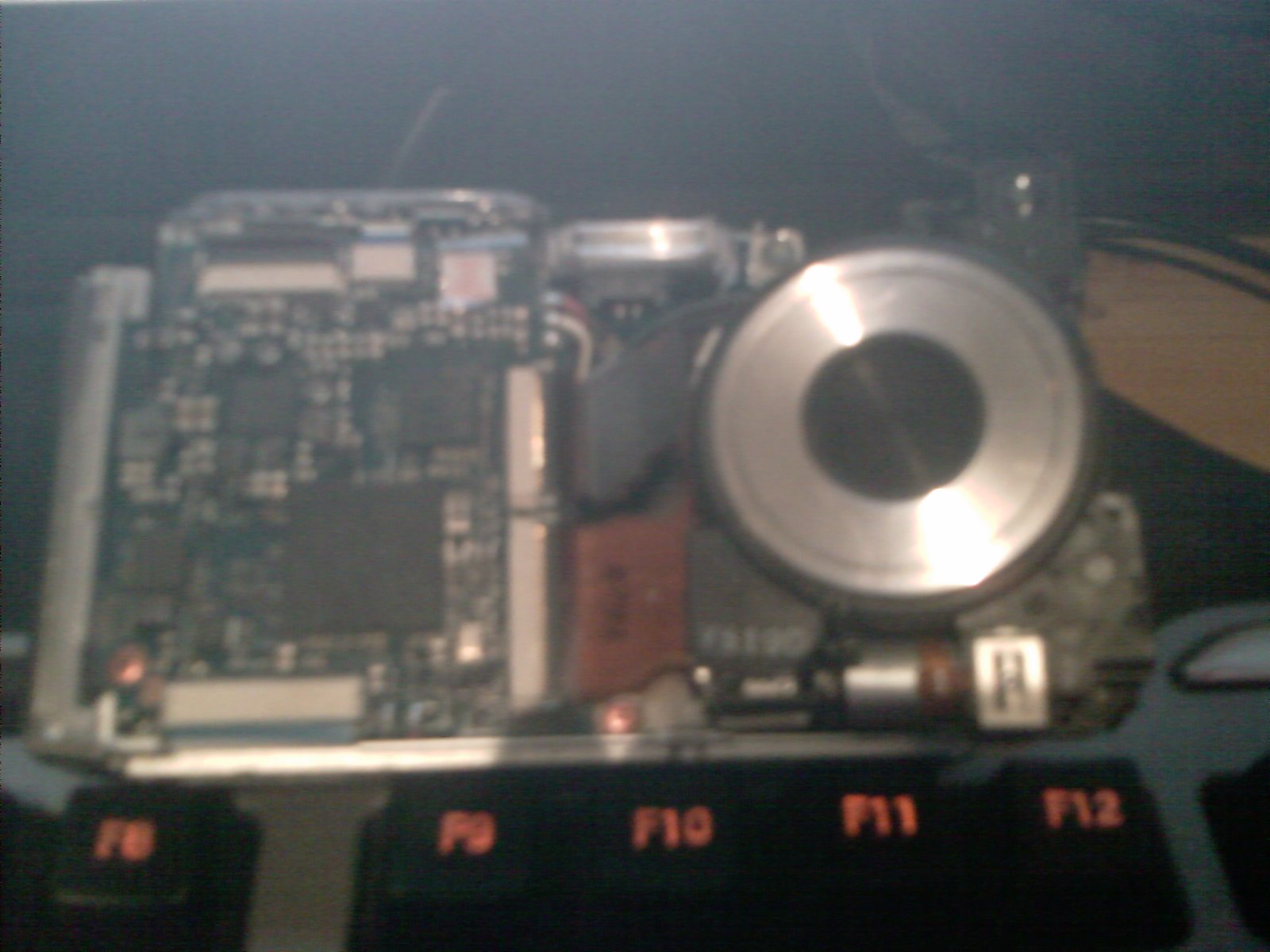
IMAG0004[1].jpg
Clive
Sun, 14 Mar 2010 19:59:32 +0000
Oh i forgot to mention what was going on basically the top ribbon cable is what transfers the photo to the circuit bored and the brown cable connects the circuit board to the focus motor and shutter on the camera and lens
Clive
Sun, 14 Mar 2010 20:05:22 +0000
TENHO UMA SONY H50 QUE DEU UM DEFEITO NA OBJETIVA COM O C�“DIGO E:62:12, QUE SOLUCIONEI COM A DICA DOS COLEGAS DESTE FORUM, COM DUAS BATIDAS NA TAMPA DA BATERIA.AGRADEÇO AOS COLEGAS
MARCELO
Thu, 18 Mar 2010 00:04:55 +0000
Thanks guys!! I took the battery out and tap it on the battery side as suggested above at the top, nothing happened. Took the battery out again and tap it on all 4 sides, it went all blurry...I was about to cry. Last thing I tried was tap it again hard on a cushion, when I turned it back on, the error code was GONE and it's all clear again!! Thank god!!
Cookie
Mon, 05 Apr 2010 05:33:16 +0000
Sometimes. that methods don't work. (in my case.)
When your lens vibrated with Errors, just shake up and down.
It will temporarily work.
Jeff
Sun, 25 Apr 2010 14:09:50 +0000
I bougth my T30 in 2007 and used it on all round the world travels... I haven't dropped it but it looks like high humidity in jungles and on the beach triggered the error code... It's been going on for 2 years now and it looks like this is the end... Not only it shows the Error and the vibration all of you were getting and of course all pictures are blurry, but now the noise after opening is so loud I've never heard anything from a camera - it's a clicking sound and it's extremely loud.... I'm going to let it rest and see if that helps (I used it yesterday) but I did initialise it (twice) and took the battery out a few times... I tapped it and smashed it numerous times on all sides and it doesn't help... I love this camera and got some amazing pictures from my travels, but I can't rely on it anymore and before I saw this forum I was gonna try and buy the same camera - but after seeing this I won't be buying Sony ever again... any reccomendations what to buy? I got used to this small camera :o(
inga
Sun, 02 May 2010 17:50:52 +0000
Abour 4 months ago our Sony DSC-T50 started displaying the blinking E:6210 message. Load times after sliding the cover was about 10 seconds. Banging the camera's battery compartment side firmly fixed the error. Just like new... I used paperback book laying on a table to blunt the impact.
Mike
Tue, 18 May 2010 22:38:03 +0000
I had the E:62:10 error on my Sony DSC-T10 as well, after dropping it on day. The lens/picture on the screen vibrated when I first turned it on and then I kept getting the error message. It also took a lot longer to turn on once powered up. So I tapped the side of the camera and it seemed to fix it too. Sometimes the message comes back but tapping it again makes it go away. I haven't seen it back in a while so hopefully it's fixed now!
K
Wed, 02 Jun 2010 00:26:49 +0000
Had the same problem here with my DSC- T50 while on holiday... Got really annoyed. I googled the problem, and came across this page... Although, at first, i was skeptical, it actually worked!! I banged it on my bedside table a couple of times, took the battery out, and charged it overnight. I replaced the battery in the morning, and hey presto! It worked! :D
Mazgirl
Tue, 08 Jun 2010 08:34:26 +0000
Same E:62 error appeared on my DSC-T9 yesterday. After banging the cam a few times on a tabletop it error disappeared. Thank you guys!!
CloggyKorea
Tue, 08 Jun 2010 12:16:32 +0000
i also got same problem but after i read all ur message and i try it... HEIIII... that really works... haha...
LOUISE
Thu, 24 Jun 2010 08:14:05 +0000
I had the same problem on my camera and tapping it worked! I took the battery out and tapped it on the side, turned it on, the error code is still there, so I tried it a second time. When I turned it on again the code is gone. Thank you everyone for posting!
Chims
Fri, 06 Aug 2010 06:33:29 +0000
... same problem, same solution error code keeps comming back (intermittent) camera still takes pictures its about 5 years old now. Maybe time for a new one sorry SONY, I will be looking at other models ...
Wattyathink
Fri, 03 Sep 2010 19:02:04 +0000
Kept tryiing as recommended. Hitting the side of the battery harder and harder. Rebooted. Unfortunately, error code continues and will not take a picture and attmempts to focus in and out. So frustrated. Did not drop it. I took a few pictures and the power ran out, so I charged the battery and that is when the problem began.
Jason
Sun, 12 Sep 2010 16:20:01 +0000
I had the same sony cybershot t9 e:62:10 error, was very skeptical about the take the battery out and smack on the side solution and IT WORKED!!!! OMG sony sucks!
Sonnysucks
Sat, 18 Sep 2010 23:59:57 +0000
A million thanks to Matt's posting on Thu, 05 Jul 2007 12:43:15 -0700. I followed his instruction & my 3-year old T-9 is working again without the E:62:10 message ! Saved me $$ for another service at Sony.
Alvin Khoo
Mon, 27 Sep 2010 02:01:08 +0000
Thank goodness for Internet and camera-loving Web users!!! I am in Austria now and after a wild night at Oktoberfest in neighboring Munich, Germany my kamera (DSC-T50) started to make the flashing E:62:10. As many people now know, slightly tapping the battery cover with my knuckle has fixed the problem.
Vielen Dank!! :-)
Steve
Fri, 01 Oct 2010 08:24:30 +0000
I have a DSC T9 since at least 6 years and with them in the past no problems.
Now in my holidays my camera sometimes went crazy. If I switch it on it vibrated and additional sometimes the image on the display shook. After them on the display flashes E:62:11.
I`ll try to fix the error with bumpimg on my knee . . . ;-))
Wolfe
Mon, 04 Oct 2010 21:17:41 +0000
Thanks to the genius of the web (especially Matts posting 2007) I tapped the battery side and presto the message 62 10 vanished from my T50 camera, surely Sony have a logical fix to the problem
Brian Hills
Sun, 07 Nov 2010 01:01:19 +0000
Thanks to all Sony DSC users who were faced with same E:62:10 problem.Hitting all sides on a cushioned pad solved this annoying problem!!
Louis Steffann
Sun, 21 Nov 2010 14:51:33 +0000
Tapping the camera on the battery cover (not too hard) really works. I thought it was written just for fun, but I did it and it worked for me!
joe
Tue, 07 Dec 2010 03:54:38 +0000
I've had this error on my T10, took the battery out and reinserted it, gave it a thump, and who would have thought? It works perfectly!!!
Daniel
Sun, 26 Dec 2010 04:10:55 +0000
guys u are all genious , � dropped my dsc t30 yesterday with the case and saw that annoying error E62:10 , and read the comments above , � hit all sides gently on my wood desk in the open mode than � turned the camera off ( praying not the see that err again :) and guess what it was not there anymore yehuuuuuuuuuuuuuuuuuuuuuuu :)))))))))))thankyou everyone �m sending positive energy to all :))))))
abdullah
Mon, 14 Feb 2011 13:58:20 +0000
wow, I'm giddy because hitting the camera on the battery side on my palm worked! Same error code E:62:10 flashing on the screen. Sony DSC-T10 have had it for about 3 years first time it happened.
thanks!
kat+3
Fri, 25 Feb 2011 00:00:22 +0000
Had camera vibrating on photos something to do with stabilizer. Read about how to fix it first off remove battery ( they don't tell you that ) removing front of camera strip off vib unit somthing about the glue perished and to re glue it but when I went in to my Sony It was a different set up in the camera so all I did was to remove the black Dust cover (just like sticky tape you can see the unit vibrating just stick a tooth pick in side to check you have got the right part After refitting the battery and pressing the little switch to turn camera on when you have found the vibrating part cut a plastic straw down to fit in the slot secure it in place Blue tack refit sticky tape over it refit front back on Have lost the stabilizing on the camera but I still have a camera I can use ( it is a DSC-T10 ) but there are a lot out there that do this
Eddie
Sun, 27 Mar 2011 03:02:08 +0000
unfortunately tapping the camera on both sides doesn't work all times :/ thats year 2011 and look what we are doing , damn you Sony!!!
Enes
Wed, 06 Apr 2011 12:23:37 +0000
I've had this error on my T10, took the battery out and reinserted it, gave it a thump, and who would have thought? It works perfectly!!!
Rajeshwar
Mon, 09 May 2011 19:14:14 +0000
I have a Sony T10 that was working just fine and then started flashing E:62:10 in the display. It seemed a little slow starting up but took pictures just fine.
I consulted the manual and re-initialized the camera - this resulted in no change.
So, I took the camera apart to check ribbon cables - no change.
Then I took the cable and hooked the camera up to my computer and looked at the photos - something odd had happened, the camera had started saving pictures on the other side of my card petition. i.e. I had file 101 for photos and 102 for recordings and the camera started saving photos in 102.
So if you get E:62:10 and everything seems to be working - save the pictures from your storage card and reformat it - It just might work.
Louis McQuaide
Mon, 20 Jun 2011 19:08:07 +0000
por lo general esos errores aparecen cuando los equipos presentan fallas en alg�n dispositivo yo le di golpes a mi camara y no funciono
alralean
Fri, 22 Jul 2011 13:36:00 +0000
Probably tired of hearing same replies but the "whack the battery side of camera to fix" technique worked a charm. Thanks guys, only reference on google that helped! Cheers
Robbo
Mon, 25 Jul 2011 12:55:00 +0000
I gently hit all sides of my T9 against my wooden desk and yep, it actually stopped the E62:10 error.
Thanks!
Daniel
Mon, 05 Sep 2011 15:14:16 +0000
Problem with my Sony DSC T50 Digital Camera, as it keeps flashing with the E:62:10 Error code. I have no idea what it means though it does not seem to interfere with the camera's functions. Anybody know what I should do?
Rajesh
Mon, 19 Sep 2011 17:17:25 +0000
I have a tx10 and unfortunately none of the advice in this page seems to be working for me :-( tried hitting it on all sides with and without battery, on and off but doesnt work for me
Elcampe
Fri, 23 Dec 2011 09:50:33 +0300
After getting annoyed by the flashing error message on my SONY DSC-T50 I came over this post.
After reading all the posts about hitting the camera from the side I thougt more that this is a joke site - but I can only tell it works....no more flashing message - thanks a lot folks!
Tom
Tom
Sun, 16 Sep 2012 02:20:11 +0400
OMG, it worked!
Had the stupid Error for over a year, my boyfriend even bought me a new camera beacuse I was really annoyed with the flashing error message...
Googled it just out of curriosity and hey, so many of us having the same problem! I hit the camera gently, didn't work, then I used a bit more force, didn't work. Hit all the side, with battery in, battery out, didn't work. Then I really went for it! And it worked :-D
Thanks guys.
Pav
Thu, 20 Sep 2012 17:51:05 +0400
Hey everybody )
I'm from Russia and my Sony DSC-T10 is with me more than 5 years (or even more) Several weeks ago I droped it on the flour while taking a picture, I thought that I broke it, but it is alive and the error E:62:10 occured... I didn't have a time to fix it than.. camera still was working, but today I decided to read smth ab this error and I found this forum and guess what? After reading the oldest comments about "gently hitting" I did it - and it works ))))
THANK YOU )))
Mifonok_A
Mon, 29 Oct 2012 20:10:45 +0300
I did the same by tipping slightly on all sides and I solved he problem thanks pero
PIERO
Sat, 22 Dec 2012 00:36:58 +0300
I've just had the 62:10 error show up on my digital video camera. No help from SONY on their site. Doesn't really surprise me, though,. This is why I always carry 70s vintage 35mm SLR cameras as back-ups when I travel. Antique tech, yes, but they've never let me down where the new stuff has. over and over.
S. Wolf
Fri, 04 Jan 2013 03:44:18 +0300
thanks for the above comments.
tapping on my cam solved my problem.
varun katragadda
Fri, 12 Apr 2013 18:12:41 +0400
I have a DSC-T30 and after many years of trouble-free operation the E:62:10 error code suddenly appeared today.
None of the above mentioned remedies except one served to alleviate the problem: just a bit up-thread someone mentioned cleaning the battery leads themselves.
What I did was to simply switch to my second battery and the problem immediately disappeared. It clearly has something to do with the battery leads and simply oxidation or dust.
The reason hitting the battery side of the camera seems to work is that through the vibration enough contact is re-established for normal operation to be resumed.
So, first thing is to carefully clean the battery contacts. No need to hit your camera.
Araquiel
Wed, 21 Aug 2013 21:59:56 +0400
Same issue and I turned it off, smacked the battery side just for the hell of it, and it stopped. Started happening originally after I dropped it. Oy.
Laura
Tue, 17 Dec 2013 16:54:20 +0300
Zelfde probleem. nieuwe accu hielp niet.
Paar zachte tikken op de zijkant wel??
Vraag me af waarom Sony niet met een afdoende oplossing komt??
RvD
Thu, 01 May 2014 23:40:55 +0400
I had this camera for 9 years, never dropped (as I'm aware) and it just started doing that. E:62:10 error and cannot focus sometime. Most of the time it can take photos once it stops shaking.
yatzek
Sun, 11 May 2014 16:33:11 +0400
Special Thanks to Paul
I have the same problem with my WX50 and I tried several times tapping different sides of the camera and it didn't work but after doing Paul's solution (Turning on and tapping all the sides in photo mode, then turning it off and on again) Surprisingly it worked
Hamid
Wed, 23 Jul 2014 16:32:39 +0400
Same problem with my Sony DSC-HX300 Camera, as it keeps flashing with the E:62:10 Error code.
Nilesh
Sun, 10 Aug 2014 11:03:02 +0400
incredible i had this messesage on my T9 and none of the kids knew where it came from.
Was a little afraid of hitting my cam. But hitting it on the top with a piece of wood solved my problem.
hitting with my hands did not work so for somereason the impact has to be a little harder.
eelcom
Sat, 23 Aug 2014 14:29:58 +0400
Looked at all of the comments. Opened the battery compartment. Tapped the open area with my palm. The memory card disengaged. I slid it back in and now the error message is gone. Thanks for the helpful posts.
Bob Fleming
Mon, 01 Sep 2014 22:55:44 +0400
Had thecamera Sony DSC T50, great camera, for 7 years,and for three years it's had the same Error 62:10 flashing on the screen.I took the battery off, shaked the camera and put the battery again.The problem disappeared. THANXXXX GUYS!!!
Marisa Mendez
Mon, 15 Sep 2014 21:44:33 +0400
So i have a Sony Sup Steady Shot DSC-T30 and the camera literally starts to vibrate and wont stop(its like my camera has seizures) and this is my baby so i dont wanna get rid of it but im in a photography class and i have to be able to use it when i need it,not when it wants to work. and when it does stop the vibrating it starts flashing E:62:10 and i dont have 200$ to spend to fix it,granted i only paid 15$ for it. Helpppp Pleasee.!!
Destiny
Mon, 22 Sep 2014 17:53:06 +0400
Thank you all for sharing the tip! I gently banged the battery side of my camera against the table jokingly thinking it wouldn't work but it did!! The E:62:10 error on my Sony DSC-TX10 has disappeared! :)
wanderer
Thu, 27 Nov 2014 17:04:06 +0300
Error "E:62:10" = "Lens initializing failure."
Check the codes in attached files.
Hitting the camera doesn't worked for me.
When I started the camera I fully zoomed it as soon as it starts and the problem is solved for me.
Though I have to do it every time I start the camera.
Try to find sony_dsc-hx1_level-2_ver-1.2_sm PDF files which is service manual for dsc camera. But dont try to open by yourself as it is very complicated process.
Attached Image: 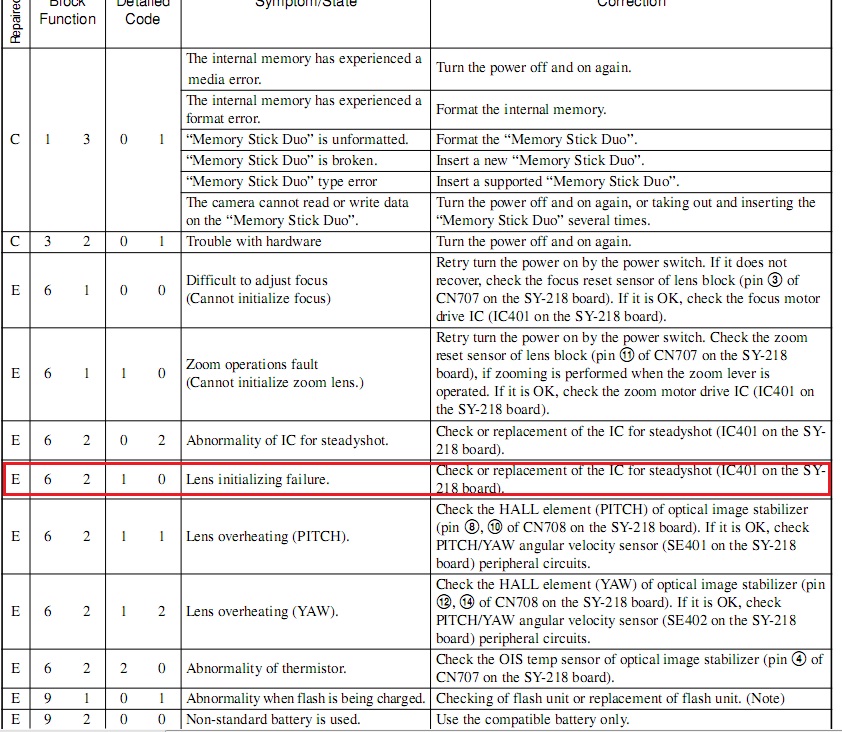
e_62_10.jpg
Tachyon
Sat, 04 Apr 2015 11:32:58 +0400
I got this error message yesterday after dropping my camera on the concrete. I was SICK! Still am! I tried hitting it, nothing, I tried resetting it, nothing. I tried zooming out upon turning it on, nothing. It's quite frustrating to see the flashing error constantly. I have no idea if it will affect my shots either. Dang it! I should not try to carry more in my hands than what is safely possible. That's what I get for multi-tasking!
Cherokeemiles
Wed, 03 Jun 2015 19:36:06 +0400
OK, I got the same E;62-10 error - Cybershot DSC-WX300. I took out the battery, hit each side a couple times, put batter back in, and it almost worked. The lense came out more than it had before, so I was able to grab it and gently pull it the rest of the way out. Now...it works. Who knew?? Thanks everyone!
JuJu
Tue, 25 Aug 2015 22:17:47 +0400
Thank you, saved the best for last in my case, DSC-HX300, dropped the camera a few times, messages goes away after extending the zoom as far as it will go, remove battery with power on, replace battery, hit power switch, no more E:62:10 thank you thank you thank you.
David Young
Thu, 12 May 2016 20:27:18 +0400
Thank you. I've got a dschx300, and the E:62:10 message, and another workaround that hasn't failed yet (at least 5 tries). Leave lens cap on, power on camera, get E:62:10 message, leave camera in upright position, pop the battery out while in upright position, pop it back in, power on camera, message is gone. Tried it again, worked again. Thank you. I really like this camera and was prepared to get another with extended warranty. Thanks again. Tried it again, it worked again.
David Young
Thu, 12 May 2016 22:15:55 +0400
OK I got the E:62:10 error code, and found this thread. I tried a few different things. Nothing worked.
Then i did the following, and my error msg disappeared.
Step 1: set the cam on a table, lens pointing down. So the cam is resting directly on the lens or filter.
Step 2: open the flip out screen to turn the cam on.
Step 4: don't touch anything, just let it sit and it will power down automatically...it may take a moment but it will power down.
Step 5: close the door.
Step 6: tap very gently and open the door again to turn it on.
At this point i personally did succeed in getting rid of the E:62:10 error msg.
Good luck and tap GENTLY.
FDR-AX100 User
Sat, 30 Jul 2016 10:11:00 +0400
Hi
I too have the same problem of error of E:20:10 which was constantly and annoyingly flickering during using my camera DSC HX 300 SONY camera.
When I googled it, it has given the list so many people above having the same problem. I read most of them and wanted to do trials.
So switched on the camera zoomed it and removed the battery form the socket.
I then gently tapped on all sides of the camera and replaced the battery. When I switched it on lo! The error has vanished without a trace!!!!!!!!
Thanks to all the persons above
Phanindra Charya Velijala
Tue, 12 Sep 2017 00:38:25 -0700
Eleven & a half YEARS on and the same problem still happens. Sucks to be Sony. DSC WX300 E:60:10 image stabilisation abnormality. Turn off and turn on again. Which doesn't work.
Only difference after over a decade is that the fault makes the camera completely unusable. Stuck in the Turn off and turn on again loop. So worse really.
Read all this with some scepticism. Turned camera on, when lens came out removed battery with lens still out. Gave it a moderate tap on the palm of my hand. Did all four sides for good measure. Put the battery back in and the lens retracted. Turned it back on and the error had vanished. Zoom works. Image stabilisation works. It takes stills and movies. Sorted. Genuinely gobsmacked, both that the fix worked and that Sony have left a systemic fault unchecked for over a decade. Smells of planned obsolescence and consumerist capitalism. No wonder we have climate change.
Ant
Sun, 24 Jun 2018 15:59:58 -0700
Add Comment
|
Related Links
|
TrackBack
Related Content
Did your message disappear? Read the Forums FAQ.
TrackBack
TrackBack only accepted from WebSite-X Suite web sites. Do not submit TrackBacks from other sites.
Send Ping |
Spam Control
Title: Sony DSC H2 Error Code E:62:11
Weblog: Camera Hacker
Excerpt: I had been receiving E62 error in DSC H2 recently purchased. I found that the internal battery which controls the clock had discharged. So i allowed the batteries to remain over 24 hours and it became ok. No more problems. The sony guys shud supply AC adaptor with camera just for avoiding this error . . .
Tracked: Mon, 25 Jun 2007 10:52:58 -0700
Title: E:62:10 on HDR-HC7
Weblog: Camera Hacker
Excerpt: I work with sony handycams on a daily basis.....looks like it's a new problem that they have all the old 1 and 3 chips, still run perfectly. However my HDR-HC7, has all the problems discussed on this forum [thread]. The erractic focus problem which I hoped would go away on it's own, however has got . . .
Tracked: Thu, 17 Jul 2008 17:18:46 +0000
Title: E:62:10 on DSC-HX400V
Weblog: Camera Hacker
Excerpt: i have had this problem twice with my SONY DSC-HX400v ... heres what to do... put camera in zoom... remove battery while still in zoom tap around battery case a few times... replace battery enter time/date and it should be clear... good luck
Tracked: Thu, 15 Oct 2015 01:20:09 +0400
Title: E:62:10 on FDR-AX100
Weblog: Camera Hacker
Excerpt: Well, the same error popped up on my FDR-AX100. Any, permanent, fox on that (w/o replacing the expensive stabilization unit?). The camcorder was not in an extensive use, and was baby sited, and in spite of that it poped up around 6 months from the purchase.
Tracked: Thu, 02 Nov 2017 00:50:48 -0700
Add Comment
Messages, files, and images copyright by respective owners.
228 Users Online
|
Get Our
$10000-above 
$5000-$9999
$2000-$4999
$1000-$1999
$500-$999
$200-$499
$100-$199
$50-$99
$25-$49
$0-$24
Gift Certificate

|
|