

 Add Comment
|
Add Comment
|
 Related Links
|
Related Links
|
 TrackBack
 Related Content
Sony DSC-P41 C:13:01 main circuit board problem
I have a sony p41 with a c13:01 memory stick error sent it in and was quoted 180.00 to fix .they said it was a mcu main circut error can i fix ths with a p41 for parts camera or should i junk the camera?
brian
Mon May 2 07:18:59 PDT 2005
I�ve got a DSC-W12 Sony camera with a SanDisk Memory stick PRO 128 Mb. I had many problems since I bought the memory stick in october 2004. Now the card is not working anymore and every time I try to use the camera I see this error message. C:13:01. I tried to resume the photos with RescuePro SanDisk program but I can�t rescue the pics. Could you help me please?
Michele Toniato
Michele Toniato
Wed, 8 Jun 2005 14:28:35 -0700
I too am having the error message C:13:01 on my DSC W5 Cyber Shot. Is there anything I can deo about this problem?
SON
Tue, 5 Jul 2005 13:56:53 -0700
I have a Sony Cybershot 3.2 and I got a C13:01 while using a Lexar 64mb memory stick. I have tried to format the memory stick but that has not work. I thought about junking it but I paid a tidy sum for it and the memory stick. The camera is about 18 months old. i have been reading different forums but none suit my problem though we have a common error.I do need help as I have photos in the camera and I do want to use it again.
Faye
Fri, 26 Aug 2005 16:36:01 -0700
I have DSC-P41 camra and I had the same C13:01 format error message. How can I fix that problem???? IS it fixable at all??? PLEASE HELP!
anna
Sat, 22 Oct 2005 13:40:35 -0700
Obviously Sony made it again. The CyberShot's cameras family is a real bad product. Just as crappy as the Vaios. Shame on Sony, they used to sell good devices, now, they sell just garbage, and very expensive. I saw thousands of people with this exact same problem, not a single response from Sony.
Rafael Ituarte
Fri, 28 Oct 2005 11:25:55 -0700
I have the same DSC-P41 camera and I hand C13:01 format error message..... But is there anybody who solved the problem and who wants to share???? Please do, i will be grateful for it.
Ingrid
Sat, 5 Nov 2005 16:09:09 -0800
Same error code with a Cyber-Shot. I don't see manyhappy faces here.
la
Mon, 7 Nov 2005 14:53:01 -0800
same stuff here..works one day then for no reason the error code c:13:01
i'm sure someone knows how to solve this problem...looks like 100 of my photos are gone up in smoke
tg
Tue, 8 Nov 2005 16:17:47 -0800
I to have the same error code C:13:01: went on Sony product support chat line went through all the check procedures, even reset camera. he pointed me in direction of data recovery web site. Could not answer the question.
Jeremy Jackman
Sat, 19 Nov 2005 10:42:03 -0800
Sony dsc-f828 + Compact Flash memory card - Now I got that C:!3:01 shite too... whatever it is, it's not good
iclafa
Mon, 21 Nov 2005 04:18:38 -0800
I had this problem many times with my camera, usually just resetting the camera with the button or removing the memory stick and reinserting it usually works.
Jamichael Dawson
Fri, 25 Nov 2005 16:45:09 -0800
I have a FDMavica 2X floppy disc camera. Most of the time all is fine. I took pics for holiday and when I went to review them they were gone and I got a C1301 message and in my computer I got an Unexpected error attemmtping to change to directory A;\\ error 27 is this my camera or computer doing this? Is ther a better floppy to buy??? Im fed up losing all my family photos.. :( Thanks for any replies..
Robin
Sat, 26 Nov 2005 10:58:26 -0800
DSC f717 with the C:13:01 Memory stick error problem. I bought this camera at close to $799 (first release). It worked for 2 years, now the Memory stick error has come about. No response from Sony - apparently costs $180 to fix. Jeez..
Prett Zellman
Mon, 28 Nov 2005 20:00:58 -0800
HOW TO GET YOUR FILES OFF SONY MEMORY STICK WITH C:13:01 ERROR.
Switch the stick to LOCK. Your system should be able to read it a show you the contents...using MAC OSX this worked. I had to create an archive of the DCIM folder in order to copy the files off onto my computer...but it worked and I have my photos.
The disk is still giving me the error though and I cannot use it. Any ideas on how to re-format or erase the disk to get rid of the FAT error?
jonathan
Fri, 2 Dec 2005 09:25:15 -0800
Also this only worked with the camera attached to the comptur...could not get anything to show up on the sony card reader.
jonathan
Fri, 2 Dec 2005 10:39:29 -0800
I'm having the same C13:01 error on my 5.1mp sony cyber-shot with a san disk 512 memory stick. I changed to the original sony 16mb stick it came with and am getting the same error reading. Since my camera just went through hurricane Wilma in Cozumel, I am thinking that it may have a little cleaning to be done inside. Will search the web a little more for an answer before opening it up. The camera has treated me well till now. Used a $20 transfer unit to take pic's off of stick and onto computer.
mark
Wed, 7 Dec 2005 08:54:06 -0800
I have got the Sony W5 camera. I have bought a 256mb card with it. But within 3 months and just after one use, i got setback as the atick is showing error C:13:01 continuously. Can anyone help me getting the stick formatted or I have to buy a new stick.
Saurabh
Wed, 14 Dec 2005 19:31:02 -0800
I have had the same problem with a very new 1gb memory stick pro after one proper use.
After investigation and trying to get it formatted in numerous ways I discovered Sonys formatting tool on the website. Tried using this and gave message saying the Disk Management is corrupt on the card. SO its basically had it.
if you cant get it formatted on your pc or in the camera. Get hold of this tool for your pc. THink you will need a card reader. Not sure.
If this tool wont format it then I believe nothing will and its time to get it back to Sony.
I;m still trying to find out how to take SOny up on the 5 year guarentee. Anyone able to help me with this?
Thanks
Tyrant
Thu, 15 Dec 2005 08:12:36 -0800
I have a Cybershot DSC S30. I got this error the other day, but I was able to retrieve my photos at a kiosk at Sams. I was told to reformat the stick via the computer. I plan to try this tonight.
Thanx
Bethe7
Thu, 22 Dec 2005 15:46:56 -0800
Hi guys! Connect your camera via usb to your computer and switch on your camera now. display should show "usb mode normal" ! turn maybe to video mode. After I did it my camera works properly again. Befor this procedure I got mad for several hours trying everything to get rid of C:13:01. Good luck!!!
Szczur
Thu, 29 Dec 2005 04:07:44 -0800
Why Sony doesn't publish the problem and offers a real answer for this problem, is very bad to be dealing whit this problem!
Jacob
Mon, 23 Jan 2006 13:20:20 -0800
C;13;01 ERROR OCCURRED ON MY MEMORY STICK 128 MB. WHEN I CHANGED IT TO THE OLD ONE 64 MB IT WORKED BUT THE 128 MB STILL GIVES THIS ERROR AND CANNOT FORMAT NOR ADD ANY PHOTOS, CAN ANYONE HELP ME PLS?
DEV
Fri, 27 Jan 2006 10:45:12 -0800
I had the "C:13:01 format error" on my Sony Cybershot P10, using a Sandisk Memory stick pro 1Gb. I recovered 95% of my "lost" photos (some were damaged). Here's how:
1. Download and install "smart recovery" (or "file recovery") from PC Inspector (100% free!)
2. Put the memory stick in your card reader and run the program.
Luc
Mon, 30 Jan 2006 06:32:24 -0800
i have a DCS- s40 cybershot and each time i put the photos on my pc and disconnect the usb it THEN says C:13:01.
i can format via camera each time - it works fine till i upload my photos?
How do i reformat via my PC?
Danny
Thu, 9 Feb 2006 16:06:09 -0800
Happened to me today. I have a DSC-P200. I have the problem with the 1Gb Sony memory stick PRO as well as with a 128Mb Lexar memory stick as well as with a 16Mb Sony memroy stick.
Now I also have a DSC-P32. All these memory sticks work perfectly fine in this camera. I didn't have any problem reading the cards in the cardreader.
In other words it is either a problem with the camera (not the sticks apparantly) OR the c:13:01 error is a very general error capturing a collection of different problems.
The big question is however: what is the solution????
Sander
Sun, 12 Feb 2006 00:31:02 -0800
I just bought a new 512mb card in preparation for a trip overseas and got the same error. I was able to format on a pc with no issue. I am able to copy random pc files to the stick. But, the camera does not recognize the stick. From the posts here I am going to assume that the older models are simply incompatible with a memory stick pro. I cannot find a regular old memory stick to test this theory so who knows. My old sticks work fine. Anyway, Sony has lost me as a customer. I have seen hundreds of posts on this problem but none on the fix. I can only assume that there is no fix.
Frank
Sat, 4 Mar 2006 18:18:00 -0800
�Did someone format it using linux? I mean, windows is not able to full format a removable media....
Juan Solsona
Mon, 13 Mar 2006 13:07:37 -0800
I too have the same issue with my 256MB memory stick.Does anyone know how to reformat the stick using the camera?
geetha
Sun, 19 Mar 2006 18:32:11 -0800
I am going to get rid of my sony !!! I HATE IT NOW!!
Baso
Fri, 24 Mar 2006 11:05:14 -0800
I've owned a Sony F717 for three years now and it has performed flawlessly in that time. Finally, the other night I got the dreaded C:13:01 error message. The problem has been tracked down to the camera and not any of my mem sticks. Considering the use I have gotten from the camera, the failure is no biggie. Well...it also helps that I bought a four year warranty with it too! We live in an electronic world folks! Digital cameras are inherently prone to problems as time goes by. It's not like the cameras of yesteryear that were primarily mechanical. Lighten up on Sony. Everybody's stuff breaks sooner or later!
Mark
Thu, 30 Mar 2006 17:57:32 -0800
Yes, everything mechanical will eventually break. I have had 2 Kodak's that eventually broke (~2 yrs each). I have a brand new Sony that I can not use unless I use the 36 MB stick that came with it. I bought a 2GB memory stick and it will not work. I suspect the stick is the problem but can not figure out how to format it from the PC (won't work from the camera, still gets 13:01). I would defend Sony but they made the STICK, too! I am very tempted to return all and go back to Kodak. It is just not worth this type of headache.
Dana
Wed, 12 Apr 2006 09:48:31 -0700
Dana, the symptom you described seems to indicate that your Sony digital camera only support the Memory Stick standard, and not the newer and bigger Memory Stick PRO standard. Yes, there is a difference.
Memory Stick supports up to 128 MB.
Memory Stick PRO supports larger than 128 MB capacity.
Your 36 MB card is a Memory Stick, while your 2 GB card is a Memory Stick PRO. No formatting of a Memory Stick PRO will allow it to be used in your camera.
For more information concerning various memory card standards, refer to my "Types of Memory Cards" article.
Chieh Cheng
Wed, 12 Apr 2006 13:34:07 -0700
I have the sony N1, with a 2GB Sony Memory stick duo!
& have the same error, and cant access nothing :(
Terry
Sat, 15 Apr 2006 11:34:59 -0700
i just bought 2gb and put it in the DUO ADAPTOR and i get the fuckkiin c-1301 error...
WHATTTTTTTTTTTTTTTTT !
I paid hard earned money for this and i get this, so DOES ANYONE KNOW HOW TO FIX IT OR IS IT FIXABLE AT ALL????
MANN, PISSSESS ME OFF
what the fufckkkk
Sat, 15 Apr 2006 15:10:57 -0700
Tengo una P-73 y mi camara presenta el error C:13:01 intentare conectar la camara con el USB como lo comentan arroba para ver si funciona, les comento el resultado luego... C Ya
TANQUE
Tue, 18 Apr 2006 07:02:06 -0700
Hey I got the same problem of C:13:01 . Sony manual says it may be due to the hardware faults or may be ur memory stick is not formatted properly. I tried all formatting optiond to fix the problem but nothing works. I got this problem after taking 20-25 snaps with my S60 model reading format error. I will try to fix that with the hardware consultant now. When i copy images from camera to PC, it shows corrupted images & can not be recovered with any tool.
Nilesh
Thu, 20 Apr 2006 05:51:49 -0700
Got c:13:01 error on one side of a 128:128 split 256 Memory stick with my sony cybershot DSC-p10. It had been working fine.
I lost pictures but got it working again as follows.
Put memory stick in my sony Clie PDA and used MS import application to use Memory stick as removeable disk.
Accessed this 'disk' using 'my computer' then deleted offending folder (in this case 101MSDCF) then added new folder in same location and same name.
Both 'sides' A and B now both work, problem solved
Another 128MB stick works fine so assume this error is caused by
paul
Thu, 20 Apr 2006 08:57:15 -0700
If the problem persist, the problem is in the camera, the cable connector of the card reader is the problem:
SONY DSC F707/F717 C13:01 MEMORY STICK ERROR
Santi
Thu, 20 Apr 2006 15:05:07 -0700
My 2 month old Sony 1Gb stick gave up the ghost last night, card reader doesn't pick it up anymore and the the dreaded C:13:01 reading on the camera. It's not the camera because my 512Mb stick is working fine in the camera.
It will also not allow me to format the 1Gb on the PC or the camera!
What can I do??
MandyP
Mon, 24 Apr 2006 06:38:18 -0700
Same prob here; got a Sony DSC F-717, LEXAR 128 memory stick, took pictures yesterday night, untill the camera went out of power (I pushed the button to take a picture, but it did not respond, gave me the "battery low" indicator", and went out). So, I was thibking maybe the last image did not save well, corrupting the 128mb memorystick. Did not try any other sticks 'till now, will try that tomorrow. If anyone has any solution to retreive my pics on this drive.. No results with "Pc inspector smart recovey" though, won't detect my drives, any of them (cardreader), including the camera itself. Thx for any replies.
tEdDy nOoN
Mon, 1 May 2006 08:30:54 -0700
Yup same prob AGAIN!! I have a Sony DSC P72with lexar 128mb ms and of course the 16mb sony ms. 16mb ms works fine, lexar 128mb gives c:13:01 code over & over again, my cardreader however doesnt seem to have any problem accessing the lexar! At Sony they dont seem to know the c1301 code. Dont these guys have internet? this is the last product i bought from sony.
sushi eating plicks!!!
RoN
Tue, 2 May 2006 07:40:30 -0700
I have a Sony DSC-W1, same damn error C:13:01 with my SanDisk 1gb PRO Memory Stick. However, my old 128mb memory stick works without issues. I am not happy to see so many people with the same issue and no quick and easy fix available. You just lost me as a future customer Sony.
John
Wed, 3 May 2006 09:17:39 -0700
Error c:13:01 for Cybershots. Switch to Set Up mode and turn on camera. When error appears click CANCEL. Scroll down to format. Click it. Select OK. You lose everything but your stick will work again. My camera kept switching to view picture mode during shooting pictures just before this happened. Might be a good sign to back your pictures up.
Infinity
Wed, 3 May 2006 19:17:48 -0700
I have a SONY V1 which have had the same C:13:01 problem. I am well understand how it feels when this message appear. I took it to the SONY customer service and they said it is simply because dust particles have been accumulated on the memory stick reading slot inside the camera. It was cleared now and work fine. However, I have taken the camera to SONY twice before they figured out what exactly the problem was! In the first time, they even said my camera is "OK, no problem".
My 1G memory stick Duo Pro has been crashed before the camera was fixed. The stick cannot be recognised by my PC and V1 anymore...
Any suggestions to rescue the faulty stick is much appreciated.
Badbadzmaru
Wed, 3 May 2006 23:39:08 -0700
See the PCInspector post beloiw - - it worked for me and I recovered about 80% of the files on the card. THANKS
Steve G
Fri, 19 May 2006 09:11:11 -0700
I downloaded Memory Card Formatter from Sony and formatted card this way as opposed to using the camera to format it. Then used the camera to format disc as well. It worked for about 15 minutes then did the same error. Im takig it back to the shop and getting a different brand. You can be sure it will happen again even if they do fix it and then it will be out of warrenty. Screw Sony.
Brett Carter
Sun, 21 May 2006 00:31:42 -0700
Was using my 2 year old Sony F717 with 9 month old 512mb Sandisk memorypro stick at wedding, when warning C:13:01 appeared. (I was not a happy bunny) Came to this site, (thanks folks) and downloaded PC Inspector and recovered some of photos.
Cannot reformat memorystick. Have been to the recommended Sony site to reformat memory stick but it does not apply to the 512mb Pro stick!
Camera works fine(at the moment) with Sony 128mb and 32mb. BUT I CAN'T TRUST IT NOT TO HAPPEN AGAIN. Was not aware that it was such a problem with a Sony camera.
Pete
Tue, 23 May 2006 08:35:15 -0700
I have another DSC-F171 and got this "C:13:01 merory stick failure" message after about 100000 shots, not bad for electronics of this kind. After learning to take pictures with F717 (always need adjusting), the pictures have been hard to match with other brands. However disappointed I am after the camera I plan to use my 10 memory cards /mc pro's with the Sony cameras in the future too.
While the cameras are excellent, I agree that the Sony service is notoriously poor (lacking knowledge and expensive), so please consider Nikon or Canon too when buying a new camera. But still, can they offer something like H5 for just under 500€?
Juha
Tue, 23 May 2006 09:13:25 -0700
I had the same problem with the 13:01 and was really getting frustrated. On the stick there was this little lock switch, and I flicked it to the other side. Now everything works fine. I guess it must of flicked over on accident or something.
Collin
Tue, 23 May 2006 19:08:31 -0700
I have a FDMavica 2X floppy disc camera.
The camera works fine with a memory stick however it will not accept ANY floppy disc without coming up with FORMAT ERROR c:13:01.
It seems that most people have this problem with the memory stick but mine is confined to the floppy disc - formatting on a PC or another camera have made no difference).
any suggestions are welcomed
Thanks
Mike
Mike
Sat, 03 Jun 2006 11:04:11 -0700
I got same problem ( c:13:01 with sony memory stick 512 mb. please tell me what can i do?
lin
Sun, 04 Jun 2006 02:12:20 -0700
Yep, the infamous C:13:01 error once again. Losing all my pics!
Solution?
NEVER buy Sony again. Never recommend Sony again. Use Sony as an example of what not to buy.
My Sony Cybershot was the most expensive $500 sony ever made.
Ron F
Mon, 05 Jun 2006 07:58:20 -0700
just had the C 13:01 error on my DSC F717 myself....
go to Sony Digital Photograpy Support Area
(for en in the link enter you language), select your camera model, find Memory Stick Downloads and download the Memory Stick Formatter on the following page. Install. Format.
That will erase your pictures already on the stick but the device will be usable again.
Worked for me.
Axel
Sat, 10 Jun 2006 06:29:54 -0700
Same thing. Loaded a brand new stick into a Sony DSC-P50. Error code C:13:01. Guess I'll have to get another camera because even if I was able to clear it, it could come back.
Charlie
Tue, 13 Jun 2006 13:19:00 -0700
WOW! I can't believe all of these differen't camera models coming up with the same error code and Sony doesn't know what it means. Fock Sony!
Ok, obviously I am here because my DSC-P8 3.2M Cybershot is doing the same thing, "C:13:01 memory stick error".
Here's my chain of events:
I was previewing the last picture I took using the left arrow, and noticed it was way too dark, so I deleted it. Right when I selected OK, the error message C:13:01 was flashing on the screen. There were pictures on the card still, and with my built-in card reader on my PC I was able to transfer them over and they all look fine.
Here's a list of all of the things I've tried and the camera still displays the C:13:01 error:
1) ejecting and re-inserting the 256MB Pro card.
2) Locking/Unlocking the 256MB card.
3) Tried an old 16MB card and it does the same thing. I know this card is good too, so I suspect a hardware failure with the camera. Most likely the interface to the memory card.
4) Formatted the 16MB card with the PC.
5) Formatted the 16MB card with Sony's Memory Card Formatter.
6) Tried putting my camera in various USB connect modes with the cable, i.e. "normal mode" and "ptp mode".
7) Cannot format the card in the camera. When I try it just displays the error, further proof the memory card interface is the problem.
8) Anything people suggested above that could possibly help didn't - I think I covered them all in my list here.
I sort of wish I had purchased the 4-year warranty at Best Buy now, but then again...I don't feel that I ever needed it. I have treated my camera very well and it has served me well for over 3 years, 5500 shots and many videos. I've never had to replace the battery and the charge still lasts for over an hour. The extra warranty was $60 on top of a $400 camera with a $100 memory card, but that would be $60 now that I can spend towards a better camera. I've been wanting to get a new digital SLR with external flash. The smaller point-and-shoot cameras are nice, but I've always battled with the dim lighting. If it's not sunny, or very well lit, it's almost impossible to take a shot that doesn't require some photoshoping later. Not to mention the graininess is hard to fix. I realize I may still suffer from this same situation with a more expensive camera, but the answer is out there somewhere.
I hope Sony can own up to this error code and everyone here can get their cameras fixed, but I'm not going to hold my breath on that one.
Canon and Nikon do look very tempting :)
Brett
Sun, 18 Jun 2006 22:00:08 -0700
HOORAY!!! IT'S FIXED!!
So after doing everything I said I did in the above post, I decided to crack open the case and have a look at the connectors.
WARNING: Do not attempt this unless you have a very small set of philips and flat head screwdrivers, 5x jewelers loupe, fine needle nose pliers, a very small set of tweezers, a working knowledge of electronics and FPC (flat printed circuit) connectors and can accept the fact that you may actually break your camera more than it is already.
Remove the battery and memory card.
I have a DSC-P8, so there are just 4 screws holding on the front cover (the cover around the lens). Remove those and pry with your fingernail in the crack between the memory card door cavity and the front cover to pop it loose. Carefully remove it and follow the instructions in the following picture (several links in case some go down):
http://img221.imageshack.us/img221/3709/sonydscp8c1301error4wh.jpg
http://rapidshare.de/files/23467590/Sony_DSC-P8_C1301_ERROR.jpg.html
http://www.everybodytothelimit.com/sony_dsc-p8_c1301_error.jpg
(also attached to this message - if it works)
I hope those of you with other models can "figure it out", because from what I can tell the service manuals are not free or cheap.
Email me if you wanna chat about this:
emailbrett [a-t] gmail [d-o-t] com
Attached Image:
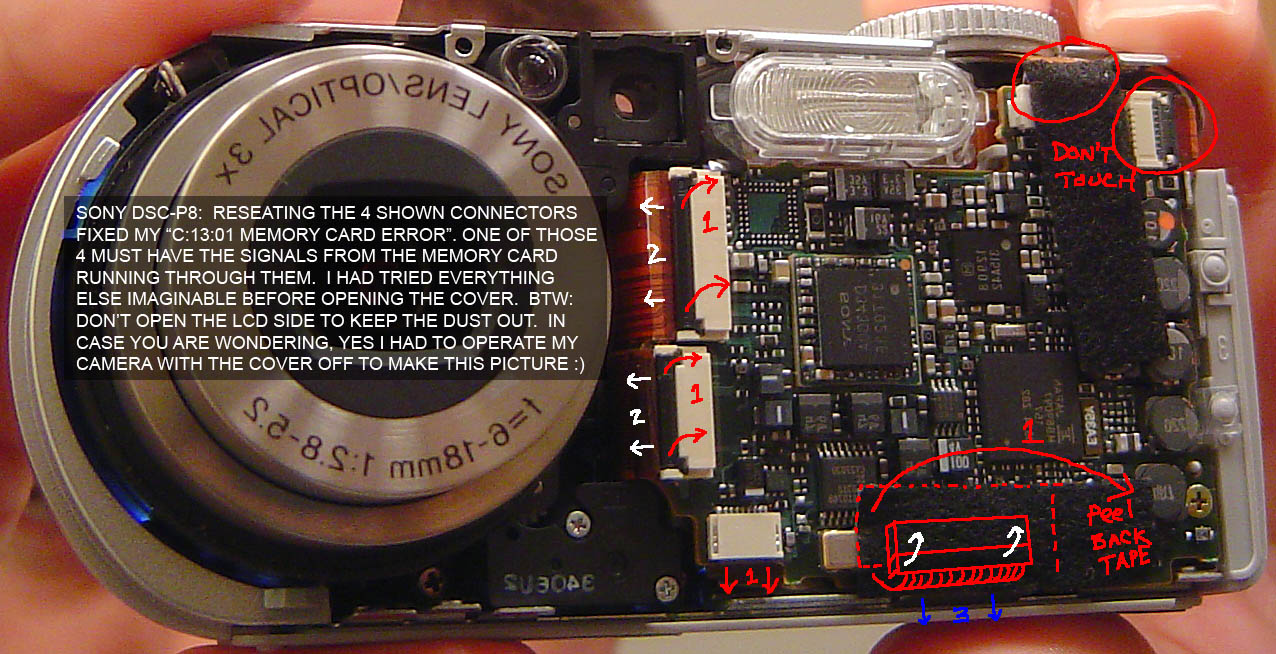
Sony DSC-P8 C1301 ERROR.jpg
Brett
Sun, 18 Jun 2006 23:56:14 -0700
Hmm... just remembered I took that above picture in the mirror and everything is going to look a tad backwards if you open up your DSC-P8. Attached is a mirror image for reference.
Attached Image:
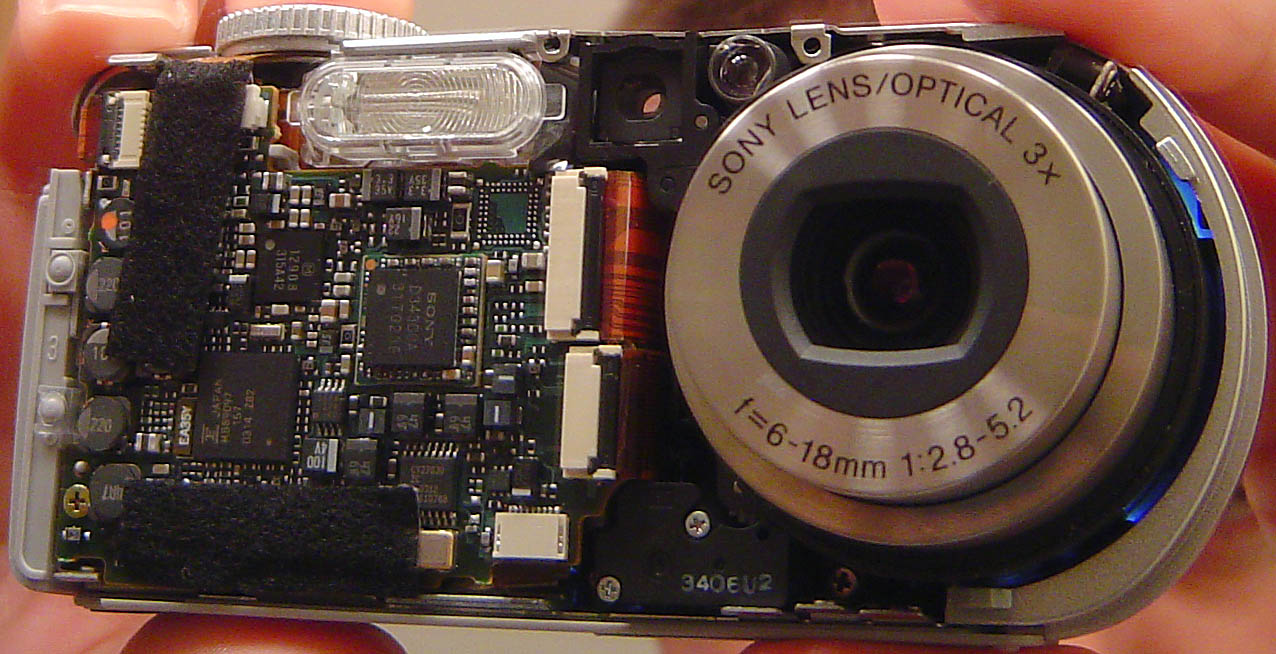
Sony DSC-P8 C1301 ERROR mirror.jpg
Brett
Mon, 19 Jun 2006 00:01:22 -0700
I have a sony cybershot which gives me the same dreaded error message "Format Error". Now it gives me a very dark messy pictures. We should force Sony to correct their bugs for free. I paid $610 for this camera on ebay and did not expect it to break down in 3 years. Then the price in Bestbuy was $999.
Anil Tuladhar
Wed, 21 Jun 2006 09:00:08 -0700
I'm having the same C:13:01 problem with my Cybershot W5 and a Lexar 128MB memory stick. Is there an alternative (less technical) fix to this problem?
Kevin
Mon, 03 Jul 2006 22:39:52 -0700
I got this problem when i tried a new 1gb card.
Thought the camera had failed as the same thing happened when i tried any of my other cards.
But i managed to clear it by switching the camera on without a card in it and then switching off and putting a old card in.
Still get the error with the 1gb card so assume the card is faulty.
Sparkymc
Thu, 06 Jul 2006 01:22:56 -0700
COME ON PEOPLE! POST!
Has anyone else tried opening their camera and manually fixing it (like you see in the pictures above)? For what camera models? How was it?
alex_vtz
Fri, 07 Jul 2006 14:26:42 -0700
I too am a victim of the Sony fraud. The fact is that there is only one memory stick that you can use with the DSC-F707, or lesser camera, and that is the MSH-128A (or 64A,32A,16A, but those are impossible to find). It will also use a MSA-128A, but the MSA is no longer being manufactured. Most retailers don't stock such an outdated memory stick as the MSH-128A. (Keep in mind, you do not want the MSH 128, you have to have the 128A. Good luck finding one.)
I do not know if Sony is trying to protect proprietary material, or it is trying to force its customers to upgrade. Either way it doesn't matter to me. Sony is dead. The camera I bought is only three years old, cost $1500, if you add all the accessories, and now belongs in a museum. I can do nothing with it now.
I do know that Sony competes with itself to try to outdo its own technology. The casualty, of course, it its existing customer. The corporate culture there does not look to maintain loyalty to its current customers. It's goal is to develop new technology to attract new customers.
I will never take Sony seriously again. My advice is that if you want something that you will use for two or three years and then throw away, you may consider a Sony. Otherwise, I would recommend something else. My next camera will be either a Canon or a Nikon; still Japanese, I suppose.
Alex Hadley
Sun, 23 Jul 2006 03:21:18 -0700
I have a sony camera of7 mega p.I have a problem that when i take pictures only file error displays.Plz. sent me your instruction.
Yam gurung
Sun, 23 Jul 2006 10:31:54 -0700
I'm surprised that no one has posted this very simple fix... I have a f717 and use a 1 GB Memory stick pro. I recently used the stick to transfer over 700 megs of photo in Germany and Austria via "wallet". The camera I used in Europe did not take anything over 128 megs (f707) so I erased everything on the 1 GB stick and used it for xfer via USB only. When getting back (and making 3 backup on three different computers of my treasued photos) I put the stick in the f717 and got the FORMAT ERROR.
Here is why. When I blanked everything on the stick to use it not for taking photos, but only for tranfering my photos in my pocket, I erased the folders that the camera uses to store the photos. So to fix the problem just do this :
1) BACKUP ALL OF YOUR PHOTOS on your computer, all your friends computers, upload to online services like boomspeed.com, etc. BACKUP BACKUP BACKUP!!!!!
2) Now, erase everything on the stick.
3) Create a new folder on the stick called DCIM
4) Enter the DCIM folder by double clicking on it.
5) Create another new folder inside the DCIM folder called 101MSDCF
Stick the memory stick back in your camera and you are ready to go.
Greg Deeter
Houston Texas
Greg Deeter
Wed, 26 Jul 2006 15:43:46 -0700
Greg, you were lucky... but at the same time, you did something to the memory stick it really wasn't designed for. Typically if you want to transport data around you use a USB thumb drive¹. But I'm guilty of doing what you did as well ;) The thing is, most people with the C:13:01 error really have some sort of interface conflict between the memory stick/card and the microprocessor inside the camera. This could just be something simple like a bad memory stick, or dirty contacts inside. A lot of people are getting loose connectors inside of there camera like I did (see above with pics).
The Sony DSC-F717 level 2 service manual states this about the C:13:01 error:
***********
C:13:xx
CAUTION DISPLAY DURING ERROR: "FORMAT ERROR" or "MEMORY STICK ERROR"
CAUSE: Unformatted memory stick is inserted, or Memory stick is broken.
COUNTERMEASURE: Format the “Memory stick” or Insert a new “Memory Stick”.
***********
-------------
¹ You can get a really great USB thumb (err, Pinky) drive on newegg.com right now. It's an OCZ Mini-Kart 2GB drive for only $39.50 after rebate! Read my reviews too ;)
OCZ Ultra-Slim Mini-Kart 2GB Flash Drive (USB2.0 Portable) Model OCZUSBM-2GB - Retail
Brett
Thu, 27 Jul 2006 20:15:13 -0700
Anil Wrote:
"I have a sony cybershot which gives me the same dreaded error message "Format Error". Now it gives me a very dark messy pictures. We should force Sony to correct their bugs for free. I paid $610 for this camera on ebay and did not expect it to break down in 3 years. Then the price in Bestbuy was $999."
Hi Anil,
I have a suggestion. Have you tried to use Sony's formatting software to fix up the memory stick?
Get a compatible card reader for your computer, and then install the correct software from Sony's site:
Memory Stick Service and Support Area: Downloads
Usually the "format error" is fixable, the "memory stick error" can be a little trickier as you can see above.
Good luck!
Brett
Brett
Thu, 27 Jul 2006 20:40:20 -0700
This is what Sony China says about "C:13:01", but definitely useless:
"Please insert a new Memory Stick if the LCD shows C:13:01 and Format Error. This error code means that the camera is not working in a proper condition. Using a unformatted Memory Stick is the mostly possible, but users can try to fix it by formatting the Memory Stick or inserting a new Memory Stick."
That's what I tried to translate from SONY DSC-H1 FAQ
I also have the same f***ing problem with a DSC-V1. Can't read a 128MB memory card, with a lot of important pics inside. All these happened after a snapshot.
Anyone can help? many thanx.....
Johnny Yuan
Mon, 31 Jul 2006 12:04:24 -0700
I have a Sony DSC V3 camera, which had the same problem with 1GB memory stick. As usual i tried for solution over web. I read all comments, but of no use. Finally, I just played with the lock switch locking and unlocking. I inserted back into the slot and switched on the camera with slider on memory stick position, though initially c:13:01 error showed up I slid to Compact Flash (CF) mode and back to stick mode. The error has gone. Try this with your camera.
Prakash
Mon, 31 Jul 2006 21:37:36 -0700
I too have a sony dsc 41 and it showed no error message but everytime i pressed the shutter the screen and photo turnes a funny black and white with a tint of blue, I checked all the settings and all were aok so being on a round the world cruise in the back of nowhere i tried the old irish tv trick. When it was swithced on i gave it a thump and now all is well yeehaa
derek in costa rica
Wed, 02 Aug 2006 22:14:04 -0700
I have a Cybershot PSC-73. I had the c:13:01 error. and this is what I did to fix it.
First, once you get this error, do not try to format your Mstick with the camera. This error is in the main board, so if you re-format your M-stick You'll be creating a corrupted formatting.
Then Follow this:
1) Reset your your camera. This will remove the error from main system.
2) Go to the following link and download this formatting tool
Memory Stick Service and Support Area: Downloads - Memory Stick Formatter Software Install it inmediatly in your PC.
3) Connect your camera, if the M stick is working fine, you should have no problem with this step.
4) Run the formatting tool, Select to see al phisical drivers. You should see your MStick listed.
5) click on Formatt, and wait untill the process is completed. ( Make shure that quick format is selected)
6) Release your camera and test you formatted M Stick. And Enjoy
What cause this proble and how to prevent it?
Never run your camera on low batteries. Voltage variants alters data processing on the main board. Always have fully charged batteries on hand. When the camera is accessing your M Stick to record the picture it consumes some energy from your batteries. When batteries are low in charge, can happend a variance in voltage and then you'll be saving a corrupted file. Notice that some times
you can preview the first feu pictures you took but you can not recover them. Data is recorded in binary patterns (000110110) when a variance in voltage occures a 0 can be replaced by a 1 and so on. Then you get an un-valid data. THat error can be writen at any part of your M stick, sometimes goes to the picture and some times to other parts causing formatting problems. When you reset your camera, make sure you are doing it connected to a power supply or to new fully charged batteries. This will remove the error trapped in a loop in you main board.
THe link above is to download a tool to formatt you M stick. Is provided by Sony Europe. Is not available in the US Sony Site.
This I'm telling you was not from the mouth of any service attendant at Sony. Sony makes some bucks "repairing"this errors. Europe is more oriented to service and to society. That's why they have the download option.
Bad news is that i dont know about how to recover the M stick data. But at least you dont have to junk you Camera or M Stick.
josrios
Thu, 03 Aug 2006 22:41:47 -0700
I forgot to say that the c:13:01 error is very generic. It can be caused by dirty contact pins, or even a bad formatted M stick. Other thing is that M sticks has their own life cycle. You should try what I mentioned above before "going into the camera". If the steps above don't work, then try to clean the contacts or verify the inner connections. Good Luck! Once again, always use fully charged batteries. If you batteries goes halve charged after 3 or 5 pics you have to throw them away and replace them.
josrios
Thu, 03 Aug 2006 23:02:15 -0700
I had no idea, that so many people suffer because of this shit with sony cameras!!!!!
Looks like, that there is really only one way: to open the body.....checking the contact-
but finally, after so much frustrating, we got an idea!
Thanks from germany
ina
Sun, 06 Aug 2006 14:00:58 -0700
DATA RECOVERY:
Use a memory stick reader/writer; a memory card slot on your computer, at a friends computer, Kinkos or even a computer store like Best Buy (Circuit City helped me once) and don't forget to take a disk with you to copy the data on.
BATTERY POWER ISSUE:
Might be right in some cases. I use rechargable batteries, came with the camera, and the manual says to run them down to zero by using the slide show and then recharging.
While taking pics I got the error message. So, the binary was correct when I started.
MEMORY STICK DEFECT or BRAND NAME:
I don't think so, (might be in some cases). I got the error with a SANDISK memory stick; then, inserted the Sony memory stick the camera came with and received the same error.
Looks to me, that this is a camera issue. Since my camera is already 5 years old, one of the first 3.2 meg, I just started to take it apart.
If I find something which will resolve it, I'll be back to let you guys know.
REgina
Mon, 07 Aug 2006 17:18:46 -0700
I have tried and tried to remove this damn error C:13:01, nothing I do helps.
I have read until my eyes ache, is there any known cure for this.
Please Help
bethe7
Fri, 11 Aug 2006 07:44:47 -0700
Hi,
I am also facing this problem.
I was on a trip to Singapore and my DSC-P72 fell off my hands. *ouch*
I had a 256 MB stick in it and the stick has stopped functioning since then and always shows the C:13:01 error. Tried shoving the stick in and out many time but nothing helped.
The new stick that I bought and the default 16MB stick that came with the camera works just fine.
Amit
Sat, 12 Aug 2006 16:35:34 -0700
IT WORKED!!! I took 65 vacation photos on my DSC-S85 today and then got the C:13:01 error code. I downloaded the free PC Inspector File Recovery program as mentioned in a previous post (above by "Luc"). I inserted the memory card into my generic card reader and ran the program. After it scanned and found them, I selected and saved them to a folder on my desktop. On the first attempt, only one photo was saved. On the second try, all 65 photos were rescued! They all open normally now, from the desktop folder. I reformatted my card in my camera with a fully charged battery, and it works normally again. While taking the photos in question, I used one batttery until it was very low on charge (it automatically shut off). A previous post (above by josrios) discusses how a very low battery can possibly cause this code. It may have caused the code in my case. I normally don't let my battery get too weak before changing to the back-up, and I've never had the problem before.
I had tried everything, but this recovery program worked like a charm!
GTOGUYDYE
Sat, 12 Aug 2006 23:38:55 -0700
I have a Mavica CD-1000 with this C:13:01 error code. SO it's not memory sticks, mini-cd's, or camera operator error. Even cd' Ive formatted with this camera will not read.It's Sony junk that's the probelm.
Martee
Fri, 25 Aug 2006 11:06:07 -0700
Derek's post on 8-2-06 was the one that did it for me!!!! Whoo-hoo!!!
Lark
Sun, 27 Aug 2006 11:39:14 -0700
After several attempts to fix this error, I simply cleaned the end of the memory stick with a Q-tip and some rubbing alcohol. I then formatted the stick using the camera and started taking pictures. No problems yet and I've been snapping photos for a few hours. Hope this works for some else. Good luck.
Erik
Mon, 04 Sep 2006 11:34:09 -0700
I recently bought the Sony DSC-R1 and was spending the day trying it out, getting used to features. In the evening I was previewing my photos and guess what appeared on the screen of my brand new camera ....................... C:13:01 .......... great!!! ...so I brought back the Memorystick duo card and it was replaced with a 1GB Pro Memorystick, so far so good ... has anyone heard of this happening with Compact Flash??
Lee
Wed, 06 Sep 2006 04:41:03 -0700
Hii all, I had an error for a long time C:30:01 n I formatt Memory stick Pro wiht computer n after that I used it couple of times n it seems like it has solved my problem.
GOOD LUCK!!
Palku
Mon, 11 Sep 2006 13:54:15 -0700
I've had the same strange C 13.01 Format Error too. It very likely seems to be not a very helpful error message, as the problem can be of several origins.
Mine was solved by the Formatter you can find on the Sony Website, but it only worked together with the build-in Memory Slot of a Vaio Laptop, with my USB Card Reader the formatter was of no help at all.
Good luck.
sibylle
Fri, 15 Sep 2006 04:04:11 -0700
Hello everyone, I have an DSC-F717 Sony and i was getting the error C:13:01 with a new Lexar 1Gig Pro Duo Memory stick. After verifing that the memorystick was good, I tried cleaning the contact on both the adaptor and memory chip with rubbing alcohol..The error went away. Good luck everyone
Franklin
Mon, 18 Sep 2006 18:05:33 -0700
My Sony camera had the same error as everyone else, C:13:01 and I was using the memory stick I bought with camera, camera had been working fine for 3 months. Memory stick I knew was working fine. I figured might be dust, so inhaled over the drive, and then that must've moved whatever the problem was, and now everythign works fine, Maybe try a vac sweeper too.
aoli
Sun, 24 Sep 2006 10:15:48 -0700
Hi,
i tried every tool which was mentioned here but nothing helped me.
when i put my 2GB Memory Stick Duo in my DSC-T9 it shows FORMAT ERROR.
When i inserted the memory card into my generic card reader he didn't found the device. so i can't work with the tools, because there is no device.
there are nearly 2 gb pics on it.
SO PLEASE HEEELP!
Timbo
Tue, 03 Oct 2006 00:48:57 -0700
Got a brand new DSC-T10 Cybershot from Sony with a 1GB Memory stick DUO. One month later I have the C:13:01 error and I am mighty angry. It happened when I tried to read the memory stick in a SONY memory stick duo adapter in my PC. When that finished I returned the card to my T10 which gave me the C:13:01 error.
What's completely stupid is that all my photos are intact on the camera, and I can export them all off the memory stick but now I cannot store any new photos onto the memory stick with my camera!
There is no write protect notch on the MS Duo! Trying to reformat the memory does not work in Windows, or even with SONYs memory stick formatter!
I call shenanigans. There's no way in hell that the memory stick or camera is broken. For something to malfunction this easily is a bad joke, considering I've done all sorts of things to SD cards and the like with no problems like this before. I was warned about SONY's stupid proprietary formats and now I'm getting burned because of them. This is all SONYs fault and I'm never getting anything from then ever again!
NayNay
Sun, 08 Oct 2006 06:57:12 -0700
Same C:13:01 format error problem here. Sony brand 64mb memory stick.
I cleaned the contacts carefully with Qtip and alcohol and it recognized the stick immediately upon reinserting it into the camera sony DSC-P41.
I got the clue when someone on another site suggested reinserting the stick over and over quickly 20 times or so, It seems to happen more to used sticks/cameras more than new. How many of us handle the sticks with our grubby fingers, even if only briefly. Some of the oils will eventually transfer and then lint and other stuff will eventually collect and then one of those contacts will be prevented from passing sufficient current to the stick and voila you have a c:13:01 error.
Yeah, I know this sounds simple and too easy to be true but it worked for me. Coincidence, I think not.
Remember the old trick of cleaning battery contacts with the eraser end of a pencil to make them shiny? What really strikes me as strange is that none of the other sites I looked at mentioned cleaning the contacts as even one of the possible solutions. You would think someone would.
Anyway, try it before you toss the stick.
maskmaker9
Wed, 01 Nov 2006 07:33:50 -0800
Got this from another site:
SONY DSC F707/F717 C13:01 MEMORY STICK ERROR
Good luck!
Janae S
Thu, 02 Nov 2006 13:39:42 -0800
On my first week of my H5 + 2GB MS Duo stick I got the C13:01 error and I can assure it was not dirt contacts. Sometimes when I turn the camera off for a few minutes, it works again. It happens with one of my sticks, the other one is all right.
Nilson Dias
Fri, 03 Nov 2006 16:12:16 -0800
I had the same problem in my Sony Memory Stick 128Mb... C:13:01 error
I wanted to recover my pics, then I follow the indications of this forum:
1- Download the software PC Inspector from: http://www.pcinspector.de/download.asp#file_recovery
2- Put the memory stick in your card reader and run the program
3- The pics wa recovered 99 %, great!!!!
4- Format Memory card in your camera, not from the PC.
_____________________________________
EN ESPAÑOL:
He tenido el mismo jodío problema en mi Sony Memory Stick 128Mb... C:13:01 error
Quería recuperar las fotos que había hecho y no había manera, así que seguí las instrucciones que vi en este foro:
1- Descargate el programa PC Inspector, que encontrarás en este link: http://www.pcinspector.de/download.asp#file_recovery
2- Pon la tarjeta de memoria en un lector de tarjetas (o en la cámara).
3- Pon en marcha el programa, sigue sus instrucciones y bieeeeen, a mi me ha funcionado y he recuperado el 99 % de las fotos!!!!
4- Formatea la tarjeta en la cámara, no desde el PC borrando los archivos en la carpeta de la cámara... siempre desde la cámara!!! ESPERO HABER AYUDADO, y por fin dar una solucion escria en español al jodido problema de las Sony Memory Stick!!!
Horace
Fri, 10 Nov 2006 13:15:47 -0800
Tengo dos camaras sony Cyber shot DSC-F717
al comienzo muy buenas, fabulosas pero en dos años de uso las dos se dañaron las dos no tienen imagen, una ademas del LCD, el flas no funcionan ni el zoom.
Espero que la Sony recupere su moral y me escriba diciendome que mis camaras serán reparadas y reenviadas a mi casa.
Tambien tengo una dsc-s30 cyber sho de 1.3
megapixel y sigue trabajando perfectamente
esta fué mi preimera sony tiene mas de seis años y no tiene problemas, entonces que pasó con la DSC-717 ?.
Simplemente no sirven.
Isaias Lara Kevelier
Fri, 24 Nov 2006 18:49:02 -0800
Many thanks to PC Inspector (100% free!)
I have been able to recover most of pictures on a memorystick displaying C:13.01 when in my Sony DSC-P71 or systematically proposing to reformat the media, when connected directly to a PC.
Of course, never reformat via computer, first because no hope to recover pictures after formatting, secondly, PC formatting is incompatible with Sony DSC camera (at least P71). A formatting function is existing from the camera menue.
collod
Wed, 29 Nov 2006 10:15:55 -0800
I have a (uk) W12 camera.
On holiday I developed the format error.
My problems are.
a Sandisk 512mb card works fine.
the Sony Duo pro (with adaptor) 2gb will not format.
I have tried the formatting options mentioned above.
If i created the directories and place some pictures on via a pc and memory card reader the camera will view the pictures but will not write to it.... very strange - it seems the camera will work fine with the 512 card but not the 2gb - this works fine on the pc.
lee connell
Tue, 05 Dec 2006 14:53:13 -0800
This has just happened to my camera and i'm so annouyed I've lost pictures of my holiday in Amsterdam days out while I was out and trips to London aswell Sony you are SHI*E you cant do anything right you are a bunch a shrimp eating PRIC*S who are so up your own ARS* you couldn't do anything right.
Will
Tue, 05 Dec 2006 15:45:34 -0800
I am getting the C:13:01 error with a 256MB (128MB side A and B) Sony Memory Stick. Side B works fine, but side A does not. Side A gets C:13:01 error on two different Sony digital cameras. Other Sony Memory Sticks (64MB and 16MB) work on both of these cameras. So I know it's not the camera it has to be the 256MB MS. I really want the pictures on the stick, I don't care about the card itself. In fact I will throw it out if I ever get the pictures off there because now I don't trust it.
Side A is not recognized on my PC card reader.... when I try to explore it says "please insert a disk into drive J". The recovery software won't work because it can't detect the drive on my PC. I've tried cleaning off the contacts and locking/unlocking. I can't check the folder name (DCIM\101MSDCF) because I can't browse to it on my PC. Side B has the correct folder structure.
I've tried all of the suggestions that would apply to me and none have helped. Any ideas\suggestions would be greatly appreciated. Thanks for your time.
Arpe
Sun, 10 Dec 2006 09:13:44 -0800
Anyone had F717 giving the problem of memory stick error which prompts C:13:01 something like that?
I had a F505 which serve me so well for at least 5 years and its still working fine. Bought the F717 for better features... now using the F717 for 3 years, its giving up. Any known problems out there?
laikl
Sun, 10 Dec 2006 20:43:39 -0800
I got the C:13:01 error. With the suggestions above, I downloaded the PC Inspector (for free) and saved all my photographs. I needed to reformat the card afterwards, and everything is working fine now. Thanks
Reha
Wed, 20 Dec 2006 10:32:57 -0800
KEY STEP for Error C13:01. Format the strip in your camera with the setup option.
MAC
Sun, 24 Dec 2006 06:35:00 -0800
I have a Sony Cyber-shot, I've had to replace both the shutter and the LCD before, but this is a new issue.
I have two memory sticks, a sony 512 mb and a sony 128 mb and as of 20 minutes ago, each time i put them in my camera i get Memory Stick Error and the C:13:01
(I've already got pictures off of it, so its fine with my card reader)
I already tried to reformat my card on the camera, but it won't let me, it keeps saying Memory Card Error.
If anybody has any other ideas for me, that'd be great!!
Danielle
Tue, 02 Jan 2007 18:50:58 -0800
I also had this error showing on my DSC-S40. I tried the program and did the data recovery. I needed to get an external card reader and plug into the comp in order get the pics. I recovered 99% of my pics.
I couldn't format the card in my comp, so i did it using the computer.
Everything works now...but I am not buying a sony anymore. They used to be quick, but now they don't really care anymore, quantity more than quality.
Canon is looking good.
Patastic
Sat, 06 Jan 2007 15:04:31 -0800
I used PC Inspector and it worked perfetly I only lost 1 picture.
link: smart recovery - Version 4.5
I also tested this:
Memory Stick Data Rescue Service
both work perfectly, only with the second I recoverd more files.
The error C13 also has been solved with camera setup.
Thanx
Tigra
Mon, 08 Jan 2007 15:21:09 -0800
suk! I've tried all these tips above but none of them helps. I also tried memory stick formatting tool and formatting from window but both said that my memory (128Mb) was protected (although I had swiched off the lock key)! damn...
my 32Mb still works well so I dont think the problem is the camera (DSC-W1)
can any one tell me what's going on? this drives me crazy!!!!!
mozaak
Mon, 08 Jan 2007 23:52:37 -0800
i have code 13:1 error code can you please help.
bill brown
Tue, 09 Jan 2007 04:23:57 -0800
I have found a solution for my camera, it is a Cybershot (Sony) DSC P71. I came across the error when i put all the pictures onto my mac and then deleted them all from the card. After a few hours of looking on the net i found nothing, here is my solution:
1. Reset the camera to its factory setting (like when you first got it) with the memory card still in.
2. Go to the setup menu on your camera.
3. Now find "format" and click 'ok', the camer will format the memory card and add the neccesery files and folders that were on the stick when you first got it.
BEWARE: FORMATING THE MEMORY STICK WILL DELETE EVERYTHING THAT IS ALREADY ON IT. Therefore i would not recommend using this method if you have photos that you want to keep.
note* this may now work with cameras that use floppy drives as the storage media.
P.S i will not be held responsible for any data lost.
email: [email protected] for help.
this email addresses works on msn.
james thompson
Sun, 14 Jan 2007 05:06:47 -0800
If no hardware issue,
You can download the Sony format software:
Memory Stick Formatter Software
Hart
Sun, 21 Jan 2007 02:27:10 -0800
I had the C13 01 error message appear, at the same time as the distorted image fault occurred on my DSC F717. I found the information about the Sony recall to replace the CCD on various forums. I returned the camera to the Sony service centre in Pencoed, South Wales and it came back with both defects repaired.
Their description of the repair says:- CCD Replacement
and PWB, FP-617 Flexible Replacement.
Thought this info might be useful to someone.
Derek Jones
Tue, 13 Feb 2007 00:46:05 -0800
i have and old dsc-p41 4.1 cybershot, and is not working it only takes like 1/8 of the picture and is dark i wonder what it is, is nor showing any error message.
villar
Tue, 20 Feb 2007 18:40:34 -0800
For those that think that it is only the format of the memory stick and not a problem with the camera.
I had the very same problem, error 13:01 on my sony dsc p85 after formating the stick in my pc.
SOLUTION: for all these things is to reformat the chip.
YOU DONT NEED A SPECIAL PROGRAM. My camera unfortunately has no firmware with a format option, so i tried the Windows ones to let this thing run.
And it worked after these MAGIC commands at the c: prompt on your computer.
format y: /FS:FAT /A:8192
the y: is the driveletter for the chip in your pc and the important bit is /A:8192 -- means that the clustersize on the chip has to be 8kB. The standart format in windows is using 512b clusters on a chip with these sizes.
Dr. Joe
Joe H
Fri, 23 Feb 2007 15:05:12 -0800
Here's my experience so far trying to resolve C 13 01 with a failing Memory Stick and saving my photos on the stick.
The C 13 01 error just means that the camera can't read the card, whatever the reason may be. May it be the card, the camera, or dirt in between. In my case it's the card that's had it (second hand Lexar 64 MB Memory Stick) after a lady in a cyber café in the Fes medina, Marocco, shoved it in and out of all the wrong slots. My camera can't read it, my card reader can't read it (unless I press n squeeze really hard but it doesn't work well enough to be useful - the drive appeared "busy" and couldn't be read) but my friend's card reader read it easily, so try with a lot of different readers before you give up, folks!
Don't format if you intend to save the pictures.
We tried the PC Inspector Smart Recovery but unfortunately this software could only report that the data was too heavily damaged and the software failed to do anything at all.
If anyone got a tip on other recovery software that has worked for them in a similar situation, I'd be glad to hear from you!
I even "protected" marked my best photos, as I took them, in fear of loosing them (my friend accidentally erased his) but still, I can't acquire them! Still hoping though.
Josef
Thu, 01 Mar 2007 10:51:18 -0800
I have a sony cybershot dsw-50, with 1GB pro duo. When I turn the camera on it shows "acces", after a little while the famous C13:01.
Cannot acces the card through the computer. Inserting the card for serveral time, no way....will see what to do next.
Hans
Tue, 13 Mar 2007 15:23:43 -0800
I had a dead F717 (C13:01)for 2 years. Was about to take it apart for fun when I came across the link above:
SONY DSC F707/F717 C13:01 MEMORY STICK ERROR
worked perfectly - simply reconnecting the card reader restored life.
Mac
DetroitBikeBlog
Sat, 24 Mar 2007 11:35:54 -0800
Hmmm... well since i havent been using my DCC-P72 (3.2m), i didnt bother to fix my Sony 256m stick. But i see all these ppl strugling with the C 213 01 error.
Solution:
Just format the stick with Windows, using FAT file system NOT FAT32. make sure ur batteries r @ full and its all good. at least for me :).
(i tried over 10x256m , couple 512m and 1Gb sticks, All SONY!, and it worked)
Lazar
Thu, 29 Mar 2007 14:31:21 -0800
Had problem fix is to clean the contacts on the card. may look clean but have a go it could well work!
Dr DJS
Mon, 02 Apr 2007 15:01:49 -0700
Cybershot 5.1 mexapixel dsc - w5 owner and i keep getting a format error 13:01. any tips? i don't want to loose what was on the memory stick last night -- turned on today with the error message -- please help.
novice
Tue, 10 Apr 2007 19:35:12 -0700
We ran into the same issue however the hardware was fine. We were trying to use larger memory larger than what the camera supported. Here is the link from Sony's site where I was able to determine that.
Memory Stick Media Compatibility Information for Sony Digital Cameras
Jason
Wed, 18 Apr 2007 12:51:21 -0700
I have a 256MB Memory stick pro with a Sony DSC-W1. It's work fine ;-)
But i have buy a 4Go Memory stick pro duo with a Adapter for my W1 (it's write at Memory Stick Media Compatibility Information for Sony Digital Cameras is compatible), but a have the famous C:13:01 message when a switch on my W1.
I have try to reset my W1 -> same error.
I have try to format the Memory stick pro duo but my PC can't see it using the USB cable between my W1 and my PC (It's work fine using the 256MB Memory stick pro) -> I will try to find a USB Memory stick pro duo reader.
Any other idea ?
Thanks
Yannick
Wed, 18 Apr 2007 13:39:47 -0700
EASY, make a LITTLE stroke. it has beaten your camera in a table a 2 or 3 times. Tell me the resultes.
My camera(Sony DSC-V1) come back to the function after crash.
Danilo
Mon, 23 Apr 2007 21:42:16 -0700
It's works fine with a 1Go Memory stick pro duo with a Adapter with my W1. I thinks the compatibility information is wrong.
yannick
Tue, 24 Apr 2007 00:50:27 -0700
!!!!!!!!!!!!!!!PROBLEM SOLVED!!!!!!!!!!!!!!!!!!!
FOR ME: ITS THE MEMORY STICK DUO ADAPTOR!!!!
YOU NEED TO HAVE THE CARD SLIGHTLY PULLED OUT OF THE ADAPTOR WHEN IT IS IN THE CAMERA ONLY .5MM AND IT FIXED THIS STUPID BLOODY ERROR!!!!!
HOPE THIS WORKS FOR YOU LOT!!!! CHEERS - IF YOU REQUIRE ANYMORE DETAIL EMAIL ME MSN - [email protected]
STU
Mon, 07 May 2007 06:26:20 -0700
Thank you, Luc! I got the "C:13:01 format error" on my Sony Cybershot camera twice, and had vitually given up on my vacation pictures! I used the "smart recovery" software from PC Inspector (suggested by Luc in Jan 2006) and recovered ALL my "lost" photos (some were damaged). Here's how:
1. Download and install "smart recovery" (or "file recovery") from PC Inspector (100% free!) (URL: http://www.pcinspector.de/)
2. Put the memory stick in your card reader and run the program.
Good luck!
Anne
Wed, 09 May 2007 16:56:17 -0700
Here is the description how to recover the module from "memory stick error C:13:01"
Sony Camera Memory Stick Problem, or "memory stick error C:13:01"
Sergey
Sun, 03 Jun 2007 06:39:34 -0700
ERROR CODE C:13:01 ALL YOU NEED TO DO IS SQUEEZE AND BEND "SLIGHTY". IT WORKED FOR ME..
rizzo
Mon, 11 Jun 2007 07:20:19 -0700
I have a sony cybershot W50- I got the error 'Reinsert the Memory Stick' with a flashing C13:01. Tried all the great tips that were on here...still has a problem and photo lab says my 500 photos from San Francisco are irretrievable. Called Customer Service and Headquarters, right bunch of a**holes they are. Did nothing except for an I'm sorry and that they could send the stick for service (it's already fried, I know it). Learned my lesson, I'm gonna stick it out another year with this camera and it's tossed. NO MORE SONY PRODUCTS OF ANY KIND. Can't even manage to help people when their own product becomes defective. Word of advice, make use of what you can now but never buy Sony again.
Nasim
Wed, 27 Jun 2007 06:33:08 -0700
I had same problem. I simply clean the memorystick with my finger and its work.
Necati Üstündağ
Sat, 30 Jun 2007 15:34:19 -0700
REFORMAT THE DISC!
Sony Cybershot 7.2.
Problem: C:13:01. "Format Error".
Solution:
1. Turn on camera with disc in it.
2. **While** "format error" sign is 'beeping" its alarm,
hit the "MENU" button,
3. hit "right" arrow, til you get to "SET UP" (it will say "set up" on the screen in gray with an arrow next to it --> meaning hit the 'right arrow' one more time, to enter 'set up'.
4. NOW hit the "DOWN ARROW" once, getting to the screen: "Internal Memory Tool"(noted at top of screen).
5. Now, hit 'right arrow' again to light up the word "Format",
6. then hit the right arrow again to light up "OK". when you do this, 'cancel' is automatically it up,
7. SO hit the UP arrow, to light up "OK" again. (OK is yellow).
Hit the CENTER BUTTON (in the middle of the arrows). new screen will say, "All data in internal memory will be errased" and the 'cancel' is lit up.
8. hit the UP arrow to make the "OK" yellow.
9. then hit the center button to do it (to reformat).
you will see "Formatting" flash on your lcd screen, then it will be back to the screen "Internal Memory Tool".
You are finished.
To get out of that screen, hit the LEFT arrow twice.
To get out of "menu" hit the Menu Button again. Now test it. Take a picture. Then test to be sure you can retrieve the pic onto your computer. I had no problem after reformatting the camera disc. If you have pics on it you dont want to lose before you reformat, check all the comments here.. many found a way to remove their pics. I had nothing to lose on mine, so i just reformatted.
Magfire
Sun, 01 Jul 2007 15:35:55 -0700
It tried one previous users comments show below and it worked for me. Just connected the usb, mounted it. The only thing i did differently was locking the memory stick when mounting but could not verify whether that mad a difference. Hope this helps!
Hi guys! Connect your camera via usb to your computer and switch on your camera now. display should show "usb mode normal" ! turn maybe to video mode. After I did it my camera works properly again. Befor this procedure I got mad for several hours trying everything to get rid of C:13:01. Good luck!!
Elliott Hawkes
Mon, 16 Jul 2007 19:25:36 -0500
Hi Folks! I had the same C:13:01 problem with the memory stick in a Sony CyberShot. After I read all the above postings, I was getting desperate! So I decided to try the simplest solution, clean the memory stick's contacts with eraser and than blow of the dusts. IT WORKED!!!!
DSP-200 User
Tue, 17 Jul 2007 20:51:17 -0500
Go to menu, then to setup, then go to memory stick tool, then scroll down to format, click ok, then the camera will deleate any existing pics you may have but follow the cues and you will get your memory stick reformated and get rid of the dreaded error code or call sony (like I did) and they walked me throught it and now after reformating the memory stick my camera is working wonderful again.
Good Luck!
brittany
Wed, 25 Jul 2007 14:39:30 +0000
I always got the c:13:01 message whenever I put my memory stick in my f717. So I had to format it on my PC when that happened; and it always worked fine on the PC. But when I'd stick it back in the camera after a fresh format, it still wouldn't work. So I went back on the PC and created an empty folder named "DCIM" on the stick. Then when I popped it back i, everything worked fine! Wupee!
Greg McDuffie
Wed, 01 Aug 2007 19:46:52 +0000
I have a DSC-S85 that apparently can't accept anything greater than the old MS-128 sticks. This has me aggrevated since I am going on a honeymoon and would like to use the 1gb stick I bought without knowing it wouldn't work. Has anyone figured out a firmware upgrade to allow the older cameras to run the new memory sticks?
I am just as angry as the rest of the people on here about the way Sony has run off and left some of their best customers and forcing them to buy new all the time. This camera new cost me almost as much as my first car! I will definitely be looking at a REAL name in cameras for my next one.
I would love to try out some new firmware if anyone has a good suggestion!!
Thanks
Todd
Sat, 08 Sep 2007 05:48:33 +0000
I'm getting really pissed of with my 1Gb memory stick duo :@
Gabriel Alexander Joensen
Thu, 13 Sep 2007 03:13:56 +0000
I get rid of the C:13:01 error problem !
Forget the reset button...
I have a Sony F717 cybershot.
One day, for no reason : C:13:01 format error
All i had to do is :
Plug with a USB cable the camera to your PC.
But not in the "play" mode !
Put your camera on the "movie" mode.
Switch the camera on....
On the screen you'll have "usb mode" and blue dots (instead of red dots in the play mode)
Right clic on your computer then "manage"
Go on the disk manager.
Your Memory Stick is there...
Quick Format your stick.
Turn your camera off.
Unplug the USB cable
Turn your camera on the normal mode...
It works ! I still have my working camera but for how long ?
Nickthomas
Thu, 20 Sep 2007 18:10:01 +0000
Try formating the memory stick in another device and then putting back into the camera that gives the error. I used a FAT format and the memory I was getting the format error worked fine. I suspect the camera isn't capable of formatting the stick on its own. This was supposed to be a minimum $200 fix from Sony. Worth a shot.
Charles Moody
Sat, 22 Sep 2007 02:43:20 +0000
SOLUTION:
Hi I have a PSC-P52. My camera dropped and then it gave the C:13:01 error. I turn off the camera, take off the memory stick and the batteries. Using a card reader I recovered the pics on a pc (so the memory was working right)
Then I put the lock option on the memory stick and that's all! The memory stick was read on the camera and then i turned off the camara and set off the lock option.
Francisco.
JOSE FRANCISCO ZARATE
Mon, 24 Sep 2007 18:38:46 +0000
It works, clean and reformat the MS and I have my camera back! Thanks :)
Steven
Tue, 02 Oct 2007 15:16:46 +0000
I got the same problem, fixed it by adding a few layer of tape on top of the memory stick, I guess the contact must have wornt down by taking the card in/out, so by adding 3 or so layer of tape (just on the contact's end, not over the whole surface) I made it tighter
David Hsieh
Sun, 07 Oct 2007 07:24:47 +0000
i have a problem with my digital camera model DSC F717 3 years old already but now i can't do taking a photo anymore caused by a message affair in the screen /memory stick error C:13:01.how can i solve this problem?
rodante lopez
Mon, 15 Oct 2007 05:41:12 +0000
i have a problem with my digital camera model DSC F717 3 years old already but now i can't do taking a photo anymore caused by a message affair in the screen /memory stick error C:13:01.how can i solve this problem?
rodante lopez
Mon, 15 Oct 2007 05:44:29 +0000
RE: C:13:01 ERROR
I tried "squeezing" the MS as suggested somewhere (didn't work), but then read earlier in this thread to SWITCH ON THE CAMERA IN USB MODE...
I tried that (had to plug into the mains too), then removed the camera from the cradle, and oila! The camera worked! I then used the camera to format the stick again (had tried to re-format using cmd on WinXP earlier without luck), and the camera's working fine! This is a Sony 2GB pro duo.
cRaZyiNgLiSh
Sun, 21 Oct 2007 05:19:46 +0000
Have just recovered my pictures of the Rugby World Cup final using the PC Inspector. Many thanks for the post on that one!
The Memory stick seems to be at fault. Works OK with other Cards. I have Sony DSC-75. Have underwater housing so hanging on to it!
Doug
Wed, 24 Oct 2007 16:50:22 +0000
Hi rodante lopez!
i have read in [this thread] that you have been having problems
with your ms 2gb pro duo
Can you tell how did you do to recover the photos you had in? i have
recently tried what you have suggested and nothing happened. i'm
really sad because i cant recover my pictures.
Can you help me with this?
Thanks....
Paula
Wed, 31 Oct 2007 05:15:33 +0000
We were taking pictures over the weekend and started to get the error c:13:01. I don't want to reformat the disk, I would like to recover the pictures as they from a family reunion. Please HELP!
Levy
Mon, 19 Nov 2007 17:25:24 +0000
well well well. another C:13:01 victim .... me! Anwyays, i havent read all the posts here and i'm still trying to figure out on how to get it working. if the memory card is damage, i dont realy mind buying another card but it seems that the problem remains even if you use a different card. I had this error on my dvd player before the store repaired the lens ... because it wastn reading.
Recoverign pictures:
I took my card to Shoppers Drugmart (or any developing store) and plug my card in their card reader .... NO PROBLEMS at all. All pictures showed up got them developed.
Mel
Mon, 26 Nov 2007 15:09:59 +0000
Have an F828 since 2004, no problems till this morning ... the dreaded C:13:01 message. Tried it with 3 different memory sticks and still got the same problem. Read through this forum and after reading the few suggestions about about taking apart the camera to reset the memory stick holder ... I gave mine a whack with the bottom of my fist ... in case it would jar something back in place. To my surprise ... it worked. All 3 memory sticks (Pro Duo, by the way) work fine now. Good luck to you guys.
bco
Thu, 29 Nov 2007 22:44:50 +0000
After reading ALL of this log and trying a few things, I tried what bco tried. I just tapped my camera on the desk then gave it a good shake and wholla, my camera was working. Turn off/on, changed settings, etc, all working fine.
I found Sony's support web site to be hopeless.
I am so glad I did not choose Sony when I purchased my digital Video Camera and DVD player.
Mark Pountley
Mon, 10 Dec 2007 01:06:09 +0000
I got the reinsert memory stick error. Then I took the card out and replaced it about a dozen times before it finally couldn't read it anymore. Then on my PC I placed the card in my 3rd party usb reader and then received a blue screen stating some memory error then my computer rebooted. After reading this forum completely I did this as suggested by user : rizzo -
ERROR CODE C:13:01 ALL YOU NEED TO DO IS SQUEEZE AND BEND "SLIGHTY". IT WORKED FOR ME..
It worked. I didn't have much to lose trying it seeing as how I couldn't even access it with my PC. Now both the camera and pc can read and write to the card. I guess we'll see how long that lasts.
Xman
Fri, 21 Dec 2007 01:04:02 +0000
I have a Sony Cybershot and got a Fatal error C:13:01 after a file was corrupted. Here's a fix which worked for me.
Save the existing files on the memory stick by - attach the camera to a computer via USB while camera mode is on "Video". Access the files on My Computer and save to a folder of your choice. Insert memory stick into camera slot (camera is OFF). Change MODE to "Setup", turn camera ON. On LCD screen, go to "Format". Format the memory stick. Turn camera OFF. Switch mode to "Camera", turn camera "ON", fatal error should be gone.
Manny Espiritu
Sun, 23 Dec 2007 22:46:51 +0000
had this error, just bent the card a little and it worked!
nathan hearn
Tue, 25 Dec 2007 17:03:53 +0000
I have been reading this post with interest; basically I was a lucky (?) winner of a Sony DSC-W55 in a competition. Great, I thought, brand new camera to play with. Time to get shot of my old Canon Ixus... Christmas morning came along, took loads of photos of my little boy getting all excited. thought, I'll have a look and see what I've got so far... bang. 'C:13:01 error' whaaaaaaat???? OK, format. 'You will lose all files' Great. Fine. nothing I can do about it. Seemed OK after that, for a few uses.... then again it happened. Same again, lost all data.
Mailed Sony UK - 'ooooo sorry, unless you can provide proof of purchase you are out of luck, but here, have our repair price list to peruse!!' No thanks...
Mailed the prize supplier - 'may I take this opportunity to draw your attention to our terms and conditions regarding warranties not being implied' blah blah.
RIGHT NOW - I HAVE HAD ENOUGH. HAVE YOU???? MY NEXT MAIL IS GOING TO BBC WATCHDOG, AND HERE IS THE ADDRESS. [email protected] PLEASE USE IT, ALL OF YOU, IF WE ALL DO IT THEN WE MAY GET SOMETHING DONE. GO ON, WHAT HAVE YOU GOT TO LOSE??????
Good luck,
Amanda
amanda astill
Thu, 03 Jan 2008 12:42:30 +0000
I'm happy with my cybershot camera but sony just didn't want to know when my new 512 stick came up as either locked or error you'd think a corporation as big as sony would just replace it , i had proof of purchase original packaging etc
SHAME ON YOU SONY !
mark Allsop
Wed, 13 Feb 2008 20:29:08 +0000
I have DSC-W55 camera and I have the same C:13:01 format error message. How can I fix that problem???? PLEASE HELP!
Satya
Sat, 08 Mar 2008 16:33:18 +0000
As for the Mavica floppy discs not working, they have to be formatted within the camera, not the computer. If you alter the image such as cropping or enhancing and save, the camera will not recognize the floppy disc and you have to format in the camera.
As for memory sticks, the Mavicas up to FD200 will not recognize any stick over 128mb so forget about a 1G stick for $8. Also, you have to use the old standard sticks, not the Pros.
My 13:01 code in a Sony Cybershot was solved by downloading Sony's memory stick formatter.
Cheers
acmeron
Thu, 20 Mar 2008 19:19:31 +0000
I got the C:13:01 format error message on my BRAND NEW sony cybershot T2. Which uses internal memory. I managed to rescue *most* of the photos using the smart recovery program, although some were damaged (images on top of each other etc.)
I'm going to send it to sony to be repaired, but honestly, I'd rather have the �250 back and just buy a cheaper camera. I'm worried about the same thing happening over and over again...
My tip of the day - don't buy sony.
Maree
Thu, 27 Mar 2008 15:23:52 +0000
THANK YOU TO "INFINITY" FOR YOUR POST ABOVE! IT WORKED FOR MY CAMERA! IT HAD BEEN ACTING CRAZY FOR A WHILE WITH THE SCREEN TURNING WHITE AND FUZZY. SO I WOULD HAVE TO SLAP IT AGAINST MY HAND AND IT WOULD BE OK. BUT I WENT TO UPLOAD PICS THE OTHER DAY AND NOTHING WOULD HAPPEN ON MY PC. SO I COULDNT FIGURE OUT WHY IT WOULDNT LET ME TRANSFER THE PICS. SO I RESET THE CAMERA AND IT GOT THE C13:01 ERROR MESSGAE AND HAS BEEN DOING IT EVER SINCE. WOULDNT LET ME TAKE PICS OR ANYTHING. SO I WAS UPSET BECAUSE I USE MY CAMERA FREQUENTLY AND DONT HAVE THE MONEY TO GET ANOTHER ONE RIGHT NOW. I CAME TO THIS BOARD THE OTHER DAY AND TRIED SOME OF THE THINGS AND IT DIDNT WORK. BUT I JUST FINALLY FIGURED OUT HOW TO GO TO THE SETUP MENU AND REFORMAT THE STICK. I HAD ALREADY LOST MY PHOTOS SO NO BIG DEAL. I JUST WANT MY CAMERA BACK. AND IT WORKED. SO THANK GOD AND THANK YOU INFINITY FOR POSTING!
anonymous
Sat, 29 Mar 2008 12:08:37 +0000
well having bought a Sony DSC-W55 last july,thought i was getting a good gadget,with back up and brand name..after using about 10 times started getting error messages...then switch poWer off and on etc..thought it was a glich .having not useD the camera since xmas day go 2 use this week and all the sAMe problems....have just taken the camera and box with receipt back 2 sony shop..only 2 find they want 2 send it away and get me to sign disclaimer that if no fault found then i pay them �55....its obvious from this forum and others that these cameras have such faults...having recently bought a 37" + 20" sony lcd tv...guess i am in for some potential problems at my EXPENSE and sonys warrantys obviously seem worthless to us the customer and just a money raking tool....maybe george micheal was right in his video "FONY" !!!
GaryM
Tue, 08 Apr 2008 09:26:01 +0000
I got the C:13:01 message too (on my DSC-P3) and tried this:
Open the battery/mem stick door. With a pin or other very fine point, press gently into the RESET hole. I pushed it twice, the message cleared and it seems to be taking pictures again.
LD
Thu, 17 Apr 2008 17:37:05 +0000
Hi guys. Ive had my Sony Cybershot DSC-W30 for a couple of months now and its worked a treat. Was using a SanDisk memory stick pro duo 512mb and it was all good.
Im going to New York soon so thought I would invest in a larger memory card. Got a sony memory stick pro 2GB and decided to test it out on Friday night. Ended up taking approx 350 pictures/videos and the battery obviously died. I charged the battery during the night when I got home... put the camera back on, on Saturday and browsed through the pics fine.
Then i took a couple of pics of my cats... then to my horror this C:13:01 error was flashing on my screen.. telling me to reinsert my memory stick. After reading up here im totally gutted... dont think il get my pics back will I? We really need them for college as it was a findraiser.
When i plug the USB cable into my comp it just says 'connecting'... it wont read the memory card but when i take the memory card out of the camera the PC reads the camera!! Then... when i put my 512mb card in it reads fine!
So im guessing its the 2GB that has the problem.
Took it to Jessops and their card readers arent reading it either...
I want to download these programs that people are talking about to retrieve my pics but how will it work if my PC isnt reading the memory card in the 1st place?
PLease Help
Gill x
Gill F
Sun, 20 Apr 2008 12:46:57 +0000
I had a similar problem but only after I had dumped the pics to my PC. After putting the memory stick (2GB memory stick pro) back into my Sony DSC-T100, I got the famous "reinsert memory card" and C:13:01 error mssgs. Since I had already dumped my pics to my PC, I had easier options on how to resolve this. First I tried to reformat the memory stick from the cam, but no luck. I next tried restoring the cam to factory defaults. Still no luck. Finally, I downloaded Sony's memory stick formatter and reformatted the memory stick from my pc. The funny thing was that it did not complete formatting. I showed about 50% completion, but then hung for about 20 minutes before I gave up. I tried reformatting again and had the same issue (did not complete after 20 min). But then I put the memory stick back into the cam, and it worked! I formatted the memory stick again on the cam just to be sure the PC formatting and the cam formatting was not any different, and it is working fine! Not sure if this last step is absolutely necessary but that's what I did so it worked for me...
Anyway, realize of course since I did not have to recover any pics I could go right to the reformat option. This may not be an issue for many of you if you have pics you need to restore. Obviously you'll need to restore your pics first before reformatting...
Tiger
Sun, 20 Apr 2008 16:11:30 +0000
I have a dsc-p200 that is about 3 years old. Currently alternately using a 256MB and 512MB SanDisk MSPro. After transferring the latest batch of pics to the computer, I put the 512 card in the camera and get the awful error. Pics already salvaged. Able to format card in computer, still no luck on camera. Even able to pull photos off the formatted card with some recovery software. The 256 card works in camera, and both work fine in the computer. At one point I was able to take 3 pics, but then the error message reappeared.
Finally, after all attempts at reformatting (only on computer, as could not even reformat on camera) and cleaning contacts, I just flexed the card ever so slightly (towards underside of card) and it worked!
bgg1
Fri, 02 May 2008 00:48:23 +0000
Hey, So i was having this same memory stick errror accross all memory sticks it came across on my Sony Cybershot V-1! I was about ready to give up, I had taken it apart and put it back together with no luck. Then I read the post talking about cleaning the memory stick pins that connect to the memory stick. so i figured it would be a good idea to make sure the memory stick was seated right... so i shoved the memory stick in and held it. I turned on the camera and it works now! Every time. give it a try! hold in the memory stick all the way down then start up!
Brian
Tue, 27 May 2008 21:49:51 +0000
I had the same error message as i was on holidays, so really P** off... Not only could not take any more pics but lost everything that was on. Managed to restore the memory card though using the Mac's First aid program, but not able to recover the files. And for those of you who wrote thinking it could be the size of the card or the brand, mine was a 1GB Sony original, so nothing to do with the card - it's the camera... Now that i have the camera and won't be getting a new one anytime soon, lesson learned - download them ASAP.
Pipsqueak 08
Sat, 09 Aug 2008 17:27:52 +0000
This is my second Sony DSCF717 and both have been riddled with problems (believe me, i wouldn't have bought another Sony piece of shit except for the fact i was able to get a replacement via travel insurance). In all cases, Sony have refused to offer any solutions or barely even acknowledge the problem despite 1000's of users making very vocal forum posts. Their solution is always to have you send the product in at considerable time and expense (often taking weeks and costing almost the equivalent of buying a new camera). Id be interested to see the profits their repair division is making.
Last time i had a problem (strange error message and focusing problem) after pages of forum posts the agreed method of repair involved giving the camera 2 karate chops. Surprisingly it worked :) fixing the memory stick error problem involved an equally cave man like approach
SOLUTION:
Inserting and Ejecting my memory stick repeatedly WORKED :) I had to do it like 30 times, but i can now read all my memory sticks again. For how long this will work i dont know, but we are leaving to go hiking in the west fjords in iceland tommorow and we are desperate as both our cameras died at the same time :)
I would like to get in and clean the contacts on the camera properly, but the slot is too long and narrow and i dont have any adequate tools, so this method will have to suffice :) If anyone has any suggestions on how to do this it would be appreciated
good luck!
-Dan
Dan
Mon, 18 Aug 2008 18:06:32 +0000
This solved the 13:01 error for me:
Turn off the camera and connect the USB cable.
Select something other than "Video".
Turn on the camera.
Select "Video".
Pull out the USB cable with the camera still on.
That worked for me.
Tom
Sat, 30 Aug 2008 13:15:06 +0000
I had the same C13:01 error which occured when my computer locked up during a photo transfer from my 512MB Sony Memory Stick in my DSC828. I purchased a 4Gb Sony stick to replace the one with an error but had the same error - Grrrrrr. Interestingly, my 128MB stick worked so I knew it wasn't the camera. Having tried to reformat unsuccessfully several times, with no luck and also not wanting to try the eraser fix on my brand new card, I turned the camera on and removed the stick (pretty much the same thing that screwed it up in the first place) and it worked!!!
Mary A.
Mon, 01 Sep 2008 05:48:30 +0000
** A solution for C:13:01 **
If you are getting this error on your DSC-F707 OR DSC-F717 then I strongly suggest trying the following solution. This guy recommended a solution which seemed really stupid at first. But believe me after one year that I saw it first I gave it a try. I said what I have got to lose? Now my camera is working and the error never came back. I just wish I tried it a year ago.
the solution is described here.
http://hbar.servebeer.com/text/f707/
monish
Fri, 24 Oct 2008 21:10:41 +0000
My F707 had the C13:01 error yesterday and I do not want to open the body as described in http://hbar.servebeer.com/text/f707/ I agree that the ribbon cable contact should be the cause of error, so I remove the battery and the MS, HIT the F707 a few times, mainly on the camera base. I reinsert the battery & MS, the F707 is back to live!
Hope this helps!
CMWong
Sat, 25 Oct 2008 03:03:04 +0000
After spending the last 2 hours reading all these posts, you can be sure that I will NEVER EVER buy another Sony product again. I have purchased 2)707's & 3)717's and have nothing but trouble with them. When initially purchased they were all great camera's, but over time they have not held up to my expectations. I paid $699-$1099 for these camera's & gave them to friends & family as gifts.
From the 1st recall to the C13:01 Error message, these camera's have been a real pain in the butt! Service was expensive & they never would give a reason why so many error messages. I am convinced that the many different solutions suggested here will help many of you to fix YOUR problem. For me, swabbing the contact points on the sticks with rubbing alcohol & a cotton swab, seemed to do the trick. I was they able to download the pitures on my PC card reader & thus didn't lose ANY PICTURES!!!!!
When re-inserting the lexar 256mb memory stick, one side would work, but the other side would not. I proceeded to push the memory stick all the way in the camera memory card slot & continued to hold it in, while I turned it on. This seemed to work, but I am not sure whether I will use this 256mb card again, as it can't be trusted. The pictures I was able to save were the last pictures I have of my dying mother!
I BELIEVE THAT IT IS TIME FOR A NIKON D300 - NEVER AGAIN A SONY!!!!!!!!!!!!!!!
DSTEALT
Sun, 26 Oct 2008 10:26:33 +0000
what a joke, i'll never buy a sony camera again!!
James E Arnold
Mon, 03 Nov 2008 17:02:37 +0000
I have a DSC F717 and the infamaous error has been happening on and of for several years. It would usually just correct itself. I learned that "banging" on the camera would clear the error, but last weedend at the zoo with my kids (for the first time) it failed and I have not been able to get rid of the error since. I read just about every post and tried all the fixes. I even dissassembled the camera and check the connections following the step by step instructions on http://hbar.servebeer.com/text/f707. I can see how this could be a problem for some people, but it did not fix my problem. This is very frustrating indeed! Anyone have any more suggestions.
brandon
Fri, 21 Nov 2008 00:55:25 +0000
What I did to solve the C13:01 error on my sony cybershot was go to SET UP, then went down to memory tool, went to FORMAT, and pushed Cancel. it erased all my pics >:[ but.. at least the annoying error went away...
Jo
Wed, 26 Nov 2008 23:58:25 +0000
i've tried all your suggestions but i still can't retrieve my pictures. that F??????!!!! error still in my camera.. please if you have some more suggestions kindly post it. thanks:)
sam27
Thu, 04 Dec 2008 22:20:16 +0000
I just recieved this problem too. I think it is a problem with windows. It has happened to me with usb memory sticks, mp3 players and now the sony memory stick. The only common thread for me was windows vista.
Brian
Sun, 04 Jan 2009 08:37:46 +0000
well, I just bought a GREEN Carl Zeiss Sony cybershot 10.1 megapixels.. took about 131 beautiful pics. and WALAA
C 13.01.. "reinsert memory stick" i was like OMG..
now i read 2 hours of post..i was like a wish i read them before..
btw, i bought the camera two days ago.. february 6th 2009..
Francis chung
Sun, 08 Feb 2009 16:16:59 +0000
btw, it's a DSC-T77 with a 4g Sandisk pro duo
Francis chung
Sun, 08 Feb 2009 16:27:09 +0000
C:13:01 POSSIBLE SOLUTION!!!!
I HAD THE SAME PROBLEM A FEW weeks ago. The error message would say 'Reinsert the memory stick' it was 4GB and contained about 300 pics. i thought i lost them all until i went into Jessops! they retrieved all of my pics and i put them onto a cd straight away!. ive got my pics now but ill be throwing the memory stick away!
Sajni
Thu, 05 Mar 2009 13:09:52 +0000
THIS WORKED FOR ME
Have a cybershot with an 8GB produo stick and was getting the C:13:01 code with Format Error on my memory stick. Reformatting the stick alone did nothing to fix it. I initialized the camera and then reformatted the stick and it worked (for now!).
Dana
Thu, 12 Mar 2009 20:57:58 +0000
I HAVE PURCHASE DSC T10 A WEEK AGO AND IT IS SHOWING C:13:01 MESSAGE. I HAVE A 2GB PRO CARD
I TRY TO USE CARD READER BUT THERE WAS INSERT DISK NOTICE AND I HAVE SOME IMPORTANT PICTURES IN IT
PLS HELP ME ON THIS ISSUE FOR HOW TO RECOVER MY PHOTOS
ZUS
Fri, 10 Apr 2009 07:28:51 +0000
c:13:01 error on May 11, 2009 sony 707
Lisa Chow
- 11th May 2009 18:20
Found a fix for c13:01 error that you may not have thought of.
Sony 707 was flashing c13:01 error and I could not stop it.
I read the articles here but I did not want to reformat the stick as I did not want to lose the pictures.
I thought about it for a while.
I was so frustrated, and seriously stressed that I may have lost the pictures on the stick.
After fiddling with it.
I put it down, and thought, why not try the stick in my sony 828.
Where I had used it before.
I inserted the stick into the 828, had the camera hooked up to the computer and turned it on.
OMGosh it worked. Thank God.
I downloaded all my pictures from the stick to the computer, but I did not delete them from stick.
I then inserted the stick back into the 707 and OMGosh it was fine again.
I am so jazzed.
The 707 did not flash c13:01 again
Whee hoo!!!!
PROBLEM SOLVED!!!!!
Reply
Lisa Chow
Mon, 11 May 2009 18:22:38 +0000
Been getting these C13:01 Errors for a while now on my Sony T100. I purchased this camera to replace my T33 which performed well but was accidently lost. So I gave the T100 a try. Whenever I get the error, the T100 asks me to "re-insert" the memory card. Sometimes i have to do it a couple times, and the problem goes away. The only problem is that the few shots around the time the error pops up are currupted. I cant look at the images on the PC or T100... or even remove them off the Memcard. So i left the files on my card hoping one day I'll figure out how to remove them. the mem card continues to work. to date 25 shots currupted... out of 15,000+ pictures/videos.
After reading these posts all morning... i tried to retrieve the files that were still currupted on the memory stick.
- I tried to zip the files while still on the mem... the files transfered but when i try to unzip the images, the file size for each was 0kb... this did not work
- I tried to use a friends Sony Camera to read and maybe unload the images... didnt work
- I tried to use a mem reader connected to PC via USB... didnt work
- WARNING!!! Then I tried to see if the files were "locked" by checking the properties of the file and found that they are "Archived". So I selected all the currupted files and un-selected "Archive" and clicked "Apply" and POOF!!! all the file sizes for all the files went from 2300kb to 0kb. Basically it's all gone. That definitly DID NOT WORK!!! Grrr.
So Frustrated!!!
Formatted the Memory stick 30 minutes ago... and plan to format the mem after every time i unload the camera. hoping this helps. This is the last Sony Camera I'll purchase.
Shingo
Tue, 02 Jun 2009 21:29:59 +0000
Try contact cleaner on the card's gold contacts. It's also sometimes called tuner cleaner. Radio sells is for $10.99.
http://www.radioshack.com/product/index.jsp?productId=210370 . . .
It works for other electronic contacts/control, too. Noisy volume controls, removable radio faceplates that don't work right, etc.
LarryinTN
Fri, 17 Jul 2009 00:29:06 +0000
This Worked For Me.
Hope It Works For You.
http://www.sonydigital-link.com/memstick/downloads/downloads . . .
have uploaded the .exe fro assistance
Kama
Sun, 19 Jul 2009 12:22:04 +0000
Hi, i too had the same error. C:13:01. But after some searches came to know that its because the camera does not support the higher capacity on the stick. Refer to Sony website to see if your camera really supports the stick. Also other brands of stick cannot be used on Sony cameras. Hope this helps. Cheers.
TechGuy
Wed, 19 Aug 2009 11:37:25 +0000
Title: DSC 43 cybershot camera - C:13:01 PROBLEM! NEED HELP
When i open camera it come format error c: 13:01
kalpana
Fri, 28 Aug 2009 14:38:22 +0000
sony DSC-P8.
ERROR C:13:01.
I cleaned the memory stick slot (with electro spray and a q-stick) and it started to work.
jani
Thu, 08 Oct 2009 18:41:47 +0000
HAVE SAME ERROR. I've tried cleaning. I've tried other computers. I'll try another camera.
Samuel
Thu, 15 Oct 2009 20:36:50 +0000
I've come across artsybelle's website recently and she has blogged about this same error with instruction on how to fix C:13:01 error. It has something to do with placement of the memory stick. I have to give credit to her blogsite for helping me fixed my S950 cybershot error.
http://artsybelle.blogspot.com/
Hope that helps you all! Kudos to artsy!
Rosie
Thu, 22 Oct 2009 07:20:48 +0000
Direct link to the fix: http://artsybelle.blogspot.com/2009/10/c1301-error-code-arts . . .
Chieh Cheng
Thu, 22 Oct 2009 09:24:14 +0000
!!! THE CURE for the c13:01 error (at least it worked for my DSC-V1): Put the card in the camera. Switch camera on. Set camera to "set up" mode. Find the camera's formatting function, and format the card IN the camera. DONE.
In my case, the card was used in a different camera in between, which must have screwed up the formatting so that the Sony-Camera didn't like it anymore.
Maybe that won't work for all of you, but at least for some... good luck!
Matt
Matt
Mon, 30 Nov 2009 01:32:26 +0000
This error also happened to my dad's camera last night.
IT was christmas eve so of course it would be hella cool if there were pictures. So my dad took some and stuff, and all of a sudden when we plugged it to the laptop, it got the c:13:01 error. I was like wtf
So i came across with this forum and tried PC insector. IT WORKS! I think i got most if not all the pictures in the camera.
Although the camera still doesn't work.
My dad said he was cool as long as the pictures were recovered.
then he was like, "SONY has failed"
DO NOT EVER BUY A CAMERA FROM SONY!
Yanos
Sat, 26 Dec 2009 15:21:45 +0000
After reading all of the above, and having the same problem with my Sony Cyber-shot 5.0 MP, I downloaded PCInspector put my 1GB MemoryStick Pro in my card reader, and ran the program. It took awhile to run the program but when It was done, everything was like "brand new" again just like it was when I bought the camera in 2005. So for the last 4 years in has worked perfectly and now does again. Here is where I got the info:
I had the "C:13:01 format error" on my Sony Cybershot P10, using a Sandisk Memory stick pro 1Gb. I recovered 95% of my "lost" photos (some were damaged). Here's how:
1. Download and install "smart recovery" (or "file recovery") from PC Inspector (100% free!)
2. Put the memory stick in your card reader and run the program.
David
Sat, 02 Jan 2010 19:09:03 +0000
I have a Sony DSC-W1 for over 4 year and is a second hand. It have been abused in many ways and until now perform flawlessly with the original 512M card and with 1G M2+adaptor card. And today I buy a 4Giga PRO DUO + adaptor.
First time to see C 13:01 . My first think was that the new card is exceedingly high on bits and is not recognized by the camera.
After few tryings of insert, eject, format, make picture, delete, clean the contacts, I was able to format the card and everything seems to work ok. On other forums I read that this is a error located in the memory-camera interface, and maybe in the imperfect contacts.
Anyway, I do not blame the Sony camera because it work fine with the original (and the 1Giga third-party) card(s).
Bogdan
Sun, 10 Jan 2010 20:08:33 +0000
i bought sony DSC-W5 camera.
now,this camera is experiencing memory stick error.
how to fix this problem.
please help me.
april win
Wed, 20 Jan 2010 08:24:43 +0000
I had the same error code on my camera and replaced the memory stick from a 1G to a 2G and everything worked fine.
Just for Kicks
Mon, 01 Feb 2010 17:48:57 +0000
I have T-10 and got the "code of death" (C13-01) error.
I am currently forrmatting in FAT16 mode.
Netguy
Sat, 13 Mar 2010 18:53:41 +0000
I have a solution to the C:13:01 on the Sony DSC - W200 model. I was receiving (when inserting the memory stick) this message - "Please reinsert the memory stick".
The solution I found:
- Insert gently the memory stick (pressing it towards camera pins) util it says "Accesing" then pause and continue the insertion
Mazilu Catalin
Thu, 29 Jul 2010 07:02:37 +0000
DEAR ALLLLLLL
GOOD NEWSSSSSSSSSSSSSSS ............ its working................!!!!!!!!
I HAVE A SOLUTION TO THIS SONY ERROR C:13:01
REMOVE UR MEMORY CARD FROM CAMERA USE A MEMORY CARD READER N DEN FORMAT IT IN UR LAPTOP/PC (BUT NEVER FORMAT WITH QUICK FORMAT OPTION) LET IT TAKE TIME BUT FORMAT COMPLETELY THEN DOWNLOAD SONY MEMORY STICK FORMATTER FROM
(http://esupport.sony.com/US/perl/swu-download.pl?mdl=MSACUS4 . . .
COPY THIS LINK AND PUT ON ADDRESS BAR
THEN USING THE SAME CARD READER FORMAT UR MEMORY CARD FORMAT AGAIN IN DOWNLOADED (INSTALLED)SONY MEMORY STICK FORMATTER
THEN AGAIN SWITCH ON UR CAMERA WITHOUT MEMORY CARD GO TO SETTINGS OPEN THE FORMAT OPTION FOR INTERNAL MEMORY (BUT DONT FORMAT) THEN KEEPING IT ON OPEN CARD SLOT INSERT UR SONY MEMORY STICK DEN U WIL SEE OPTION FORMAT UR MEMORY CARD THEN FORMAT IT
NOW IT WILL BE READY TO USE..........
CHEERS IT WORKED FOR ME.....HURAYYYYYYY......
Ajit Mohite
Tue, 16 Nov 2010 07:51:43 +0000
Hello,
Got the C:13:01 error on my wife's DSC-W330. Took a while to figure it out. My solution is 1. Plug the camera into your computer with the usb cable. 2. Open explorer in Windows. 3. Turn on your camera. 4. When the C:13:01 error flashes on your camera, manually eject the memory card then reinsert. Windows should now be able to see your memory card. Good Luck.
John Gentry
Thu, 16 Dec 2010 13:28:38 +0000
HERE IS WHAT WORKED FOR ME AND WHAT THE MANUAL SAYS....SWITCH THE DIAL TO "SETUP" POWER ON CAMERA...CLICK CONTINUE BUTTON ON THERE ERROR SCREEN...MAY SAY OK I CAN'T REMEMBER...NEXT GO DOWN TO THE SECOND ICON LOOKS LIKE A BRIEFCASE...NEXT GO TO "FORMAT"...SCROLL OVER AND SELECT "OK"...POWER OFF AND ON....WORKED FOR ME HOPE THIS HELPS EVERYONE.
mike r
Wed, 05 Jan 2011 07:03:52 +0000
WORKS!
If you don't want to loose your pictures DO NOT FORMAT not even the Quick format.
Just download the PC Inspector. At first I show weird files with huge Size. But playing around and looking into other folders I found the real location of my pics. Then just press save. Easy.
Recovering 1.8 GB took around 50 minutes.
Javier
Sun, 16 Jan 2011 08:31:37 +0000
I just had this problem today.
The only thing I did was take out the memorystick and
reformatted the camera.
But this "Reinsert the Memorystick" issue deletes most of your photos..
TranVo
Thu, 17 Feb 2011 23:20:19 +0000
hi guys! ive been using sony pro duo for years now! i baught one off ebay a while ago and then had the same problems as you lot. error C:13:01.
fortunately ive got several pro dou's and only the one from ebay was causing problems. it turns out that it was a counterfeit memory stick. theres loads of counterfeits out there and they look like the genuine item.
if you didnt buy yours from a reputable shop then yours is most likely a copy. Ebay allow the sale of these copies and sony havent yet taken action against them. (assuming that they know!)
anyway, the copies are temperamental. they deffo dont have magic gate, but they do allow you to store info on them. unfortunatley if your device recognises it as a fake it wont allow it to work.
ther was an austrailian seller on ebay selling the genuine article. his advert also included all you need to know about identifying a fake memory stick. and its well illustrated with pictures and tests. and its quite easy to follow!
can somebody please report the sale of these replicers on ebay to Sony as we are all being ripped off. you may buy one of these memory sticks and it might work fine in a cheep device, but when you need it to work properly in a good device you will realise that youve been ripped off!
hope this helps you all.
sexy time!
extremely sexy guy
Tue, 01 Mar 2011 18:21:21 +0000
I had "C:13:01 - Memory Stick Error - come up on my Sony Mavica FD92 camera when I was using a Lexar 64mb memory stick. I did get the photos transferred to a computer...but figured I didn't have anything to lose...so I fiddled around with the stick. I tried the bending\mashing thing...but that didn't work for me. And these cameras don't have a "reset" button.
What I did try was - I made sure the lock was off on the Memory stick and I pushed the stick in like I was going to use it to take more photos on. It started giving me the error message again. So I took the stick out, pushed it in again and then pushed harder (mashed the stick into the camera with some additional pressure) and held it for about 5 seconds. That seems to have done the trick. Both stick and camera are used...but I never had that message show up before this morning.
The only thing I can figure is - the "connectors" on the back of the stick was NOT connecting with the inside of the camera. WHY is the big question...when it's never happened before.
Who knows?
Technology and it's quirks. Gotta laugh or pull your hair out..and I JUST wouldn't look good bald. HA!
Carol
Tue, 17 May 2011 13:34:20 +0000
Upon close inspection of the memory stick, I see that it actually goes into the slot farther than the spring loaded mechanism clips it. You push it in farther to click it into place, then also to click it to spring out. I placed a paper wad on the end of the stick, closed the lid on it, so it is pushed down that extra 1/16th inch, and now it works perfectly again ! This was after buying a new stick that produced the same error (it obviously did not need cleaning being brand new). I think the points inside where they can't be reached must be dirty, and the extra little bit gets the stick down to cleaner metal. So this may not be a permanent fix. Question: how to clean the internal points?
Lee49
Wed, 06 Jul 2011 07:32:24 +0000
hi everyone. unfortunately, few minutes after i got this c13:01 error for the first time, my camera (sony dscR1) STOPPED reading card completely. first it was this error and when i inserted my cf card into computer�s card reading slot - it showed the card, but only for a few seconds - when i wanted to watch/copy some of the pictures, it immediately disappeared. now i cannot read my card anywhere, my camera is just showing "access" on the screen but the card never shows up. is this the sign that i completely LOST everything? i am kinda pissed, because i can�t try any of your solutions here because i simply cannot even see the card. is it possible that card can be "destroyed" by a camera or a computer?
Tomas F
Mon, 01 Aug 2011 15:02:44 +0000
OMG!!! I read in one of these forums to spray a burst of brake cleaner in there and blow dry for a few seconds and believe it or not, it worked! That's after me taking it apart to make sure the connectors weren't loose, using the pencil eraser and banging it. I am not making this up. It was my last resort and it worked. Thanks to whoever it was that posted that. I have a DSC-P200 by the way! : )
Richard
Fri, 30 Sep 2011 05:33:47 +0000
[here is the solution my friends:]
you take the default c:13:01 memory card and you put it in another device SONY to your friend or close and you format the memo card and voila your memo card works properly in your device... good luck.
samemetabox
Thu, 27 Sep 2012 21:10:51 +0400
i have this problem with my handy-cam with the memory stick no mater what i did i could not make it recognize the memory but i noticed that when the camera warmed up the memory would be recognized so it is a bad connection to the memory stick so to solve the problem i use pledge lemon clean furniture polish put a drop on MY finger then to my memory stick and did the cleaning by inserting several times but did not fix the problem till i blew the card hole out with compressed air apparently the contacts where not coming up all the way 'PROBLEM FIXED"
caj
Thu, 27 Nov 2014 05:12:34 +0300
Like everyone else, I go the dreaded C:10:01 error message and tried many of the above posts regarding formatting the memory cards, but none of that worked. So, like Mel said above on Nov. 26, 2007, I just gave the camera several good swift bangs on the bottom of it, turned it off, then back on again, and BINGO ... the camera works great now. Good luck!
Mudflap
Wed, 31 Dec 2014 06:27:10 +0300
Add Comment
|
Related Links
|
TrackBack
Related Content
Did your message disappear? Read the Forums FAQ.
TrackBack
TrackBack only accepted from WebSite-X Suite web sites. Do not submit TrackBacks from other sites.
Send Ping |
Spam Control
Title: Memory Stick reads on camera phone, but not on digital camera
Weblog: Camera Hacker
Excerpt: I have a new DSC-W50 and a W800i mobile (with a 2megapixel camera, it con be considered a camera...) and two memory sticks, one with 64Mb and another with 512Mb... Evething worked fine with everything... Until today!The DSC-W50 give me the C:13:01 when i put the 64 memory stick... It still works wit . . .
Tracked: Tue, 18 Apr 2006 12:47:28 -0700
Title: Sony Mavica FD-95 displays C:13:01 error
Weblog: Camera Hacker
Excerpt: help, i have a fd-95 with the C:13:01 format error. it has been determined that its a head alignment problem and the floppy drive needs replacing. the drive is a teac fd-02h. i cant find this drive anywhere. is there a compatable replacment and if so what is it and where can i find it? thanks
Tracked: Tue, 18 Apr 2006 12:49:12 -0700
Title: Level 2 Service Manual for Sony Cyber-shot DSC-P8 and DSC-T1
Weblog: Camera Hacker
Excerpt: After much stress dealing with a no-name vender (sivaraman vasudevan or sharmila at [email protected] and/or [email protected]) I have the service manual for the Sony DSC-P8 camera. It's the level 2 version which means it's one step up from the owners manual (level 1) and has all of the necessa . . .
Tracked: Wed, 12 Jul 2006 12:51:10 -0700
Title: DSC-S85 does not support Memory Stick greater than 128 MB
Weblog: Camera Hacker
Excerpt: user joe has entered room analyst Keith_ has entered room Keith_> Hi Joe. Welcome to Sony Online Support. I'm Keith. Please allow me a moment to review your concern. joe> I have sen on semveral message boards that the 1301 error is a chronnic problem Keith_> Thanks for waiting, Joe. I'm . . .
Tracked: Sat, 20 Jan 2007 18:50:45 -0800
Title: Memory Stick C13:01 on DSC-N1
Weblog: Camera Hacker
Excerpt: I own an Sony DSC-N1 digital camera and one of the extra Sony Memory stick has a C13:01 error and cannot either view the pictures or download to computer. I do not want to erase any existing pictures since I haven't download the pictures yet. The strange thing is that when I run the slide show, the . . .
Tracked: Mon, 30 Jul 2007 07:34:51 +0000
Title: DSC P93A - C:13:01 PROBLEM! NEED HELP
Weblog: Camera Hacker
Excerpt: Ive readed many threads on here many goes on "FORMAT ON YOUR CAMERA" .. Ok read my problem and situation: I got a Sony Cybershot DSC-P93A. When i press format in the setup and ok to verify that im erasing all then on the LCD screen it says Formatting... after some seconds it comes "FORMAT ERROR . . .
Tracked: Mon, 20 Aug 2007 18:28:24 +0000
Add Comment
Messages, files, and images copyright by respective owners.
370 Users Online
|
Get Our
$10000-above 
$5000-$9999
$2000-$4999
$1000-$1999
$500-$999
$200-$499
$100-$199
$50-$99
$25-$49
$0-$24
Gift Certificate

|
|