

 Add Comment
|
Add Comment
|
 Related Links
|
Related Links
|
 TrackBack
 Related Content
dsc-w50 acess/turn off on again
My camera was in a heavily padded case and was dropped no more than 2 feet it barely hit the ground but when i turned it on it read acess then turn off then on again. while it reads this the lens is moving in and out. i have tried to reset it but still the same problem. any suggestions?
jennifer
Mon, 09 Apr 2007 10:55:14 -0700
hi Jennifer, I am going on with the same problum from last 6 days, I serach many forum and sites, but cant get the resuilts :(, U droped it , But in my case..It's suddenly stop during capturing of pics. but it's working fine in play mode.If you find than please also suggest me.. if I than definately to U.. I am also a technical person in electronics..and try to finding it's firmware.. I suppose the problum arries due to capturing IC which provide daata to the CCD.
Ishwar
Ishwar
Wed, 11 Apr 2007 23:28:24 -0700
Hi,
I got an estimate to fix the camera for 129$ but thats crap i would rather buy a new camera. the funny thing is i dont need to. someone was joking and said well "how did u break it?" and i said "i dropped it" then they said " well drop it again" guess what? we lightly tapped the camera on the desk and as we were all laughing at how stupid it was to do that we turned it on and the damn thing was working!!!!!! the way we figured it the thing was already broken whats the worse that could happen? i dont suggest dropping ur camera but tap in lightly see if it jiggles whatever is out of place back. sounds dumb but hey im not paying 129$ to fix mine. good luck ~Jenn
jennifer
Sat, 14 Apr 2007 10:48:41 -0700
i think the reason it would not turn on was becuase the lense was slightly off from the first drop. my only conclusion as to why it turned back on is that we must have set the lense back in alignment when we tapped it. weird. we didnt think it was going to work!!! way too funny!!! and to think i was ready to buy a new one becuase we are going on vacation next month.
jennifer
Sat, 14 Apr 2007 10:51:57 -0700
Hey guys... i ramdomly was searching on web because of the same exact proble,...
i read jenn's first article...
guess what?
i did lightly hit my camera on the desk...
i know, i was like... this is so weird...
HOWEVER!!!!!
it freaking works again...
but if i have to do this everytime this problem occurs...
i would get a new camera...
anyways, thx u guys :)
Keith Kang
Mon, 02 Jul 2007 22:04:55 -0700
ok, so i had the same problem we've all had. after reading these threads i decided whats the worst that can happen!? i lightly 'tapped' it as told to do and guess what!!??? IT FREAKING WORKED!!!! thanks everyone!
Grant
Sun, 08 Jul 2007 14:19:33 -0700
Just wanted to chime in, I just had this happen to my work camera; I followed the instructions above and very lightly tapped it (against the bottom of the camera, holding it upright) and boom, it works again. Thanks.
Todd
Tue, 17 Jul 2007 13:29:38 -0500
umm holly shit. I've had the same annoying access message for the past week and finally decided to look online for a solution. I took the 'tap' advice and although mine took more than one good tap it's back to normal. Too funny.
josh
Tue, 17 Jul 2007 22:54:44 -0500
Had the same problem, telling me "Access" and to turn on and off. I cannot believe this worked, but I "banged" my w50 on a tile floor and now it works again! Unbelievable.
J Hall
Thu, 19 Jul 2007 06:50:41 +0000
Hey guys! I had the same annoying problem with my W50 and I tried the light tapping thing and out of frustration, because, guess what...it didnt work I threw it against the wall...you guys full of shit. Rot in hell!!!!
Geraldo
Tue, 07 Aug 2007 12:49:29 +0000
Unbelievable... 3 taps on the front of the camera and it works. Must have something to do with the lens alignment. What a Cliche!
Hardy
Thu, 08 Nov 2007 01:11:22 +0000
Hey guys I'm having the same problem everybody else is having....could you just explain what to do one more time
Jonathan
Sun, 11 Nov 2007 03:06:03 +0000
I'd like to corroborate. Today I went to turn on my camera and the lens would not telescope out. I tried prying at it with my fingernail and a knife to no avail. Then I read the suggestion posted, commenced with some tapping of the camera upon desktop and boom! it works again. Hope it stays working now. Thanks a lot for the info!
Jay
Sat, 24 Nov 2007 00:58:35 +0000
Tap the LENS CAP! The lens cap is jammed. Push it against a hard surface to pop it back in place, then turn off and on once it's realigned.
pampurdpups
Mon, 07 Jan 2008 02:55:32 +0000
same problem but without being dropped. carrying case was "shedding" fine dust as foam crumbled. apparently dust caused binding of lens. place vacuum cleaner nozzle over lens as turned on - and out popped lens and camera worked again. had to pop lens out several times with vac before it would operate normally again
clip
Sat, 19 Jan 2008 20:19:24 +0000
Wow, my camera has been broken like this for a year. I bought a new cannon camera cause I thought this problem would never be fixed. Today I was looking through my bag and found my Sony DSC-W50 and thought maybe I could fix it. I found this website hit it a few times on a table and it worked. Sweet, thanks for the post on her.
Aaron
Mon, 05 May 2008 00:21:25 +0000
it worked. I tapped it a few times while it was in the "Access" state. Then the camera screen displayed.
Good work.
rob
Sun, 01 Jun 2008 16:11:13 +0000
Hey everyone just want to say thank you for the tips! Everytime I had turned the 'on' switch the stupid message would appear 'Turn your camera off and on again'. After giving the lens a couple of taps , it began to work again!
Belinda
Mon, 02 Jun 2008 00:30:16 +0000
Unbelievable. I told my girlfriend: "come on, I'm sure the hundreds of people for whom it DIDN'T work didn't post on this site". Well it's her camera, so she banged it against the table after turning it on, and suddenly she screams: "I can see through it!!!".
The joy on her face demands an infinity of thanks to the posters who suggested it. Thank you.
squirrel
Mon, 16 Jun 2008 03:15:04 +0000
*BANG BANG BANG* Holy crap, its working. Thank you.
Gek
Thu, 26 Jun 2008 17:55:03 +0000
TNX, it worked! Someone shoul tell this to Sony!
Maria
Sun, 20 Jul 2008 15:25:14 +0000
Thanks, i had the same problem.
About 10 times boom boom boom at the desktop and it works again.
UNBELIEVABLE
Konstantinos
Thu, 31 Jul 2008 09:26:49 +0000
Thanks! This really works. I wasn't banging strong enough, but then I lost my patience and... BANG! It works again! =))))
Nemesis
Thu, 28 Aug 2008 22:21:19 +0000
I have the same exact problem, so i tried pushing it back in and tapping it on the desk, and now my lens is stuck and it won't go back in, even when i bang it on the table. I still have the same access message and "turn the power off and on again". Any other suggestions? Thank you.
Sara
Sat, 06 Sep 2008 15:30:39 +0000
i didn't have much luck with the tapping. but then i tried pulling on the lens just a little bit while it was going in and out and... it worked!
jeremy james
Mon, 15 Sep 2008 23:59:47 +0000
aodga;dsifa
ohh my gosh. the tap advice worked like a charm. 6 taps. and my camera works. very good instructions. should put on manual
Landon
Tue, 21 Oct 2008 01:40:32 +0000
I have contacted anyone and everyone I could think of, and took my camera to countless places to try to fix this problem. The only answer I received was �Buy a new one�. I ran across this site on a whim, and read over the countless replies to the �tap fix�. I figured what the heck? IT FREAKIN WORKED! My wonderful pink camera is back in action! But I do have another problem that I�m hoping someone can help me out with. Now that I can take pictures, it won�t focus correctly. Any suggestions?
Kc
Tue, 04 Nov 2008 15:37:42 +0000
Ok well i have discovered if I zoom in a lot, the picture will focus. But it makes a strange beep/buzz noise.
Kc
Tue, 04 Nov 2008 20:58:15 +0000
on MY GOD THNX ALOT ITS WORKIN AFTER 9 TAPS OH MY GOD I CANT BELIEVE THNX THNX THNX:D I AM SO HAPPY WAS DAMN WORRIED ABOUT MY CAMERA THNX:D
QANDEEL
Sun, 09 Nov 2008 09:31:13 +0000
People, in what moment should I tap the camera (when it's off, when it's turning on, during the 'access' time)? And where?
Thank you in advice!
the.xHawk
Wed, 24 Dec 2008 20:36:46 +0000
dam i have two broken sony cameras w50 and w55 and i tried this bang thing and it wont work =(
Katelyn
Mon, 29 Dec 2008 21:23:13 +0000
I am the IT Manager for a law firm and one of our attorneys brought me his camera that was doing this. After finding this article I performed the tap/slap directly on the camera lens as it was extended/extending and while the display read "Access". Sometimes it took 2 to 3 or even more hits to get the display to come up. Even afterwards the focus doesn't seem to be as good as it should. Also, almost every time the camera is turned off then it displays the "Access" again after it is turned back on. I would guess the lens is still a little out of alignment, and I'm a little nervous about pushing too hard on the lens in order to try and more permanently fix - but the attorney said he would push it hard and see if he can get it. Good luck to everyone else.
John
Wed, 07 Jan 2009 23:14:52 +0000
This tapdancing with the camera works realy great!
This is hylarious!!!!!!!!
hederik and anne
Sat, 17 Jan 2009 12:09:57 +0000
Hey ppl, my camera was in trouble and appearing that fucking message "Turn off and on again"...I was getting so irritated, then I've started to search on the WEB, then guess what ? I've read Jenna testmonial, then I thought...Well, It's broken already, so it'll not break more than it is now...So I took my camera, a few minutes ago, then I let it drop once, and in the second time it started to work again...AMAZING !!! And a little bit weird too, anyway, thank you Jenna !!!
Hey guys. I'm sorry if i did many english mistakes, I'm Brazilian and I'm learning english...
Thank you all !
Gustavo
Mon, 02 Feb 2009 00:18:36 +0000
I have the DSC-W100 which stopped working after taking pics....turned off and then went to use it again a day later...same thing Turn off and on blah blah blah....been doing this for about a week, did a few hard taps as softer taps didn't work and wahlaaa back to working again. Doesn't make sense but hey whatever it works again :D
Teresa
Sun, 22 Feb 2009 13:20:46 +0000
OHHHHHHH MY GOD YALLLLLLLL!!!!!!!! I JUST HAD THE SAME PROBLEM TOO AND I KEPT BLAMING IT ON MY MOMS FRIENDS FAULT CAUSE SHE WAS THE LAST TO TAKE A PIC WIT MY CAM AND RIGHT NOW MY CAMERA WORKS!!!!!!!!!!!!!!!!!!!!!!!!!!!!!!!! I BANGED IT ON MY LAPTOP AND NOW IT WORKS THX I SHOULD OF GONE HERE BEFORE GOING TO SIX FLAGS WITHOUT MY CAMERA!!!!:(
KIMBERLY
Tue, 28 Apr 2009 18:40:57 +0000
that taping dance really works guys... just tap lightly over the lens and it will start work
anoop arya
Thu, 14 May 2009 09:54:52 +0000
OMG!! this worked!! i had the same problem and i did the TAp thing and it freaking worked!!! SHITT its a miracle =D THNX GUYS!!!!!!!!!!!!!!!!!!!!!! U SAVED ME LXOXOXOXOXO
CUTEST
Tue, 19 May 2009 20:33:36 +0000
OH MY GOD!!!!!!!!!!!!!!!!!!!!!!!!!!!!!!!!1 this does work! how rubbish and unreal! i thought our w55 was finished for ever with the "access - turn camera off and on again" message. have tapped the lens and its now working!!!!!!!! so stupid its not true. sony should put the advice in the manual.
laughtons mate
Tue, 26 May 2009 23:23:08 +0000
Thank you www.camerahacker.com and all those who have commented! My camera was taking pictures completely whited-out, or with a red tinge. The fix of knocking the camera a few times worked fine. Saved me a $88 service fee, time and hassle. For camerahacker; I got here by googling 'sony dsc-w50 firmware' and this was ranked 3rd. I clicked it first.
Drew Webster
Thu, 04 Jun 2009 20:47:35 +0000
WOW , I was having the same problem for my Sony DCS-W55 and after reading this I hit my camera 10 times on desk and you can't imagine what happened it is now working!!!!!!!!!!!!!!!!!!!!!!!!!!!!!!!!!!!!!!!!!!!!!!!!!!!!!!.
Thaaaaaaaaaaaaaaaaaaaaaaaaaaaaaaaaaaaaaaaaaaaaaaaaaaaaaaaaaaaaaaaaaaaaaaanks
Khalil Awwad
Tue, 16 Jun 2009 08:10:26 +0000
I had the same problem with the sony cybershot saying "turn power off and on".
The solution is to get a pair of adjustable grips (in the attached photo) and when you turn the camera on pull the lens rightout. It seemed to be stuck in a cycle where it couldn't decide where the lense position was.
This worked for me.
Attached Image: 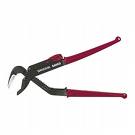
grip.jpg
Alistair Carter
Thu, 18 Jun 2009 08:45:50 +0000
Had the same problem and googled fault to find this page, dropped the camera from 4ft on to floor. Camera is now working. Many thanks!
Dan Roma
Fri, 19 Jun 2009 07:38:59 +0000
I tried tapping, pulling the lens out, banging it against the floor nothing is working
COnfused
Sun, 21 Jun 2009 05:15:25 +0000
omg ! at first my camera was working andmy mom had dropped it outside on the ground and it already had said turn on and off but it was still taking pictures even when it said that . but then when i searched "why do my camera say turn on then off" , it took me hear and i read all of these just to get my camera to start working , but then i finally got tired of BANGING it then i turned it on and then tapped it on my computer chair arm and then the sign went away and boy was i happy ! but i suggest to just get a brand new one cause you never know if it happens again cause thats what im doing if you have warning thingy on it your good money but yeah it works ! : ]
thanks guys ! = ]
taya
Mon, 13 Jul 2009 00:51:58 +0000
omg. thanks for the tapp advice.
my camera is finally workingg.
but i find it annoying how im going to have to tap it every tyme i turn it on -.-
how do u finx that part?
vera
Mon, 13 Jul 2009 20:34:56 +0000
Officially a believer of the TAPPING method. Same way you would with the TV remote when it's starting to run out of battery. YES! Thank you!
Jerelyne Idica
Sat, 18 Jul 2009 03:02:51 +0000
banged it a couple times and now it works again. Like Magic
Dave
Tue, 21 Jul 2009 02:08:14 +0000
_Thank you so much! It took a lot of tapping and throwing on the floor but after a little while it works! I hope it stays that way... I almost bought a new camera last week. Good thing I didn't. I just wish I found this blog alot sooner. Thanks again =)
G.I Jane
Tue, 21 Jul 2009 21:04:55 +0000
Unbelievable but it works (even in Belgium) with 3 little tabs on my desk!!! Thx for the advice.
Frits
Sat, 25 Jul 2009 14:14:44 +0000
This Really works!!!Got a stuck lens camera off ebay for parts.
Tapped by on the side of my table.And it works!!!!!!!
The LCD displays a blurred image,But if you select the option "macro on" the pictures are perfect.
anon
Tue, 28 Jul 2009 00:37:59 +0000
Genius!! I thought my 2 month old camera had had it [and after surviving soaking wet weather on the top of Blencathra two days beforehand!] I suggest your leg as the bashing surface. It's soft ;-)
Peter
Fri, 31 Jul 2009 21:40:36 +0000
Hi I am having this same problem. I dropped it a few times and nothing works. When I turn it on the lens makes some weird sound. Can someone please help me!!
Lola
Fri, 14 Aug 2009 23:20:33 +0000
took all the advice to heart, banged on the night stand a couple times, didn't work, then wacked it harder, didn't work, and then a little harder...now it is not moving at all..good thing we just ordered a new one last week.
Travis
Fri, 18 Sep 2009 04:05:13 +0000
Save your energy with tapping I spin dry my camera in washing machine for a minit not my camera is fix...works with any model...:-))
syuhadah
Thu, 24 Sep 2009 02:22:03 +0000
sorry spelling error on previous post,
should read,(Save your energy with tapping I spin dry my camera in washing machine for a minit now my camera is fix...works with any model...:-))
syuhadah
Thu, 24 Sep 2009 02:25:04 +0000
OMG!!! It took a few more bangs than 3 and some playing around with but it finally started working lol...I was looking at other cameras to purchase but can't really afford especially with the economy in the shape its in...Thanks alot it really helped.
Elizabeth
Fri, 02 Oct 2009 16:06:15 +0000
Been reading the blogs and playing with methods for a few days now. I believe there are TWO problems that are being discussed as one because they both present the same "access" message. With my camera, it didn't seem to have a stuck lens. I did everything that was recommended on the blogs, tugging (withOUT excessive force) on the lens, stopping the extension on power-up, blowing compressed air in the gap, taking off the cover - nothing worked. For me, the tapping worked - - and it had to be pretty hard. The first day, I had to tap it every time I turned it on. Next, I tried all of the lens-related fixes (above) with no results. With nothing to lose, I put the camera case (soft) on a brick and whacked the sides of the camera against it - to the point that I was afraid of denting the case. I made sure I hit it square on the side and not the corners. It worked and this time it stayed working. To those with this problem, lets face it, there's nothing left to lose, so keep trying. Good luck!!!!!
VideoBill
Mon, 12 Oct 2009 02:19:49 +0000
W50 WORKS AGAIN!
Method: Several solid taps on wooden desk on bottom and left side of camera didn't work. However tapping lens solidly with finger as it was extending a number of times corrected the problem. Thanks to the posts.
Denis
Fri, 23 Oct 2009 22:26:48 +0000
this is awesome.
i took my digicam to a school trip, and after one pic, it stopped working and gave this erro, i was woried but i thought after foramtting, it wud coreect itself. it didn't. i searched and found this site.
i followed the instructions and the tapping one worked.
but for tapping, better to use your hand or bed mmattress, do it with force of slaaping someone easily, an eas, low energy strike.
don't strike it like ticking with finger or hand, it won't work, u gotta put ver little, but muscle in it.
THX A LOT UR SITE.
I know how good it feels, my mom looked so dissapointed bcz she said i shud take cam only if i cud handle it.
:)
THX
Nitish
Sat, 07 Nov 2009 14:40:16 +0000
Wow... thats so crazy... thanks for the info guys
lafayette
Sat, 21 Nov 2009 01:24:58 +0000
Thanks to everyone, It worked for me also. And those Bandits even Sony help wanted me to send it in for the $120 repair.
Art
Fri, 27 Nov 2009 23:05:46 +0000
IT WORKS IT WORKS! Thanks so much!
anonymous
Sun, 06 Dec 2009 14:41:13 +0000
I cannot believe this!!! Awesome!!!
THANK YOU SO MUCH
Tech Teach
Wed, 09 Dec 2009 18:05:49 +0000
I had to press on the lens...presto...UFB
Kendall
Thu, 10 Dec 2009 01:15:49 +0000
DAMN!! I did everything you all wrote, but it didn`t help...
Untill i read the last one, thanks Kendall, now it`s working!!!!
I`m sorry if i wright everything wrong.. My english is ehm... very bad!! hihi
BUT IT DOSN`T MATTER< BECAUSE MY CAM WORKSSSSSSSSSS YEAHHHHHHHHHHHHH
Greetx from happy girl in Rotterdam (NL)
bridge81
Mon, 25 Jan 2010 22:32:30 +0000
oh my!!
i searched on the web for different types of solutions & they didnt work..
they also said to tap on a table or something..but i got my camera to work by tapping on the lense with my pal while it was out =]]
thanks!!
dee
Fri, 29 Jan 2010 03:17:24 +0000
holly shiva man unbeliveable but it works....BANG that SHIT...G n it will work...
ndnplaya
Wed, 10 Feb 2010 14:47:51 +0000
Well, the tapping is not working at all. I even slamed it harder on my table but no use. After I had returned from a party I tried to turn the Sony w180 on and the message appeared - 'Turn off and on again"
Since then no improvement with tapping, slapping or whatever you call it. I am just pissed off with sony. Can anyone suggest me any better idea?
Rashed
Fri, 12 Feb 2010 12:42:45 +0000
lol... these are some very funny posts.
dscw50owner
Thu, 18 Feb 2010 04:28:22 +0000
this is a very funny topic indeed. My camera just broke off for like a month now and I thought I really had to bring it to the store. But yeah, I just hopelessly google and found out this topic. After some quite strong dropping at the table but it didnt work out, I tried to tap to lens cap and it freaking worked.haha. Thank you guys a lot for all the posts.
queenie
Sat, 27 Feb 2010 06:24:15 +0000
i had the same problem.....i did hit my camera few times on the wall, it worked....i was like wow...thanks!
mg
Tue, 09 Mar 2010 08:55:56 +0000
I tapped it and it didn't work. However, I then just pushed in on the lens with my finger and heard it click back a little further. It seems it wasn't telescoping all the way back in. After that, I turned it on and it works fine.
Shawn
Sat, 20 Mar 2010 16:48:28 +0000
I had the same problem and message when I turned on the camera. Followed the directions on this site and was able to take pictures again. The camera however wouldn't focus. Tapped it a few more times and pulled on the lens as it was going out. This worked and now it's back to normal.
Tom
Sun, 04 Apr 2010 02:19:39 +0000
This tapping advice worked great, just a few gentle taps (not even against the table, just against my hand) and it's working again!!! Thanks!!!
PA
Sun, 11 Apr 2010 23:11:36 +0000
It worked for me too. It took about 4 rounds of tapping before it worked. Thanks all !!
Bob
Fri, 30 Apr 2010 00:47:30 +0000
did it with my Sony DSC-W 170 R and it worked. Tried first with gentle taps, without success and then gave it a harder tap and it worked. Amazing. Used a desk as surface and tapped it on the bottom.
Many thanks!!!
dirk
Sat, 01 May 2010 07:20:23 +0000
This was brilliant! I have a Sony DSC-W150 and I tapped the lens about ten times with my finger and then tapped the bottom of the camera. And poof! It worked. Awesome. Thanks everyone! :)
Sonycamera
Sun, 02 May 2010 23:09:00 +0000
I have a Sony DSC-W170 and hitting it totally fixed it!! thanks guys! you saved me $111 (that's how much sony wanted to charge to get it fixed...)!
Amberton
Sun, 09 May 2010 05:25:34 +0000
Just succeeded reviving another DSC-W50 by tapping. Thanks a lot!
my name
Wed, 12 May 2010 16:25:50 +0000
This does indeed work. I fixed 2 cameras this way.
Scott
Tue, 01 Jun 2010 15:23:31 +0000
My camera (sony DSC-W150) has been working fine for a while, but now whenever I turn it on, and then lens goes in and out a bunch of times, then says Turn Power Off and On again. what should I do?
Dave
Mon, 14 Jun 2010 21:45:21 +0000
It took a little more than three taps, and some shaking, but it worked. Don't be discouraged if it doesn't work after three little taps, give it a good shake too.
Thanks for the help everyone.
Leo
Fri, 18 Jun 2010 11:49:29 +0000
I thought, no way, how on earth can this happen, but yes 4 / 5 decent taps on the bottom, and it's sorted. Cheers guys
b
Tue, 06 Jul 2010 15:11:44 +0000
OK this really works!!! I am so amazed, I thought everyone was talking trash-NO they are not. Thank you- whoever thought of this. Sony should pay you. (or not, Im sure its a built in crap thing so you keep buying new cameras!!!) THANKS AGAIN!!!!!!
pennykitty
Wed, 14 Jul 2010 14:42:55 +0000
I sware to god it works now that i tapped it ... i wouldve bought a new one or paid to have it fixed !!! you should sell your idea !!!! have ppl send you their camera and then you tap to fix and charge 129 bucks !!!!!! awesome info . youre my new hero !!!!! great post !!!! so amazed with this ... thanks all !!!!
michelle
Thu, 15 Jul 2010 23:32:59 +0000
omfg i think i broke it. i tapped maybve a little bit too hard? what do you do when it comes to this; the lens is EASILY pulled in and out by hand. it sounds like a spring is broken, its kind of "loose".. so.. did i fail?
Malin
Thu, 29 Jul 2010 17:27:45 +0000
Sony DSCW50 - I googled for 20 minutes before I found a fix that didnt cost $100+. Unfortunately, dropping, hitting, tapping etc didn't work...BUT
Either pulling or wiggling the lense when it was trying to turn on that made it work! I'm SO excited! Thank you to everyone (except sony) for the advice!!!
Leanne
Sun, 01 Aug 2010 02:11:28 +0000
Well, the tapping (more of a frustrated banging, but not too hard) worked after about 7 gentle thwacks. Very cool. THE CAMERA SHOULD BE ON WHEN YOU DO THIS. IT MAY TAKE A FEW SECONDS AFTER YOU BANG IT. If it doesn't work at first, shut it off, then turn it on and whack it again. The lens getting stuck was the result of turning the camera on and inadvertently putting it face down while the lens tried to open. Anyway, it works fine. My camera is a DSC W-230.
Uncle Bob
Fri, 06 Aug 2010 21:48:24 +0000
Oh my god... I thought you're all crazy!... banging the camera and all that. But it freakin worked! ;D I love u all;D
marry
Sun, 08 Aug 2010 08:22:55 +0000
Yh from Ghana, It worked after banging it on the front for like 3 times.
Thaaaaaaaaaaaaaaaaaanks.
Abu
Tue, 24 Aug 2010 11:23:30 +0000
My Sony DSC-W50 suddenly kept asking for the date/Time to be reset, everytime i turned it on I had to set Date to procede what a PIA... So, I found this Forum and decided to tap the Camera on the desk a few times... IT WORKED for this function as well... no more setting the camera up to take a pic.
Thanks So Much!!
Dave
Mon, 30 Aug 2010 16:53:11 +0000
its freaky but it worked for me today. I head tech support for a large co & I didnot beilive in this CRAP while I was reading through multiple posts (I owe all of you an appology) because I thought it was freaking lie how could something work by just tapping
but it worked
I hope Sony is reading through all these posts & do soemthing to fix their lens & whatever get these lens to behave erratically.
if nothing else, they should post this solution on their website.
thanks to all of you guys
harsh bhatia
Sun, 03 Oct 2010 16:35:38 +0000
I've got a DSC-W50. When turned on, the LCD screen would only show "Access" while the lens flichered and then beeped to power cycle it.
After reading the top of this post, with the camera off, I slapped it on my hand 3 times firmly. And it works now.
Sean
Mon, 04 Oct 2010 06:12:17 +0000
Incredible! same problem!! and solved. took nearly 15 taps. tapped bottom, lightly at first. took increasing force wondering if i was going to hit it too hard but it worked. simply amazed!
capncanuck100!!
Sat, 23 Oct 2010 19:32:11 +0000
Tried all combos of force, location, number. Then I tried to prevent the lens from going out. There was a slight click and then BAM! The thing works. Awesome.
lupmeister
Sat, 06 Nov 2010 21:23:22 +0000
Oh my god, I just read these comments here, and YES! They worked! Smack it around, pull on the extendable lens... I'm so glad that technology sometimes just needs a good kick. It worked for my computer tower, why not for my camera? (By the way, I was getting the same turn off and on again message--Sony Cybershot 8.1 DSC-W150) Thank you all, guys! You've made my night!
Arlene
Thu, 11 Nov 2010 08:27:38 +0000
I can't believe this worked! My fiance droped the camera on the ground and we got the standard "power off then on again" and I found this in a google search. I have had to do it a couple of times since, and the mechanism sounds a little crunchy now especially when zooming, but it saved the camera from being straigt thrown away. Give it a try, really you have nothing to lose.
Very suprised
Sun, 16 Jan 2011 08:13:56 +0000
Hell Jeyeah
Just Got Done Transferring Fottage From A Show & Charged Up The Battery...
Upon Turnin' It On, It Had That Msg...
So My Dumbasz Turned It On & Off Like 6 Times Thinkin' That Tha Camera Hadta Thinkbout Somn...
Then Thought, What If It Keeps Doin This
Did A Google Search, Saw A Post That Said Thanks Somewhere
Started Readin All These Tripped Out Coments
*btw* Thanks For Tha Laughs
Cupped My Hand & Tapped The Lens A Few Times As It Was Turnin; On & WTF DO U KNOW
This Piece Of Somn Works Again!!!
Tight - Thanks Again
Bless
Google Search: NDStruktable
Mystic Blu Pio
Thu, 20 Jan 2011 09:01:59 +0000
Cyber-shot W170 - two years old and much loved. The big tapping WORKED for me - for the moment at least! other suggestions, like playing with lense, didn't but the several big taps DID. great site!
ray egg
Fri, 04 Feb 2011 19:38:22 +0000
Hi! Im a brazilian guy and on feb. 2011 had this problem with my cam DSC W5 i've known that it is very old - but I love my old cam. The tip of 03 taps save my vacation.
Tks!
W.Omena
wander omena
Wed, 09 Feb 2011 21:42:19 +0000
guyz. my camera was broken last OCTOBER 2010 (and it's my bday), for some reasons. i dnt know wat happen. i used my camera sicne am till afternoon. den in dat evenign trying to tke sum pics. but wen i turn it on it say "turn it on and off"..i've done dat many times...and tired doing it....lucky me coz my friend gave me one last xmas CANON....and today MARCH 22, 2011 at exactly 10:30pm..for sum reasons i want to search some INFOs to fix my camera...(even im sleepy) my mind still stick to find it..and i found this sites..(thank u guyz) and while im reading d post....im laughing coz it's weird..the pipol here are already fixed their camera by tapping the front, back or even side of the camera..and most of them succeeded...while me doing it many time...and want to give up..coz nothing's gonna happen....i' try again my best to tap it hard w/o breaking any parts esp. d lens....AND IM HAPPY TO CHECK IT...wen i OPEN MY CAMERA.....hahahahahahahahahha.....110% it's worth it...now TOTALLY WORKING.....I CAN TKE A PICTURE NOW..so now im decided not to buy a new one for my family...(i dedided to gie dis to my family leaving outside canada)..coz i have a new one.....ALL I CAN SAY GUYZ IS..BE PATIENT TO DO THE BEST THING U CAN DO..i know it's weird eh! but NOTHING IS BAD IN TRYING...like wat i did today...b4 i decided to out my sony dsc-w150 in the garbage..but i cnt bec. this camera has lots of memories to me..i luv this..(red color) i treat dis as part of my life......and it's impt. to me to have this...so even its broken b4 i stay and keep it on my room......so now just i learn dat it's impt.sumtimes to search some psot like dis..to elarn some info. how to fix urr stuff...kudos..thank u guyz.....now U TRY it! i know u can do it too.yehheyyy!
mhelay
Wed, 23 Mar 2011 05:54:07 +0000
omg.. on web looking 4 a reason my camera dont work!!!! last resort.. tapping it like everyone said ... IT WORKED!!!!!!
Jennifer Rzuczek.
Thu, 31 Mar 2011 03:26:56 +0000
I actually did doubt this at first, as I tapped it a few times and nothing happened. Then I just decided to bang it with a bit more gusto. Then it worked. Wowzers. Thankies to original person for posting this.
Tim
Thu, 31 Mar 2011 04:29:53 +0000
Add me to the list of expert digital camera repairman, ha ha! Had the same symptoms: when I turned on the camera, the screen read Access, the lens would go in and out, followed by turn the camera off and on. In addition to tapping the camera from all angles, I pulled and gently applied rotational pressure on the lens (wiggling it around a little bit) when it was in the out position. And sure enough...IT WORKED!! Unsure if it was something inside the camera or perhaps the lens was not functioning correctly, but in either case, I'm glad to see that this has worked for many of us. Thanks Jennifer and everyone else!
Rick
Sat, 28 May 2011 01:33:06 +0000
I'm not lucky with tapping method on my Sony DSC W50, message turn the power off and on again.
free2air2007
Mon, 26 Sep 2011 23:04:56 +0000
Tappin worked!! I just knocked on the table when turnin it on and I succeed :)
Thanx ;)
Scooly
Sat, 31 Mar 2012 15:13:44 +0400
My DSC-N40 had d same problem, do u know what i did just now? I bang it on d floor thrice and guess what... I ended up crying. Holy crab!
Abaniwonda kudirat omolara
Sat, 07 Apr 2012 23:25:34 +0400
And There it is!! IT WORKS!! What a crazy tip for my lovely and oldie camera! Its a sony dsc w110, my first camera that i bought with my monez... it doesnt work for more than 1 year, and i bought a new one already. But this carl zeiss lens are really something. I just let my camera fall on the soft carpet, around 1 foot high... and when i turned it on again, it just worked!! incredible! thank you guys so much!!
thiagoavlis
Sun, 12 Aug 2012 03:56:24 +0400
Hi CameraHacker
dscw50 with accessturnoffandon problem, read the posts, pretty old stuff, guess my camera is out of date. Anyways remembered i dropped it on a table today so having read the posts, I then noticed the lens was jamming. Few taps and all is well.
Thanks lots.
Paul
paul hilliard
Sat, 25 Aug 2012 23:00:35 +0400
This worked for me!
THANKS Google search, and everybody here!!!
I had to tap it several times, progressively getting harder. But my DSC-W170 camera that takes such great pictures is working again.
I also vacummed the front and sides of the lens (as some have mentioned) for good measure.
I had been using it in the desert for a few days, maybe it got dust in it. It was not showing any picture, the lens would pop out and back in, or it said to "turn off then turn on".
I'm so pleased to have it back.
Buddy C.
Sun, 18 Nov 2012 22:36:48 +0300
Ok I am really amazed! It was a last ditch effort. The camera was trash. Took it apart. Vacuumed it. Cleaned it. Still no worky. Read this post.. laughed.. ya right, oh well nothing lost.. tapped it.. nothing banged it. nothing. pounded it nothing! Twisted the lense.. it popped.. more broken. ABSOLUTELY TRASH NOW! really twisted it with pliers to get it back. Dang thing works! Thanks... But Amazed!!!!
Absolutely Amazed
Wed, 02 Jan 2013 04:10:11 +0300
My DSC-50 lense was stuck out. I tried all of the susgestion and nothing worked. I did get it to work and this is how I did it. Grab the lower part of the lens with your fingers and put a left hand rotation on it while you turn the camera on. For my camera it fully extended and it now works fine.
Cozy MKIV
Mon, 23 Sep 2013 01:54:58 +0400
Guyz.. it works... But the prob is it goes out of focus.. Can anyone help me on tat, i guess am not the only one, i've seen someone post this same message.. Does anyone know how to fix this focus problem.. It works gr8, but only if i keep my face very close to camera.. All i can shoot at tat close range is my single eye... Kindly help on this focus problem fella's.. :)
Subash iglesias
Mon, 25 Nov 2013 13:26:18 +0300
Thank everybody. I hit the camera 3 times on a table during "Access" and the lens retracted back. It is now working absolutely fine. The Sony service centre in Goa had given a estimate for Rs. 4000/- to replace the Lens part and it was really not worth spending so much for this old model.
Deepak Bhandare
Thu, 16 Jan 2014 10:29:28 +0300
Had this problem for a few days, and then found this blog. Tapped the lens a few times with my fingers and it finally turned on and works fine. Amazing, thought it might all be a joke at first. Thanks for all the info.
John
Mon, 11 Apr 2016 18:18:43 +0400
Add Comment
|
Related Links
|
TrackBack
Related Content
Did your message disappear? Read the Forums FAQ.
TrackBack
TrackBack only accepted from WebSite-X Suite web sites. Do not submit TrackBacks from other sites.
Send Ping |
Spam Control
Title: Sony DSC W70 with stuck lens
Weblog: Camera Hacker
Excerpt: My "just out of warranty" Sony DSC W70 camera ran out of power with the lens in the half-extended position. When I reinsert the recharged bttery, the LCD display tells me to power off and on again, and the camera beeps. I can't get it out of this cycle. When I push the "playback" button, the LCD men . . .
Tracked: Wed, 08 Aug 2007 20:04:18 +0000
Add Comment
Messages, files, and images copyright by respective owners.
316 Users Online
|
Get Our
$10000-above 
$5000-$9999
$2000-$4999
$1000-$1999
$500-$999
$200-$499
$100-$199
$50-$99
$25-$49
$0-$24
Gift Certificate

|
|