

 Add Comment
|
Add Comment
|
 Related Links
|
Related Links
|
 TrackBack
 Related Content
using Sony digital camera as a picture viewer

I have seen the KODAK EASYSHARE Picture Viewer at CostCo for as low as $99, whereas it retails for $149.95. But you know, I've been thinking, I have a Sony Cyber-shot DSC-T11 digital camera that is almost just as small and as light as the KODAK EASYSHARE Picture Viewer. The DSC-T11 is just one inch longer and quarter inch thicker, but it also has a 2.5" LCD and the ability to shoot pictures as well. So I figured, why can't I use my DSC-T11 digital camera as a picture viewer? And why can't you, with your DSC-T1, DSC-T33, DSC-T7 or even the other Sony digital cameras do the same?
Now, if I only shot with the DSC-T11 camera, then this point is moot . . . because I can already shoot and view pictures with it. But what if I want to use the DSC-T11 as a picture viewer, while using other cameras to shoot pictures? Maybe even view pictures that are downloaded from the web or given to me by a friend.
With that thought, I started playing around with the files and folders on the Memory Stick Duo. It turns out that only folders in the DCIM directory on the Memory Stick Duo are recognized. And the folders has to be named in the following format, where "xxx" is any three digits:
xxxMSDCF
I dumped a lot of pictures into the 101MSDCF directory created by the camera. The pictures were random JPEG files that I found over the Internet. Some displayed correctly, other caused a "File error" message on the LCD.
It turned out that the Sony DSC-T11 digital camera was able to display any JPEG pictures generated on any digital camera that followed the Design rule for Camera File system. I was able to display JPEG pictures generated from my Panasonic PV-GS50S digital camcorder (IMGA0462.JPG) and my Nikon CoolPix 950 digital camera (DSCN0015.JPG). The file has to be named in this format, where 'x' is any letter or digit while 'y' is any digit.
xxxxyyyy.JPG
Chieh Cheng
Fri, 1 Jul 2005 18:04:23 -0700
That is as far as my success goes. So far, I couldn't get any images that I generated myself to work. I have tried to load up TIFF and RAW files, save them in JPEG in Paint Shop Pro, Adobe PhotoShop, and Canon ZoomBrowser. None of the images generated worked on the DSC-T11. They all say, "File error". I even downloaded Photo Studio 2.62, a free software to view and manipulate JFIF and EXIF data, to manipulate the images . . . still doesn't work. Two files that have the exact same JFIF or EXIF data would cause the DSC-T11 to behave differently; one would display, the other would not. So far, I'm baffled at the difference. If anyone has any ideas, I would love to hear them.
By the way, I suspect this hack will work with other digital camera and digital camcorder brands. I am quite tempted to try it on my other camera. I just wish there are more than 24 hours in a day. 8-)
Chieh Cheng
Fri, 1 Jul 2005 18:12:12 -0700
Don't know whether you need this anymore, but here is a program that converts images into camera-viewable format http://www.david-taylor.pwp.blueyonder.co.uk/software/imaging.html
I don't know how it exactly does it, but it works.
---
Tue, 9 Aug 2005 09:30:52 -0700
Thanks for the link. TVwriter seems like a neat software. But I would still like to know how it is able to put the picture back on the memory card so that it can be viewed by the camera.
TVwriter proves it is possible. And it is obviously possible because the camera itself can do it . . . but what's the trick?
Chieh Cheng
Tue, 9 Aug 2005 14:14:25 -0700
#!/usr/local/bin/python# usage: image_to_dcf.py myimage.png
# minimal program to write any image in a form that is suitable for
# viewing on a cybershot -- proof of concept only, no warranty ...
# ewan_at_mathcode_dot_net
import sys
import Imagefilename = sys.argv[1]
# input isn't checked,
# it is user's responsibility to make sure
# that input filename has 3-letter extension eg .jpg or .pngim = Image.open(filename)
outfile = filename[:-4] + '.JPG'
# after conversion, you'll want to rename the output file
# to the format AAAANNNN.JPG, where 'AAAANNNN' has 8 characters,
# A representing an uppercase letter, N a number form 0001 to 9999oim = im.copy()
oim = im.convert('YCbCr')
oim.mode = 'YCbCr'oim.save(outfile, 'JPEG', quality=100)
Ewan
Sat, 17 Dec 2005 13:33:47 -0800
Hey, thanks, Ewan! It works. I processed a few pictures with your Python script and they all displayed correctly on my DSC-T11. It's awesome.
I thought of a few improvements for the script, such as automatically renaming the photograph to the correct name format. When I have time, I will improve the script and post it here.
Chieh Cheng
Mon, 19 Dec 2005 10:33:20 -0800
Attached is verion 1 of my improvement to the script. I have changed the script name to DCF.py and it now save the image file to DCF_xxxx.JPG, where xxxx is an unique number in the directory.
Attached File: DCF.py
Chieh Cheng
Wed, 21 Dec 2005 18:34:01 -0800
Here is version 2 of the DCF.py. I made three changes since version 1:
1. check for valid input file name
2. allow arbitrary number of files on the command-line
3. add usage text
I'm going to find the dock for my DSC-T11, put it on my desk, and use the camera as my electronic photo frame.
Attached File: 1 - DCF.py
Chieh Cheng
Wed, 28 Dec 2005 16:21:41 -0800
Ewan,
Just wanna say thanks. I have started using the DSC-T11 as my electronic photo frame. I was glad to find that the DSC-T11 does not turn off after a certain time of inactivity.
Attached Image:
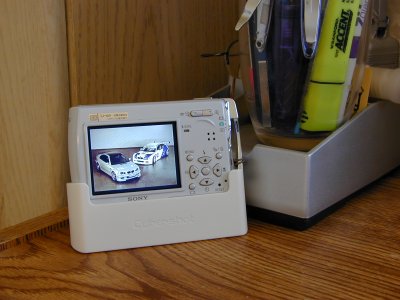
DSC-T11 as electronic photo frame.jpg
Chieh Cheng
Sat, 7 Jan 2006 23:20:49 -0800
Chieh you're a star! Thanks for the script.
.M.
Sun, 19 Mar 2006 07:56:36 -0800
.M., Ewan is the star, he came up with the script. I've only asked the question.
Chieh Cheng
Sun, 19 Mar 2006 22:28:19 -0800
Hi, i dl your program and I dont have any idea how to use it. Can you write a walkthrought that will show us how to do the conversion? Thanx
Celeste
Wed, 24 May 2006 07:39:08 -0700
Celeste,
It's a python script. You can run it on the command-line:
Usage: DCF.py "image 1" [ . . . "image n" ]
What operating system are you using?
Chieh Cheng
Thu, 25 May 2006 12:45:58 -0700
The python script(s) posted here work great for some digital cameras, but not for all those that TVWriter manages to make compatible images. Anyway, it's still unclear what exactly is the trick here. Why do the images ran through the script work with (some) digital cameras? Here's a minimal version of the python script posted here:
import sys, Image
img = Image.open(sys.argv[1])
img.save(sys.argv[2], 'JPEG', quality=80)
As you can see, the only action necessary is saving the input image into a JPEG using the Python Imaging Library. The YCbCr-conversion step is not needed. So what exactly does the Python Imaging Library do to the image when saving it into a JPEG? Why does the output image work when saved with Python Imaging Library, but not when saved with for example The GIMP?
The script works, that's great, but it's still unclear why.
---
Mon, 17 Jul 2006 11:42:07 -0700
Yes, I've tested, you just have to open and then save the image using the Python Imaging Library (PIL).
The PIL comes with a program, pilfile.py, that prints out some info about images. I used it with two images, and that's the result:
pilfile.py -i DCF_0004.JPG DCF_0005.JPG
DCF_0004.JPG: JPEG 640x480 RGB {'jfif_version': (1, 1), 'jfif': 257, 'jfif_unit': 0, 'jfif_density': (1, 1)} [('jpeg', (0, 0, 640, 480), 0, ('RGB', ''))]
DCF_0005.JPG: JPEG 640x480 RGB {'jfif': 257, 'jfif_unit': 1, 'exif': 'Exif\x00\x00MM\x00*\x00\x00\x00\x08\x00\x00\x00\x00\x00\x00', 'jfif_version': (1, 1), 'jfif_density': (100, 100), 'dpi': (100, 100)} [('jpeg', (0, 0, 640, 480), 0, ('RGB', ''))]
The file DCF_0004.JPG works in the camera, the other one doesn't (it was saved using The GIMP). It looks like jfif_unit must be 0 and jfif_density should be (1,1) - but I haven't tested other values. The document JPEG File Interchange Format explains what are these variables for, and it's worth reading.
Rodrigo Rocha
Wed, 02 Aug 2006 18:57:27 -0700
Additionaly, I read on the jfif3.pdf document that the JPEG file can include a thumbnail of itself. Unfortunately, I haven't found a way to include the thumbnail using the PIL. Without this, my digital camera (DSC-S60) displays a blue filled rectangle as a thumbnail.
Rodrigo Rocha
Wed, 02 Aug 2006 19:02:49 -0700
can anyone send me tutorial on how to use python to convert the pics.
thanks.
James Mckinney
Wed, 30 Aug 2006 15:36:59 -0700
James, refer to the "Can i use my camera to read an ebook ?" thread in the TrackBacks below to learn how to set-up python.
Chieh Cheng
Wed, 30 Aug 2006 16:12:59 -0700
Ok, I still dont get it(im kind of a nub), I created the python file but how do i run it. I'm using WinXP. I dont know where to put the files and how to run it.
James Mckinney
Thu, 31 Aug 2006 17:18:14 -0700
Great! TVWriter worked for my Olympus C-350 Zoom also.
But, how to get rid of those words 'TVwriter Demo' written on each image??
I am using this procedure to view Power Point presentations (saved as JPEG).
Hartej Pal Singh
Fri, 01 Sep 2006 09:17:32 -0700
Hartej Pal Singh:
To get rid of the watermark in images converted by TVwriter you should register it, but that costs money.
However, if the python script posted and discussed in this thread happens to work for your camera, you probably want to save the money and use it instead.
---
Tue, 05 Sep 2006 08:43:27 -0700
Help please!
James Mckinney
Wed, 06 Sep 2006 15:05:08 -0700
Based on the find that Python Imaging Library produces JPEGs that can be viewed with Digital Cameras (well, with some of them anyway), I've created a PyQt-based highly TVwriter-inspired GUI for converting images with PIL.
If you're interested, it can be found here:
Camerizer
Dace
Sat, 09 Sep 2006 13:53:21 -0700
Ok Can anyone give a complete dummies guide (step by step)on how to use the python script. I have no experience with python or programming. I'm running windows xp.
Thank You.
Gerardo Rodriguez
Sat, 23 Sep 2006 20:52:47 -0700
Nice work on the script, and Camerizer, ever think about hosting it on www.sourceforge.net ??
wts
Sun, 01 Oct 2006 17:22:51 -0700
You can also just use mspaint (Paint in Windows, the default image editor). Since this is the first hit on Google right now, I hope this helps a few people. TVView.exe, a closed source program with a cost of $70 for Windows, effectively opens, saves, then closes the .jpg's.
Once you've edited your pics, open them again with Paint, save, close paint, copy back to the camera. You should be able to view them on the camera again.
James,
Props for the Python script, but too many folks are still on Windows and won't be installing Python to fix a few pics.
Matt
Thu, 04 Jan 2007 23:57:00 -0800
That is awesome, Matt! I've updated the Wiki page with the new information you provided.
Chieh Cheng
Fri, 05 Jan 2007 01:54:06 -0800
The quality setting is a bit high; I recommend reducing it to 90 or 95 to avoid excessively large files. For some background, see:
[Image-SIG] PIL image resizing quality seems a little rough, any workarounds?
Observer
Sun, 18 Feb 2007 00:23:00 -0800
Just what I need, but how do you run the script correctly? What do you do?
I'm running Windows XP, and I just installed Python, but dont really know how to use it. Pics are going on my Sony DSC-T10.
BTW, the Microsoft Paint trick works great, for one at a time...
Any way to do it as a batch in Photoshop???
Thanks
Alford
Fri, 29 Jun 2007 14:14:06 -0700
Hi Alford!
have you trying the links above?
there is a pretty page in Camerizer
you may also consider investigate ubuntu, an friendly and easy Linux as a free (as freedom) alternative to your winXP
meanwhile in win all you need is open a command line and type "DCF.py input_image1.jpg input_image2.jpg" where input_imageX.jpg is the name of your original images.
you probably need install the Python Imaging Library (there is a link in the camerizer page)
If you get an error doing that post it and we'l try to help you.
Good Luck, and enjoy the discovering!
Wences
Mon, 30 Jul 2007 02:19:00 +0000
Hi !
This is a message from Austria /Europe.
If you are using a SONY DSC-W1 or similar camera the following could be useful:
Take any image, the format does not matter, open it in PaintShopPro and resample
it to the resolution of your camerafile (e.g. 2048 x 1536 pixel for a 3MB image).
Then save it as a jpg-file in LANDSCAPE format with compression 1 (high quality).
In my case this resulted to an image-filesize of 1.3MB.
This file is in JFIF format, not in EXIF. It does not have any thumbnail embedded.
I copied this file to the memorystick. When I played it back with my camera, I could view
it, but could not rotate it (an error message appeared).
Now I did the following trick: I resized the image directly on the camera (menu item "Resize")
to the same resolution as it alreay existed.
The excellent camera software automatically brings the image to a camera readable
format and even adds a thumbnail. This way the picture gets an original SONY format.
The picture quality is very good and I could not spot a big difference to the original
jpg-file.
This method could be useful if you want to playback pictures taken with another camera
(not from SONY).
I also tried the TVwriter software. It changed the image in a way so that it could be rotated
on the camera, but unfortunally could not embed a thumbnail into the image.
Good luck !
Gerhard Fuchs
Mon, 23 Jun 2008 05:41:10 +0000
I tried the script on my Sharp Zaurus, which already has most of python 2.4.1 installed.
I added the python_image lib, but still have errors in the console. (I didn't search for the "other" python files and QT files. These need to be compiled for ARM to work anyway).
I don't have a complete python setup on my Puppy linux PC either. It's not recommended by the authors of Puppy, so there is hardly any discussion about it.
So I searched further and found this freely available software from Panasonic.
ImageCreator for windows
It's used to convert PowerPoint files into JPEG files that comply with the DCF for use in a projector.
It also converts JPEG files that you may have laying around to above compliance.
Go here and click on "download" on the left.
http://panasonic.net/avc/projector/index.html
This takes you to an agreement, just select "I Agree"
Next page, go to bottom and click "ImageCreator1.5_3"
I tried it on a random JPEG that I got on the net and I can view it on my Nikon Coolpix L16
:)
Jon J
Sat, 15 Nov 2008 01:00:08 +0000
Hi!
I'm owner of Sony DSC T77. My camera can show any *.jpg files only with native size, for example, 1944x2592px (5M), but cannot resize or rotate it (aim is to do that to use camera as reader). As I understand, there must be exif data in every file. Can anybody tell me, how to add appropriate data automaticaly to multiply files (I've tried all listed here ways, but nothing helps).
Roman Gurinovich
Fri, 16 Jan 2009 10:09:46 +0000
It seems to be good one. but i don't know any thing about phython. should i save the given code here in a file with name DCF.py?
As there any similar answer for video's too. I want to play video in my camera taken from other camera's is it possible. Thanks for your help
Srinivas Reddy
Wed, 27 Jan 2010 11:08:17 +0000
camera's i am using are nikon s570 and yashica EZ both have the same video format AVI, but cannot able to play in one other.when i raised the question in other forum's some say resolution and encoding problem? the video taken in nikon is played by yashica but not vice versa and even checked it with fuji which has same AVi format
Srinivas Reddy
Fri, 29 Jan 2010 04:47:16 +0000
Unfortunately AVI is just a container for the video and audio, which can be completely different codec formats from one AVI to another. For example, you can have a AVI that contains DivX video and MP3 audio and another AVI that contains DV.
Chieh Cheng
Fri, 29 Jan 2010 17:39:21 +0000
Hi Chieh Cheng,
thats rite
the problem in these digital camera's is that they wrap the mjpeg codec into AVI, where mjpeg has intra mage compression its not inter image compression as mpeg, but the problem with me is i am not able to break AVI header as i am checking in hex editor neo and virtualdubmod hex editor(is there any other best method to check, I am able to find that some camera's like fuji and nikon they write their stuff in middle of the headers and the actual data, is there anythign to do with that with the camera's first check for that data.
when i take a sample video from camera's fuji and nikon or yashica to play in other, the file is just detected and says that "file contains no image data" how to break through it. any idea?
thanks in advance
Srinivas Reddy
Mon, 01 Feb 2010 03:44:13 +0000
No news... I'm trying too to understend: 1 what is the discriminant in jpgs, what the pyton apps or tvplayer or panasonic software actually does to the image (not name or folder scheme) to make cameras accept it.
2 what is the trick with video header (tried it too with hex cut and paste, with no result other than unreadable video, even from the PC)
luca vascon
Mon, 08 Feb 2010 16:50:21 +0000
How to edit DSC maker TAGS in video file?
Srinivas Reddy
Tue, 09 Feb 2010 09:02:53 +0000
Im grateful for all your wonderful ideas.
As to my case here's what i did.
im using a Sony Cybershot.
1.Go to the menu of your camera
2.Create Folder
3. Save images from the net
4. Rename them on this manner - DSCxxxxx (where x is any number)
5. THERE YOU GO! : )
Elder Alquizola
Fri, 01 Apr 2011 12:36:44 +0000
hii i m a complete noob
i read ur tutorial
just installed python 2.7 and PIL for python 2.7
i m using windows 7
copy pasted that DCF.py to notepad and saved it as DCF.py to C:\Python27 and than opened python command line..
there i entered DCF.py DSC02070.jpg
it gave a syntax error...
where am i going wrong???
path of the file for conversion is E:\DSC02070.jpg
Plzz explain in detail i m very very new to this..
Shantanu Sharma
Tue, 09 Aug 2011 17:26:23 +0000
First thing you need to do is to copy-and-paste that syntax error here so we can see what's going on. And tell us what directory you were in when you type in the command.
Chieh Cheng
Wed, 10 Aug 2011 16:38:47 +0000
Hi Chieh Cheng,
I have used your dcf.py script often in the past but now fails in Ubuntu 10.11
Any ideas.
Thanks
*** buffer overflow detected ***: /usr/bin/python terminated
======= Backtrace: =========
/lib/i386-linux-gnu/libc.so.6(__fortify_fail+0x50)[0x341df0]
/lib/i386-linux-gnu/libc.so.6(+0xe4cca)[0x340cca]
/lib/i386-linux-gnu/libc.so.6(__strcpy_chk+0x3f)[0x34005f]
/usr/lib/python2.7/dist-packages/PIL/_imaging.so(ImagingNewPrologueSubtype+0xa6)[0x3e6a36]
/usr/lib/python2.7/dist-packages/PIL/_imaging.so(ImagingNewPrologue+0x33)[0x3e6f13]
/usr/lib/python2.7/dist-packages/PIL/_imaging.so(ImagingNewBlock+0x2d)[0x3e70dd]
/usr/lib/python2.7/dist-packages/PIL/_imaging.so(ImagingNew+0x51)[0x3e71a1]
/usr/lib/python2.7/dist-packages/PIL/_imaging.so(ImagingNew2+0x85)[0x3e7285]
/usr/lib/python2.7/dist-packages/PIL/_imaging.so(+0x140c3)[0x3d10c3]
/usr/lib/python2.7/dist-packages/PIL/_imaging.so(+0xc2c1)[0x3c92c1]
/usr/bin/python(PyEval_EvalFrameEx+0x2e5)[0x80da7d5]
/usr/bin/python(PyEval_EvalCodeEx+0x127)[0x80e11e7]
/usr/bin/python(PyEval_EvalFrameEx+0x73a)[0x80dac2a]
/usr/bin/python(PyEval_EvalCodeEx+0x127)[0x80e11e7]
/usr/bin/python(PyEval_EvalCode+0x57)[0x812c477]
/usr/bin/python[0x813c010]
/usr/bin/python(PyRun_FileExFlags+0x84)[0x80700b3]
/usr/bin/python(PyRun_SimpleFileExFlags+0x2cb)[0x8070af9]
/usr/bin/python(Py_Main+0xbc6)[0x805c069]
/usr/bin/python(main+0x1b)[0x805b25b]
/lib/i386-linux-gnu/libc.so.6(__libc_start_main+0xe7)[0x272e37]
/usr/bin/python[0x81074ad]
======= Memory map: ========
00110000-00242000 r-xp 00000000 08:05 50 /lib/libcrypto.so.0.9.8
00242000-0024a000 r--p 00131000 08:05 50 /lib/libcrypto.so.0.9.8
0024a000-00259000 rw-p 00139000 08:05 50 /lib/libcrypto.so.0.9.8
00259000-0025c000 rw-p 00000000 00:00 0
0025c000-003b6000 r-xp 00000000 08:05 845 /lib/i386-linux-gnu/libc-2.13.so
003b6000-003b7000 ---p 0015a000 08:05 845 /lib/i386-linux-gnu/libc-2.13.so
003b7000-003b9000 r--p 0015a000 08:05 845 /lib/i386-linux-gnu/libc-2.13.so
003b9000-003ba000 rw-p 0015c000 08:05 845 /lib/i386-linux-gnu/libc-2.13.so
003ba000-003bd000 rw-p 00000000 00:00 0
003bd000-003f0000 r-xp 00000000 08:05 268373 /usr/lib/python2.7/dist-packages/PIL/_imaging.so
003f0000-003f2000 r--p 00032000 08:05 268373 /usr/lib/python2.7/dist-packages/PIL/_imaging.so
003f2000-003f4000 rw-p 00034000 08:05 268373 /usr/lib/python2.7/dist-packages/PIL/_imaging.so
003f4000-00412000 r-xp 00000000 08:05 139684 /usr/lib/i386-linux-gnu/libjpeg.so.62.0.0
00412000-00413000 r--p 0001d000 08:05 139684 /usr/lib/i386-linux-gnu/libjpeg.so.62.0.0
00413000-00414000 rw-p 0001e000 08:05 139684 /usr/lib/i386-linux-gnu/libjpeg.so.62.0.0
00414000-0042e000 r-xp 00000000 08:05 873 /lib/i386-linux-gnu/libgcc_s.so.1
0042e000-0042f000 r--p 00019000 08:05 873 /lib/i386-linux-gnu/libgcc_s.so.1
0042f000-00430000 rw-p 0001a000 08:05 873 /lib/i386-linux-gnu/libgcc_s.so.1
0047e000-004c2000 r-xp 00000000 08:05 106 /lib/libssl.so.0.9.8
004c2000-004c3000 r--p 00044000 08:05 106 /lib/libssl.so.0.9.8
004c3000-004c6000 rw-p 00045000 08:05 106 /lib/libssl.so.0.9.8
00515000-00531000 r-xp 00000000 08:05 832 /lib/i386-linux-gnu/ld-2.13.so
00531000-00532000 r--p 0001b000 08:05 832 /lib/i386-linux-gnu/ld-2.13.so
00532000-00533000 rw-p 0001c000 08:05 832 /lib/i386-linux-gnu/ld-2.13.so
00701000-00703000 r-xp 00000000 08:05 855 /lib/i386-linux-gnu/libdl-2.13.so
00703000-00704000 r--p 00001000 08:05 855 /lib/i386-linux-gnu/libdl-2.13.so
00704000-00705000 rw-p 00002000 08:05 855 /lib/i386-linux-gnu/libdl-2.13.so
00766000-00779000 r-xp 00000000 08:05 928 /lib/i386-linux-gnu/libz.so.1.2.3.4
00779000-0077a000 r--p 00012000 08:05 928 /lib/i386-linux-gnu/libz.so.1.2.3.4
0077a000-0077b000 rw-p 00013000 08:05 928 /lib/i386-linux-gnu/libz.so.1.2.3.4
0094b000-00964000 r-xp 00000000 08:05 141846 /usr/lib/python2.7/lib-dynload/_ctypes.so
00964000-00965000 r--p 00018000 08:05 141846 /usr/lib/python2.7/lib-dynload/_ctypes.so
00965000-00968000 rw-p 00019000 08:05 141846 /usr/lib/python2.7/lib-dynload/_ctypes.so
00abf000-00ac0000 r-xs 00000000 08:05 10785 /tmp/ffiWrQrc9 (deleted)
00ca1000-00cb6000 r-xp 00000000 08:05 910 /lib/i386-linux-gnu/libpthread-2.13.so
00cb6000-00cb7000 r--p 00015000 08:05 910 /lib/i386-linux-gnu/libpthread-2.13.so
00cb7000-00cb8000 rw-p 00016000 08:05 910 /lib/i386-linux-gnu/libpthread-2.13.so
00cb8000-00cba000 rw-p 00000000 00:00 0
00dec000-00e10000 r-xp 00000000 08:05 882 /lib/i386-linux-gnu/libm-2.13.so
00e10000-00e11000 r--p 00023000 08:05 882 /lib/i386-linux-gnu/libm-2.13.so
00e11000-00e12000 rw-p 00024000 08:05 882 /lib/i386-linux-gnu/libm-2.13.so
00e2e000-00e30000 r-xp 00000000 08:05 923 /lib/i386-linux-gnu/libutil-2.13.so
00e30000-00e31000 r--p 00001000 08:05 923 /lib/i386-linux-gnu/libutil-2.13.so
00e31000-00e32000 rw-p 00002000 08:05 923 /lib/i386-linux-gnu/libutil-2.13.so
00f65000-00f66000 r-xp 00000000 00:00 0 [vdso]
08048000-08238000 r-xp 00000000 08:05 135264 /usr/bin/python2.7
08238000-08239000 r--p 001ef000 08:05 135264 /usr/bin/python2.7
08239000-0828d000 rw-p 001f0000 08:05 135264 /usr/bin/python2.7
0828d000-08299000 rw-p 00000000 00:00 0
08579000-08659000 rw-p 00000000 00:00 0 [heap]
b6731000-b761a000 rw-p 00000000 00:00 0
b761a000-b781a000 r--p 00000000 08:05 139916 /usr/lib/locale/locale-archive
b781a000-b785b000 rw-p 00000000 00:00 0
b785c000-b78e1000 rw-p 00000000 00:00 0
b78f2000-b78f3000 rw-s 00000000 08:05 10785 /tmp/ffiWrQrc9 (deleted)
b78f3000-b78f4000 r--p 0029e000 08:05 139916 /usr/lib/locale/locale-archive
b78f4000-b78f6000 rw-p 00000000 00:00 0
bf9a7000-bf9c8000 rw-p 00000000 00:00 0 [stack]
Peter
Tue, 27 Sep 2011 03:26:07 +0000
Peter, it seems like you have a system library problem. It's probably got nothing to do with DCF.py. I suspect if you try running another Python script, you'll have the same problem.
Did you upgrade the operating system or make library changes lately? If you upgraded to new version of Ubuntu without starting from scratch, you may need to uninstall Python and reinstall the latest version as well.
Chieh Cheng
Tue, 27 Sep 2011 16:37:49 +0000
Add Comment
|
Related Links
|
TrackBack
Related Content
Did your message disappear? Read the Forums FAQ.
TrackBack
TrackBack only accepted from WebSite-X Suite web sites. Do not submit TrackBacks from other sites.
Send Ping |
Spam Control
Title: digital camera as a portable image viewer
Weblog: Camera Hacker
Excerpt: Hi all I like to ask a question regarding using digital camera as a portable image viewer. Sometimes I need to put the picture back to the camera after a little bit touch-up on computer. I want to show the picture so the client can decide which picture they like to choose. Since not all client own t . . .
Tracked: Mon, 19 Dec 2005 10:35:44 -0800
Title: importing standard mov files from PC to digital camera Nikon Coolpix 3700
Weblog: Camera Hacker
Excerpt: hi ! I'd like to show friends clips I downloaded on internet with my camera. I know how to convert any files to quicktime format (MOV), all the format descritpion is exactly the same as the format of nikon camera (quality, codec, compression method, resolution, sound...), however, the camera does . . .
Tracked: Mon, 19 Dec 2005 10:54:06 -0800
Title: Can i use my camera to read an ebook ?
Weblog: Camera Hacker
Excerpt: I was playing around with my camera (cannon a75) today, taking photographs from pages of books, and it was interesting how easy it was to read a page from a book, that i had photographed. I have often thought about how awesome it would be to beable to put images onto my memory card, and view them . . .
Tracked: Sun, 11 Jun 2006 11:30:40 -0700
Title: Movies on Sony T!
Weblog: Camera Hacker
Excerpt: I was wondering if it was some how possible to watch movies on my sony t1 screen. I was thinking perhaps some kind of mpeg format or somesort. It would be nice for car trips.
Tracked: Mon, 17 Jul 2006 16:36:55 -0700
Related Links
- A Guide to Practical DCF Use in PC Software
- EXIF.org
- Kodak Easyshare Picture Viewer for Kodak Series 3 Printer & Camera Docks - Amazon User Reviews
- Sony Cybershot DSC-T1 5MP Digital Camera with 3x Optical Zoom - Amazon User Reviews
- Sony Cybershot DSCT33 5.1MP Digital Camera with 3x Optical Zoom (Includes Docking Station) - Amazon User Reviews
- The EXIF digital camera file format
Add Comment
Messages, files, and images copyright by respective owners.
252 Users Online
|
Get Our
$10000-above 
$5000-$9999
$2000-$4999
$1000-$1999
$500-$999
$200-$499
$100-$199
$50-$99
$25-$49
$0-$24
Gift Certificate

|
|