

 Add Comment
|
Add Comment
|
 Related Links
|
Related Links
|
 TrackBack
 Related Content
memory card locked
my digital card is stuck on lock as the small plastic knob on the side broke of is there anything i can do to unlock it manualy
rob
Tue, 4 Apr 2006 21:29:59 -0700
What kind of memory card is it, rob? Is it a SD card?
Chieh Cheng
Wed, 5 Apr 2006 00:34:18 -0700
take out the memory card look on the left hand side of it and it might say in little letters lock and theres a little thing that moves up and down and then move it up... i just had the same problem and felt really stupid hope it helps
ellie
Thu, 13 Apr 2006 20:55:41 -0700
Learned this from Wikipedia today:
"The switch / notch works in same way as the notches on compact audio cassettes and videotape cassette tapes or floppy disks. A closed or covered notch is writable, while an open notch (or removed tab) is protected.If the switch becomes broken or falls off then the card will become a write-protected ROM card and no longer be writable. A possible troubleshooting solution would be to apply tape over the notched area (avoiding the connectors and the other notch) to configure the card in a permanent writable state."
Chieh Cheng
Mon, 1 May 2006 15:21:45 -0700
I lost the little tab when I took apart this miniSD adapter. I guess the old tape over write-protect trick from the old 5-1/4" floppy disk still prevails . . . ;-)
Attached Image:
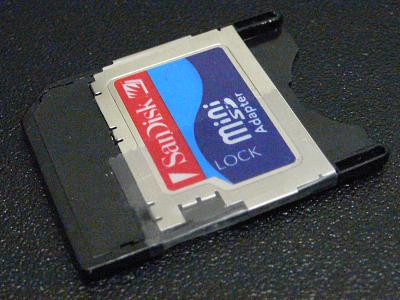
Tape Over Notch on SD Card.jpg
Chieh Cheng
Tue, 27 Jun 2006 13:29:08 -0700
I had a similar issue when I inserted my card in a new card reader that was slightly misaligned from the factory. I broke off the lock. Managed to find the little gray plastic lock piece, though, and ended up prying apart the card, putting the lock back in its groove, and then crazy glueing (VERY CAREFULLY!) the card back together. It worked - at least, so far.
Like the other person said, its just like a VHS tape, the reader 'sees' the write-protect in the proper position.
Ian
Fri, 28 Jul 2006 23:49:45 -0700
plese add me on msn [email protected] if u can jhelp me with my micro sd its broke!
jack
Sat, 30 Sep 2006 06:05:05 -0700
THANK YOU!
My Dad rang me sayign "Help my camera is saying card locked - what do I do I cant take or delete any pictures?" - I had no idea *g*
thanks again
Sue Despry
Tue, 21 Nov 2006 12:37:17 -0800
Thanks !
unknown
Sat, 16 Dec 2006 17:48:16 -0800
thank you man, its works
jose
Mon, 25 Dec 2006 16:01:25 -0800
unlocked card thank you
i do feel stupid
anonymous
Tue, 26 Dec 2006 09:18:57 -0800
i inserted a disk when the grey thing was up, but it still said it was locked? could you help mee
arghhh :] x
kim
Tue, 23 Jan 2007 11:31:54 -0800
Kim, try moving the grey tab up and down; make sure it's not stuck. Try the memory card in the camera with the tab in both positions. If it is still locked in both position, then it's not the card; it's your camera.
Chieh Cheng
Wed, 24 Jan 2007 01:25:02 -0800
No matter how many times I move the tab, the stupid card still locks on me.
Kate
Mon, 29 Jan 2007 11:09:22 -0800
That means your device (digital camera?) is broken. The tab doesn't do anything to the card itself. The sensor that detects where the tab is located is in your device (digital camera).
Chieh Cheng
Mon, 29 Jan 2007 11:14:25 -0800
I'm having the same issue. I'm using a Sandisk 1 GB and the lock is set to unlocked but my card reader always says it's locked. The thing is, my other one, a 256 MB off brand, works just fine. My only solution is color scheme... the 1 GB one is dark blue and the lock is gray and the 256 MB one is black and the lock is white, so maybe the sensor can't tell the 1 GB one is unlocked? Is it a visual sensor... well, any help would be appreciated.
Luke
Fri, 09 Feb 2007 00:40:53 -0800
my card is slightly bulged at the bottom after i dropped it on the carpet, it will got into the camera but the cam. says MEMORY CARD ERROR-LOCKED
anonymous
Sat, 24 Feb 2007 09:26:52 -0800
I've had the same problem. The lock tab on my SD card was not broken but loose. Every time you insert it in a card reader or camera the tab slides back to the locked position rendering it useless. My solution is to super glue the lock tab to the unlocked positon. If your lock tab has broken off just put or make a replacement tab and glue or tape it to the unlocked (forward) position. BTW super glue leaves a white powdery residue after it dries. Wipe it off before it gets into your camera.
A Rafanan
Thu, 29 Mar 2007 02:41:14 -0800
I just recently purchased a small digital camera and was working fine - UNTIL it said " Card Locked" on the LCD screen. I tried for over an hour with the settings and nothing worked. I thought I was going to have to buy another card until I read your postings regarding the tabs on the memory cards. Thank you to the person who suggested the idea. You saved me a trip to the store!!
Cathy R.
Wed, 18 Apr 2007 18:16:57 -0700
Thanks a lot! It worked as you had said. I had no idea this sort of thing exists!!! Thank you once again!
Santhosh
Wed, 25 Apr 2007 22:33:01 -0700
Thanks Chieh Cheng, problem solved for a friend that had been offered this camera with this "fault"...... its the camera alas. I tried covering the "slide" with tape as someone-else suggested, but couldnt get the card into the camera. Anyway, with the remarks about horrendous battery useage found elsewhere I shall suggest he doesn't buy it. Shame, because it feels rather neat !
Jen
Sun, 20 May 2007 02:26:02 -0700
Thank goodness for this information! The grey switch on my SD card kept slipping into the lock position when i would put it in.. but a little tape and its good as new! Thanks guys.. I almost bought a new card!
jamie
Sun, 10 Jun 2007 12:00:49 -0700
I have 2 digital cameras (canon A640 & canon A530) and problem with memorry card (transcedend 4GB)when I put the card in A640 it works, but when I put it in A530 it says MEMORY CARD ERROR-LOCKED... enybody kow why my mem card dont work in A530 ... i took another memcard (friends) in my A530 and it works, so the problem is not in camera ... allso I tried with little slider (Try the memory card in the camera with the tab in both positions) allso a cnat format beacuse he (camera dont give me that solutin with that card) .. I am goning carzy pls help ..hope my english is good and you undrestand me
Milena
Sun, 17 Jun 2007 13:18:56 -0700
Add me to your list of technology illiterate people. Today is Father's Day and I'm the camera nut in the family. I had no idea what "camera locked" meant. After finding this website, I solved my problem in 2 minutes.
Thanks a million.
noraehack
Sun, 17 Jun 2007 14:55:39 -0700
Guys, thanks for this information. I also lost the write protect switch (it fell off or something). I just put two layers of scotch tape and it is writable again now! Thanks a lot!
Ken
Sun, 17 Jun 2007 14:57:08 -0700
my memory card says tath it is SD protecetd so how do i get it unprotected i have an SD impact 256mb
Pauline
Wed, 20 Jun 2007 14:28:54 -0700
I tried tape, switching the lock back and forth, but the LCD still reads "card locked!". If it's the camera, is there anything I can do about it?
Jill
Sun, 24 Jun 2007 12:37:21 -0700
THX SOOOOOOOOOOOO MUCH!!!
rly works!
elliot
Tue, 26 Jun 2007 20:19:15 -0700
THANK YOU!!! I thought I lost my family photos forever! I did the tape trick, it worked!! Thank you, I'm downloading as we speak- PEACE, LOVE and HAPPINESS TO YOU ALL!
brandice
Fri, 20 Jul 2007 05:46:29 +0000
THANK YOU ALL!!
TAPE TRICK JUST WORKED, I just aplied a single layer of plastic tape (scotch?).
:) thanks!
Ramiro
Tue, 07 Aug 2007 17:20:07 +0000
the switch the memory card for my camera where i can lock and un-lock it missing and when ever i yurn on to take a picture its said it locked what should i do?
Amer
Sat, 11 Aug 2007 22:22:05 +0000
thank you so much, i wish you were with me, was unable to take photos at a party due to this. how daft do i feel.
thanks your a star.
anonymous
Sun, 12 Aug 2007 19:25:48 +0000
Thank you so much! Have not been able to use my camera for a few days now, running across this article has saved me lot of aggravation!
J West
Fri, 17 Aug 2007 03:44:32 +0000
Please help me I have 2 SD cards for my Canon A530 a 2GB and a 16MB that came with the cam . The 2GB from Kingmax came with a lock and unlock switch and it is giving me the "locked card error message" I tried putting scotch tape on in both the unlock and locked positions but i am still having problems with it.Any help will be appreciated Thanks
Bing
Sat, 18 Aug 2007 15:41:10 +0000
THANK YOU! YOU and SCOTCH TAPE SAVED MY DAY!
Rachelle
Thu, 23 Aug 2007 17:00:34 +0000
I brought a fujifilm micro sd for my fone and it had an adapter come with it first i put the msd in my adapter and put it in my sd card reader when u go to add files as u would do it will say failure to send remove write protection but u can over run that just right click on the things u want and go send to it will most likely say mmc/sd :F and click on it then two weeks later i went and put my mem card in a camera to put some photos on it but as i put it in i accidentally flicked the lock button on and when i got home i tried to get the pics off it sed write protection again and i came across this article and fixed it.
THANK YOU
rohan
Sat, 25 Aug 2007 06:05:37 +0000
i really need help to remove write-protection my memory card phone.please..............i really needed it right now...............i beg ur help.........please.......
mat
Sun, 02 Sep 2007 04:00:24 +0000
I just had this "card locked" problem too. My card is SanDisk SD 1G Extreme III. I tried switching the lock up and down. The lock stays in whatever position. (it does not slide back to lock position as other user's card, so I don't need to tape it). But no matter I unlock or lock, the screen always says "card locked"! I called SanDisk tech support and also emailed them. They can not give me a sulution but offer me a replacement. But I have 1G photos in it!!! I can not afford to loose them. Any suggestions? Break the lock?? Thanks!!
Evelyn
Wed, 05 Sep 2007 01:49:15 +0000
You won't loose them, Evelyn. When the card is locked, it is protected from formatting, erasing, and file deletion. You can still read the photos from the card. You should copy the photos on the card to your computer as soon as possible.
Chieh Cheng
Wed, 05 Sep 2007 08:29:24 +0000
thank you chieh!
I can not read the card. That's the problem.
I tried from the card reader, my PC, and laptop also, none of them can access the device.
Evelyn
Thu, 06 Sep 2007 04:57:32 +0000
thank you so much it really worked.
cj
Mon, 10 Sep 2007 01:21:25 +0000
i put the memory card in and i think i pushed it into far ,
just a little .
and now i can't get it to come out , and it won't work !
it's locked , so i can't do anything .
at first it was just memory card error , and now it's locked .
am i screwed ?
HELP PLEASE !
i will owe you big whoever fixes this ,
i'm broke , and i can't afford to go back and have them fix it for me , but i am freaking out !
my camera is a canon powershot S5 IS
Emily McGuire
Wed, 12 Sep 2007 15:09:23 +0000
Well, you'll have to pull it out first with a pair of pliers.
Chieh Cheng
Wed, 12 Sep 2007 20:32:50 +0000
hey thank you for the information.. that really helped alot.. I didn't know what was wrong with my card for my camera. luckily i found this website...
thanks again
love kristen
kristen
Sun, 16 Sep 2007 19:14:58 +0000
Whew that's fantastic.. I was just about to go away for a holiday, and thought my camera wouldn't let me take pictures when i was in the cote d'azur! yay for camera hacker!
Rosie
Fri, 21 Sep 2007 06:25:12 +0000
i would like to say thanks to the person who gave the solution for using tape.it worked.i really didnt want to break open my card or buy a next one.my lock switch got broken and now i used the tape and i can use it as normal.
phillip alexander
Sun, 23 Sep 2007 12:55:41 +0000
i busted my sisters cam...i sat on it and its 5.400.....it sez locked what do i do
Attached Image: 
PEEKING.JPG
phil
Sun, 23 Sep 2007 23:47:52 +0000
My camera won't let me take any pictures or look at them. Everytime I turn it on it says memory card error, card locked. i've tried moving the locked switch on the side of the card up and down but that hasn't done anything. and i know it isnt my camera because i put an old memory card in it and it read that memory card just fine. I have pictures on there that i dont want to lose and i tried putting them on my computer but it says i didnt take any pictures..I know i did though because i used it to take pictures the same day it stopped working. I have so many pictures on it. please help me
anonymous
Mon, 24 Sep 2007 16:39:52 +0000
Thank you all sooo much! I too felt like an idiot when something I was stressing over for an hour was as easily fixed as it was... but I'm VERY relieved, lol.
Mandi
Sun, 30 Sep 2007 18:58:31 +0000
THANK YOU! i thought my card was doomed, when all i had to do was just move the little thing up on the memory card to unlock it...
It's so simple, yet so hard...
x
Becky
Sun, 07 Oct 2007 15:31:42 +0000
i haven't seen a solution (or i missed it) for when the card is "locked" and the problem is not with either the card's slider or the camera, as it is with mine. i saw a few people posted the question, but didn't see an answer.
is there one?
dan
Fri, 19 Oct 2007 18:10:27 +0000
i was purchased a 512mb memory card.That card was inserted into my card reader/writer.But i couldn't copy the songs into my card.Every time i found one message "The Disk is write-protected".How remove the write-protection.so plz reply me.
nithin
Sun, 21 Oct 2007 02:45:48 +0000
wow! thanks! I would never have known!
debbie
Mon, 22 Oct 2007 13:12:12 +0000
I was semi-freaked! Had no idea (old eyes) the SD card even had a switch and the word, "lock" on it. I went deep into the camera user's guide and found no reference to this "card locked" screen. I was ready to go and buy a new 2G card and I only had 522 pics on it. I believe the built-in card reader on my computer slid the switch back as I pushed the card in at an incorrect angle (my bad). Thank you so much!
Joe B.
Thu, 25 Oct 2007 02:11:26 +0000
i read the comments here and tried the "taping"...i put a little scotch tape on the left side of the adapter and it worked! i felt like an idiot! ive been stressing since yesterday and its 334am now and still stressing over my camera's memory card...but im relieved now...thanks to you guys :)
Fides
Sat, 03 Nov 2007 19:34:57 +0000
i have the same kind of problem with the sd card being locked, only my sd card has no plastic cover, and no card protect switch to lock and unlock it. I tried using electrical tape and aluminum foil, which worked for a day or two and then didn't work. I was wondering, Is it possible to fix this problem?
(see attached pictures)
Attached Image: 
SUNP0002.JPG
Brenden
Wed, 07 Nov 2007 17:31:46 +0000
i have the same kind of problem with the sd card being locked, only my sd card has no plastic cover, and no card protect switch to lock and unlock it. I tried using electrical tape and aluminum foil, which worked for a day or two and then didn't work. I was wondering, Is it possible to fix this problem?
(see attached picture)
Attached Image: 
SUNP0001.JPG
Brenden
Wed, 07 Nov 2007 17:32:13 +0000
Haha. What happened to the plastic case on your SD Card? As you can see from the "Tape Over Notch on SD Card.jpg" photo above, the lock is purely physical. Without the case, it'd be very difficult for the card to trigger the lock sensor. You'll have to make a lock tab that is extended further out to the edge of the plastic case. To do that, you'll need to compare this naked card to a cased SD Card.
Chieh Cheng
Wed, 07 Nov 2007 17:35:45 +0000
well, it had started to break apart about 3 months after I got it. it had been fine up until about the second week of september, then it just broke, I managed to fix it with electrical tape, but the second I put the fixed sd card into the camera it worked but when I went to take it out, it wouldn't come out. so I took the camera apart and pushed it out, that's when the whole thing fell apart.
oh, and I still have the intact case. It split along the seam where the retards who put it together glued it.
is it possible to somehow trick the lock sensor without making something for the sd card? and is it possible to somehow remove or modify the lock sensor in my camera? just wondering.
Brenden
Wed, 07 Nov 2007 17:46:48 +0000
The sensor is either an optical sensor or a mechanical sensor. Based on the tape trick, I'd assume it's a mechanical sensor. You can probably disable (or permanently enable it) by pushing the mechanical sensor in and hold it there . . . maybe with solder? or tape?
Chieh Cheng
Wed, 07 Nov 2007 18:38:50 +0000
thanks it works don't know why i did not thought of that first...
andy
Mon, 26 Nov 2007 07:10:36 +0000
Thanks, that worked :) Have a good day.
anonymous
Sun, 02 Dec 2007 23:18:08 +0000
I have a sd card that is locked the little switch on the side is broke off. Is there a way I can unlock my card.
Kimberly
Sun, 09 Dec 2007 01:09:11 +0000
My memory card says locked. I have moved the switch on the side and tried it in lock and unlock. This did not happen until I put the card into my TV to view photos. The on/off switch moves and does not seem to be broken. Any suggestions?
Thanks anyone!!!
jan
Sun, 09 Dec 2007 19:49:40 +0000
My SD card was also saying card error, card locked! message. I tried the tape, didn't work. So I looked at the connectors and there seemed to be some sort of green oxidation going on, so I wiped it with a damp cloth(water) and dryed it before re-inserting. It worked! Had that not worked I was going to blow on it like the old Nintendo cassettes. Good luck.
Raul
Wed, 12 Dec 2007 19:04:21 +0000
My camera gave this error as well with switch in both positions. I did a low-level format on my computer, and all is well again. Then I reformatted in the camera before going back to shooting, a good habit to have.
Jeff L
Sun, 16 Dec 2007 17:48:05 +0000
i was reading these comments and thought to try the tape trick except i cudnt find any. so i took a little piece of paper, folded it enough and slid it into the lock as my switch was broke and lost. and voila! it works
abhishek
Mon, 31 Dec 2007 04:53:29 +0000
My memory card has been locked all afternoon driving me crazy i could not use it in the camera or upload my photos... aaaarrrrggggh! anyway after reading this and not finding a solution i moved the little grey switch up and down with brut force (not to break it) but to make it work... and now it does so it pays not to be too gentle...
eve
Sat, 05 Jan 2008 16:52:27 +0000
Heyyy . Well Myne is a little different then all your's but , when i put my memoryy card in the bottons don't work, i can't see my pictures , and even worse can't take anymore ! :(
I need SomeOnes HELP . ahha
Kenziee.
Sun, 13 Jan 2008 22:06:26 +0000
Kenziee, the problem you described is specific to your digital camera model, not general to memory cards. Please start a new thread in the forum related to your digital camera brand. Then describe the problem fully with camera model information.
Chieh Cheng
Mon, 14 Jan 2008 01:55:58 +0000
The slider on my SD card popped off I tried putting tape over the place where the slide was but it doesn't help. Am i doing it wrong? can someone please put in a picture of a Sandisk SD card with the tape on it
Nick
Mon, 14 Jan 2008 02:08:39 +0000
The fifth post in this thread has that exact photo. You can't see it?
Chieh Cheng
Mon, 14 Jan 2008 04:43:59 +0000
I can but it doesn't look like mine and when i tape it over nothing changes
Nick
Mon, 14 Jan 2008 22:27:30 +0000
The problem could be on the camera side. Did you try a different SD Card?
Chieh Cheng
Tue, 15 Jan 2008 03:32:20 +0000
No but it doesn't work in my card reader for my computer or my camera
Nick
Tue, 15 Jan 2008 22:29:32 +0000
would you give up a detailed description on how does it not work?
Chieh Cheng
Wed, 16 Jan 2008 10:45:09 +0000
The white slider thing on the side came off and then when i went to put a file on it it said error ROM please insert another disk. an the tape when put on doesn't change anything
Nick
Wed, 16 Jan 2008 20:40:48 +0000
Your card is bad. The locking tab has nothing to do with it. The locking tab only locks the card from being written to and erased. You can still read the card without the tab. If you can't even read it, then the card is bad, or your readers are bad. Since you posted to this thread, I was assuming you had a memory locked problem.
Chieh Cheng
Wed, 16 Jan 2008 21:44:02 +0000
im so glad i found this site.
the tape idea worked like a charm :D
i really didnt want to go buy
a new sd card and really wanted to know
how to fix this problem
so thanks so much !!!!!!
Michelle
Wed, 23 Jan 2008 05:18:42 +0000
HEY! I HAVE A LEXAR MICRO SD MEMORY CARD AND I TRIED MOVIN THE LIL SWITCH ON THE SIDE TO LOCK AND UNLOCKED AND IT STILL SAYS DAT ITS WRITE-PROTECTED WHEN I DO IT EITHER WAY. A LIL HELP WOULD BE NICE!
Nikiona
Tue, 29 Jan 2008 06:05:09 +0000
Hi, I have Cannon PowerShot SD500 camera and my SD card card Ultra II 1G keeps saying its locked. I have checked the tab on the side and i am sure that its not locked. I have tried the tape trick and the blowing air into the camera and this still does not work. I can still view my pictures but I cannot take anymore. I really don't want to buy another card since I just got this one. Any ideas on how to fix my problem will be appreciated. I received the error when inserted the card to my computer to download the pictures (something i have done multiple times) so i don't know why this time it did not work.
HELP!!!
mwikali
Wed, 06 Feb 2008 19:09:22 +0000
I have had my camera for years; I don't buy new ones because they come up with new ones every ten minutes. So I know my camera, or at least I THOUGHT I knew it; when I was taking a bunch of pictures and I was all excited to download them, I must have taken out the card and put it back a few times.. that I didn't realize what I had done; until; AAAH, the card is locked? What does that mean? I can't delete the pictures? That's the beauty of digital cameras that we can DELETE the pictures! So I had a panic attack and was on the verge of going out and buying a new card; hoping it will fix it, which it would have.. because apparently it's all a matter of switching that little tab on the card itself.. who would have known? Maybe if I read all the manuals that come with; but who has time? So anyway, thank God for Web 2.0; because I knew I'd find a solution here and sure enough I did. Thank God for super smart tech folks too.. Thanks y'all!
Ray
Sat, 09 Feb 2008 01:09:06 +0000
my lock tab on my card is broke, i tried the tape thing and making a new tab, when i put in the computer i can read it, i just can delete any files or add any am i doing something wrong
please help me
ieshia
Wed, 27 Feb 2008 03:30:19 +0000
well i have a Canon Power shot sd950 IS and it was working fine, my friends memeroy card was bigger then mine so i put hers in and was using hers, then when i was done using hers i put my memory card back in (canon MMC-32MH)(whatever that is) and when i turned on my camera it says "Memory Card Error" "card locked". my memory doesnt have a lock switch on it im 100% sure. and idk what els can be wrong with it. and i need it fixed casue i need my camera in five days for a concert! HELP
vannessa
Fri, 14 Mar 2008 00:55:44 +0000
My memory card also says it is locked when the little slider is in the unlocked position. Another memory card that I have works perfectly fine in the same camera. The bad memory card also does not work in another camera. I think it is a problem with the memory card, not the camera...
Christie
Sat, 15 Mar 2008 14:50:44 +0000
T Ellie: YOU Are a lifesaver
tHANK yOU!
Emma
Wed, 26 Mar 2008 21:05:52 +0000
Thank you so much! I was so upset I couldn't get my memory card to work, but I found the gray notch, took the card apart and put it back together and it is finally working again! thank you!!!
thankful
Sun, 06 Apr 2008 23:46:32 +0000
FIXED MY "CARD LOCKED" problem, where the camera said that the card was locked when the switch for the SD card was set to unlocked. This "card locked" message was displayed for more than one card for me, so I knew it had to do with the camera itself. This rendered my camera useless since I could not take any pictures, no matter what SD card I used.
SOLUTION:
The solution to my problem had to do with the card locked sensor mechanism in the SD card slot. For my camera (Canon SD600), it has a spring sensor (on the left wall of the SD Slot) that detects the whether the SD card lever is set to locked or unlocked. If the SD Card is set to locked, the position of the SD Card lever presses against the sensor mechanism and pushes it in, and when the SD card is set to unlocked, the mechanism is allowed to stick out.
The problem with my camera was that the sensor spring somehow got pushed in further than it was supposed to and a piece of the sensor was stuck in one of the groves in the SD card slot. To fix this, I took a small paper clip, unbent one of the sides and bent the tip of it to make a mini hook, and carefully prodded what I thought was the sensor. The sensor mechanism had a bit of bounce to it (which confirmed my guess that it was the part that was pushed in when the sd card is set to locked), so I proceeded to "hook" the furthest part of the sensor and gently pulled it out until it "sprung" out of the little grove that it was stuck under. After that I put in my SD card in and it worked like new!!
Not sure if this will work in every situation, but it was worth a try for me since I effectively could not use my camera to take pictures. Hope it works for you!
Tommy
Fri, 18 Apr 2008 20:06:00 +0000
perfect just like a good old tape, who would've known!
thanks!!!!!!
downforce222
Sun, 20 Apr 2008 07:06:05 +0000
it did it ti my camera card today. i panicked. i didn't even know you could do that... LOL.
jordan leigh
Tue, 22 Apr 2008 02:54:43 +0000
I have been using the same SanDisk 2G sd card for years. I recently bought a SanDisk 4g and when I inserted it into my camera it says Memory card error card locked! The tab is in the unlocked position and does not slide easily back and forth between locked and unlocked positions. The only difference I can see is the tab on the 4g is gray (not white). I can't access the formatting position in my camera (Cannon SD360)
Help! I'm going to Italy and don't want to buy another, just to have the same problem.
kim
Sat, 03 May 2008 00:26:44 +0000
There is another difference between the 4GB and the 2GB . . . The 4GB is SDHC (Secure Digital High Capacity). These newer cards are not compatible with older SD Card device. It's likely that your digital camera does not support the new SDHC standard. And it is not a memory card locked problem.
Chieh Cheng
Sat, 03 May 2008 11:11:43 +0000
Hi All,
As someone said before, noone has provided a solution for the card locked problem (when the problem IS IN the card and the card is surely unlocked. I have 2MB of pics on my card and Im getting crazy). The card isnt read by the camera or the computer. What can I do?
Thanx for any help,
Paco
Sun, 04 May 2008 19:00:00 +0000
tommy, thanks. i was freaking out that my brand new $700 pentax might have gotten broken. the mechanical sensor in the camera was jammed.
cranberry mars
Mon, 05 May 2008 02:36:18 +0000
i put the tape around my card in an attempt to fix the "card locked" thing and now i cant get the card out of the camera. somehow it locked up in there or jammed or some shit, but would anyone know how to get it out or another way to fix the locked card with a broken switch without putting tape on it?
bubba
Thu, 29 May 2008 01:23:34 +0000
Thanks, didnt even know there was a slide on the sd card.
freeman
Mon, 16 Jun 2008 14:04:53 +0000
Thank you soooo much for writing about how to use the paper clip to pull the sensor tab back out - it worked for me! I was going crazy because the camera wasn't mine and I needed to take pictures!
Becca Oliver
Tue, 17 Jun 2008 13:27:50 +0000
thanks soooooooooo much!!!!! da tape thing worked for my card and now i dont have to purchase another one!!!!!!!! u guys are awesome!!!!!!!
tina
Thu, 19 Jun 2008 14:28:57 +0000
ok im getting pissed i was readin some of these and mine is doin the same i tried it in both up and down thing and its still locked but its my card from my old camera so it told me to format so i did and now its locked and it cant be the camera its brand new so i dont know what to do helpppppp!!! PLZZZ
Brittney
Fri, 20 Jun 2008 13:54:08 +0000
same problem ^^ help please can you tell me where to tape the memory card please????
thxx
scratch
Sat, 21 Jun 2008 07:50:25 +0000
wonderful..advice on card lock systems..
at midnight my card was locked & i just searched on internet & my prob got solved!
thanxx a ton!
anonymous
Tue, 24 Jun 2008 23:19:50 +0000
Hey everyone! Thought I would add this suggestion to the mix. My boyfriend just busted off the itty bitty little white lock mechanism (shown in red on pic of the exact card I have).
I took a twist tie (with wire inside, the kind that came with my garbage sacks haha) cut off a very small piece, folded it in half with tweezers and popped that bad boy in the groove. Slid it to lock and unlock a couple times and we're back in business!
Say 'heck no!' to buying a new 1 GB memory card!
I'm from Orange County, Calif (the REAL Orange County.. the Huntington Beach surf shack with the wall mount A/C that never worked-Orange County) I'm cheap! Stoney and creative!
Thanks everyone for the great suggestions that led me to my Magiver solution!
Attached Image: 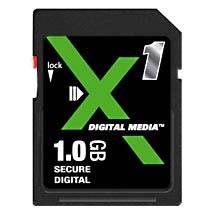
locked.jpg
OC_Surfer_Chick
Fri, 27 Jun 2008 04:33:49 +0000
i downloaded my photos on the computer then when i detached it to delete the photos the camera says "Card locked!", how do i unlock it? it also wont let me take pictures either
grace
Sun, 29 Jun 2008 07:45:16 +0000
I had an error
So put tape very carfully over the existing switch and gap - it works.
Chris
Mon, 30 Jun 2008 09:42:53 +0000
I have a Polaroid SD. And when I turn my camera on it saiys its locked!! I looked up to see what to do and i moved the little switch on the left hand side up like it said and its still reads locked!! I have over 300 pictures on that card and would really like them back! If anyone can help me, please let me know!!! Thank you,
~Tiffany
tiffany
Mon, 14 Jul 2008 18:47:32 +0000
I have a similar problem with my cards saying locked. But i have a feeling it might be the camera because it happened to both my cards after insertion. The cards dont have locks on them either.
Rebecca
Thu, 17 Jul 2008 03:44:51 +0000
Rebecca, please be more specific. What kind of cards are they? SD? miniSD? microSD? A photo will also help.
Chieh Cheng
Thu, 17 Jul 2008 17:14:58 +0000
I had a similar problem with all the cards I tried. They were all unlocked, and after reading a post that said someone wiped the sensors on the card with a damp cloth, let them dry, and put a card back in - it worked! I liked that idea, but was too lazy to get a damp cloth, so I licked - yes, licked the sensors on the card, let them dry, put one back in - and it worked! Best of luck.
Lisa
Tue, 22 Jul 2008 01:26:44 +0000
Okay, my problem (with a micro SD card) was that the micro SD -> SD adapter's lock was loose, so when I slid the adapter into my SD card reader, the lock would engage. The piece of scotch tape everyone's talking about is used to keep the lock in the "off" position.
Also for a note on wiping sensors with water and stuff? I wouldn't really recommend doing that with anything but distilled water. I believe residue from tap water or something else could damage the card somehow. At least, I know that's the case when you drop a camera into the ocean. You have to first rinse it thoroughly with distilled water before drying it in a bowl of rice, otherwise the water leaves and the salt remains, and that can damage the circuitry.
Though of course, with the SD card, all you would be wetting would be the gold connectors, not the insides of the card themselves... Good luck.
Ben
Fri, 25 Jul 2008 02:10:28 +0000
Regarding contact cleaning, I always used a "hard" pencil eraser back in the days where I was replacing memory sticks in computers (in the days of 30 pin SIMMs, anyone still remember them?). They would get a film of crud on the plating, and you'd end up with dodgy connections. The eraser takes off the crud and corrosion, and gets you a good connection again.
I guess licking them would have worked, but if you'd seen the state of some of the machines I had to deal with, you'd have been asking for hazmat gear rather than sticking your tongue near the insides :)
A pencil eraser is slightly abrasive, but it's unlikely to kill your connectors unless you do it every day for years.
Simon
Fri, 25 Jul 2008 07:17:14 +0000
I just bought a patriot SDHC memory card and its locked. I used the card in my camera and i can still take pics with it and view them on the camera but when i put it into another camera it comes up saying "memory card error, card locked!" it was in the unlocked slot so i tried moving it to the locked spot then back to the unlocked spot. I still get the same thing. I put the card in the card reader to transfer the pictures to my computer and it comes up as "error on card" How can i save these pictures that mean so much to me????
Thanks for any help anyone can give me
carla
Tue, 29 Jul 2008 03:14:41 +0000
carla, it's probably not locked. It's likely that your second digital camera and your memory card reader are not compatible with the new SDHC standard. Put it back into your original digital camera that works with the card. It's likely you'll see you photos again. You'll need to buy a new memory card reader for this card. I'll add some SDHC memory card readers to the "Related Links" below.
Chieh Cheng
Tue, 29 Jul 2008 16:47:10 +0000
I lost the small plastic/metal that makes the current attach to lock or unlock the SD CARD. Do you know which pins do I have to sold to leave it unlocked? I'm enclosing picture of my SD CARD.
Thanks.
Peppe.:
Attached Image: 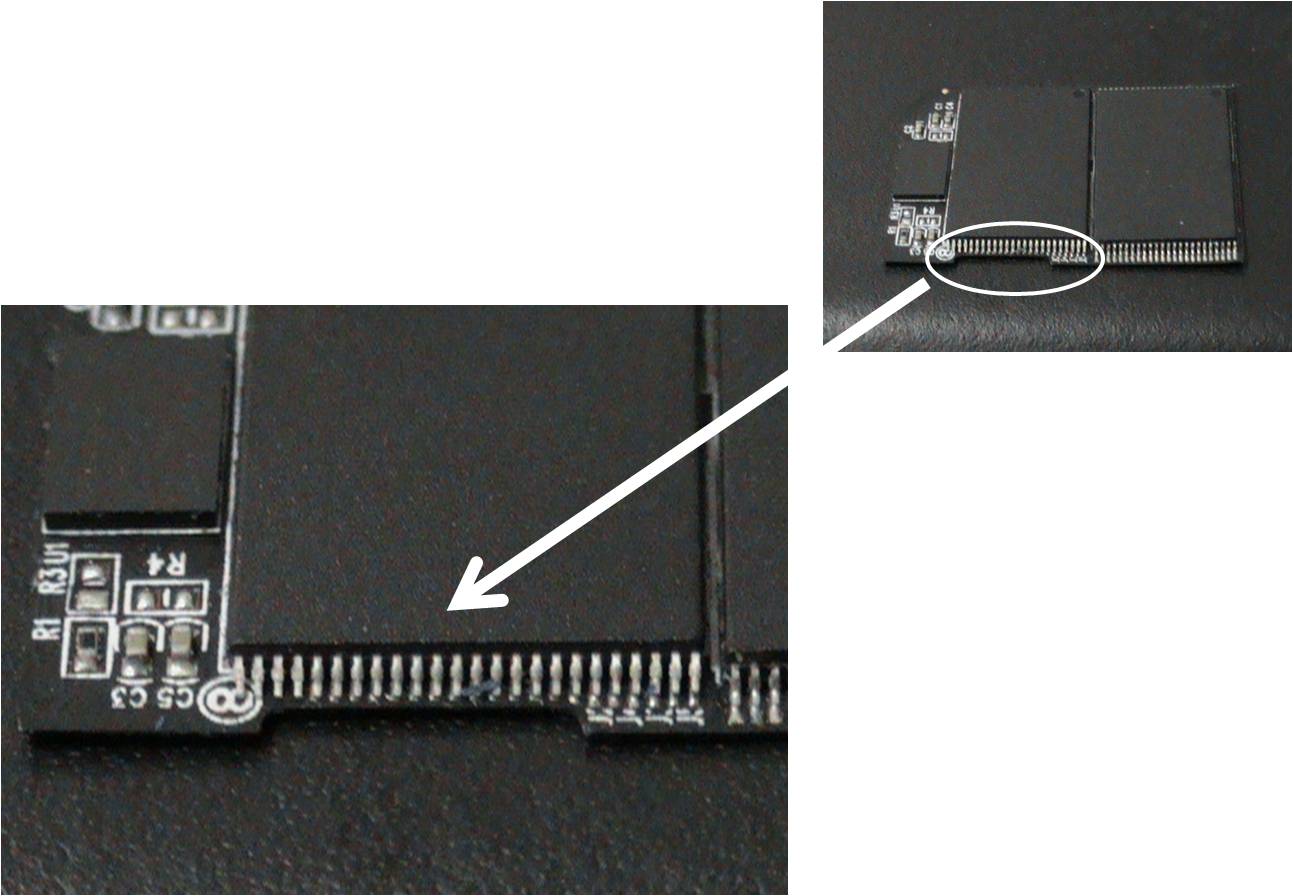
pino sd lock.jpg
luiz peppe
Mon, 04 Aug 2008 03:30:58 +0000
Read this thread, you'll see that it's a mechanical switch on the reader side. There is nothing to solder.
Chieh Cheng
Mon, 04 Aug 2008 16:15:18 +0000
Hii;
Please Help :D
When i Put My Card In My Camera
[Hitachi] it Says Protected Card!
I Once Broke My Camera And Had It Repaired And Updated
Before i Had My Camera Repaired My Sd Card Worked Fine;
Now It Says Protected?
Laureenn
Wed, 06 Aug 2008 16:09:04 +0000
dude your awsome it worked.... my little notch of my sd card broke of and i couldnt get it to unlock but low and behold i put a little piece of tape over it and tada it sudenly works it's like magic hahaha well thanks your the best
awsome
Thu, 07 Aug 2008 14:38:37 +0000
Great info, saved me hours! I have a comment to add, which goes along with Luke's. I have an SD card where the write-protect tab is bright yellow. After reading Luke's comments, I took out my trusty Sharpee and colored it black. And, voila! the read-only problem vanished!
Thanks Luke, and hope this simple trick works for others.
Al O.
Al O.
Sat, 09 Aug 2008 13:35:22 +0000
Thanks Tommy your comment from April 08 did the trick!
Buddy
Wed, 13 Aug 2008 02:16:03 +0000
Just got the same problem .... read the first few comments .. seems all helpful ..
I bet my 4SS its gonna work -- ... so Cheers in advance
r3
Thu, 14 Aug 2008 17:46:43 +0000
Pannicked as I had 2 locked memory cards with loads of holiday photos I couldn't do anything with until I read about the 'little tabs' on the side which I had never really noticed before. All sorted now Many Thanks
Heather
Sun, 24 Aug 2008 23:38:15 +0000
Thank you for your info - have been going nuts wondering what I did this time! Found the little knob, and hey presto, am in action again!
Macca
Tue, 16 Sep 2008 13:05:00 +0000
OMG, Thank you I've been like helpless over my camera saying, "Card is locked" Guess I should have read the directions with the memory card. lol.
Thank you so much!!!
Attached Image: 
Picture 0821.jpg
Emmy
Wed, 24 Sep 2008 01:16:17 +0000
this works, thanks for writing this up
joe
Sat, 27 Sep 2008 23:52:23 +0000
HAHA THIS WEBSITE JUST BLADY SAVED MY LIFE I THOUGH I BROKE MY CAMERA :-( THEN I LEARN ITS THE STUPID NOTCH ON THE SIDE OF THE CARD! HOW RIDICULOUS AND STUPID AM I ..
anonymous
Thu, 09 Oct 2008 21:33:06 +0000
---my memory card was locked,,, i cant take pictures anymore,, and some of the pictures in the memory card was unidentified,, what supposedly im going to do?---
please help me.... thanks!!!
dygee
Thu, 16 Oct 2008 05:19:43 +0000
Suddenly my camera LCD displays Card Loscked. I have tried the Tab and tape option....But LCD still says "Card Locked". Other SD cards are woking fine. I tried reading this card with my lap top also but no luck. Our families whole vacation pics are on it!! Can anyone suggest anything I can try to retreive pics?
Asif Jaffar
Mon, 20 Oct 2008 10:39:53 +0000
You should be able to read the card even if it is locked. The lock switch only prevents you from write, deleting, and formatting the card. If you can't read the card, then it's likely it is corrupted or damaged.
Chieh Cheng
Mon, 20 Oct 2008 17:14:20 +0000
OMG YOU SAVED MY LIFE! thank you sooooo much
anonymous
Tue, 21 Oct 2008 21:54:11 +0000
i feel so stupid all it was was a little slide ! ive been plugging it in and out of my computer for hours haha thanks alot
Lola
Thu, 23 Oct 2008 00:46:31 +0000
OK!!!!! The scotch tape over the slot worked for me.. My sd card notch was broken and I tried the tape thing worked like a charm. The write protect was off thanks alot everyone.
lavon watson
Fri, 24 Oct 2008 01:06:48 +0000
Thank you for the information. I had no idea. It must have happened when I took the memory card out of my computer.
Karen
Karen
Fri, 24 Oct 2008 23:12:38 +0000
Hi I am really in desperate need of help. I was in Machu Piccu taking photo's on my Canon G7 with my 4GB Sandisk SDHC card and have been using the same card for a long time and all has been fine when "Memory Card Error" Card Locked! appears. I cannot even read the SD card on my computer that has a SDHC slot so cannot run any recovery software etc. Can anyone help? Please????
Chris
Mon, 27 Oct 2008 22:37:40 +0000
I had the same problem- the lock slider on the SD adapter came off and it kept showing the micro memory card as locked- I tried using Scoth tape over the slider area and it still read locked- then I tried putting on 2 layers of tape and it worked- still working fine btway- Note *Don't put too much tape on or the card will stick in the camera and be hard to get out- Great help though and thanks to the people who suggested it.
bobdut
Thu, 30 Oct 2008 17:09:58 +0000
My sd card is locked and we have tried everything. It is a Kodak 1 GB card. We tried to lock and unlock the card as well as using the tape. Do you have any other suggestions? I am stuck.
Thanks
Leo
Tue, 04 Nov 2008 02:32:01 +0000
whoever suggested the tape idea is my hero.=]
missxmoose
Wed, 05 Nov 2008 21:20:28 +0000
wow that was easy! thank you. yup it was just slid over to the lock position
laurie
Sun, 23 Nov 2008 16:34:53 +0000
What should i do if my camera says that the memory card is locked. but i have tried switching the little switch on the card both ways and it still says it is locked and it says it for other memory cards too. What do i do?
Kassie
Sun, 07 Dec 2008 20:47:09 +0000
HELP! I am desperate..we have over 500 pictures of family vacation that are trapped on my sd card and now it is locked and I cannot access them. Error message is card locked..card error in other cameras..we have tried the tape and coloring the tab, using the twistie tie someone else recommended on this site..nothing works! Is there anything that can be done, even if I take it to a camera shop..I will do anything!!!
Jenn
Sun, 14 Dec 2008 14:44:18 +0000
The lock switch only prevents you from being able to delete photos, write to the card, and format the card. You should still be able to see the photos on the card. If you can't, either the memory card slot on your camera is damaged or your memory card is corrupted. First thing to do is to buy a memory card reader for your computer to see if you can read the card.
Chieh Cheng
Mon, 15 Dec 2008 07:36:50 +0000
i have the same issue! thanks to this forum, i solved the card locked... oh also i didnt feel stupid, because i really dont know about this kind of things, so i quickly search google and typed, card lock digital camera!
arsetothem
Fri, 19 Dec 2008 23:48:01 +0000
I did have a card reader and tried that as well as trying to read the card from 2 other cameras and I still get the same error message so I am assuming it is corrupt since nothing decribed on this site works for this card. If it is corrupt is there anything that can be done to retreive them? Thanks!
Jenn
Fri, 26 Dec 2008 02:19:04 +0000
Not really, Jenn. It's time to chuck that card, get another one, and move on. In the future, you might consider downloading the photos from the cards more often and have a backup process. Take a look at the "Photo Storage Solution" article on this site.
Chieh Cheng
Sat, 27 Dec 2008 09:24:57 +0000
YOU hElPED ME ALLOT!!!!!!!!!!!!!!!!!!!!!
annie
Thu, 01 Jan 2009 03:21:08 +0000
2 things that might cause problems that I have seen no one mention here. Both are related to using a built-in card reader on your computer. One is an issue similar to the one Tommy mentioned with his camera. If you are too aggressive with pushing the card in, a switch may get stuck in the reader. Try gently taking the card in and out a few times to see if the switch unsticks. Secondly, you should NOT use the "safely remove hardware" option when taking a card out of a built-in reader. This will lock the card on any other device. If you have done this, plugging the card back into the computer you did it on will allow you to read the card.
areader
Fri, 09 Jan 2009 22:20:16 +0000
Thanks for the advice about taping the switch into the "unlocked" position. I knew there wasn't anything wrong with the card because it was working fine in my card reader. The problem I was having was with the camera. I taped the switch into the "unlocked" position and--yippie it worked! Horray!
JWhite
Mon, 12 Jan 2009 18:05:59 +0000
Hi,
I have got the same problem, when i turn my camera on it says "memory card error - card locked", i have moved the little grey part up and down and tried tape, how would I be able to view all of the pictures that I took on it, or have they disappeared?
Paul
Mon, 26 Jan 2009 12:14:51 +0000
lol! my sd card works!
serves me right for buying cheap ****
rob
Wed, 04 Feb 2009 19:42:23 +0000
I took my sd memory card to a photo lab and they push it in to the reader to hard and cracked the blue case. The lock switch has been broken off also. When I put it in my computer it says card reader error. Is there anything that can be done? It has xmas pics. I am desperate.
carol
Mon, 09 Feb 2009 02:37:07 +0000
thanks for the tip, really appreciate it and like you i felt stupid too!
marty
Mon, 23 Mar 2009 18:52:44 +0000
MY SD MEMORY CARD IS LOCKED
THIS IS CAMERA MEMORY CARD 2GB
Attached Image: 
nanasala logo.jpg
mohamed mahir mohamed zujah
Wed, 25 Mar 2009 03:51:53 +0000
My memory card says locked when the notch is not even on the lock...what do i do??
Ariel Perry
Fri, 27 Mar 2009 01:48:31 +0000
okay. so i got a camera from my sister last night. and my memory card keeps saying card locked. i switched the thingy so many times in different positions. can it be the camera?
beckii
Fri, 27 Mar 2009 23:39:37 +0000
I have locked my memory card with a password but now don't remember the password
I am unable to access the stored within it.
PLZ HELP ME OUT
NIDHI
Sat, 28 Mar 2009 16:05:37 +0000
I read your blog for quite a long time and should tell you that your posts are always valuable to readers.
Ex Back
Thu, 09 Apr 2009 18:52:16 +0000
i moved the little thing in my sd card..but i had taken pics. im wonderin if they erased because it says no file exist..i need help!!
jessica
Wed, 15 Apr 2009 00:34:55 +0000
Thanks so much! i put a piece of tape onmy memory card and it fixed the problem!!!!
Cecilia
Sat, 18 Apr 2009 15:47:46 +0000
Thank you so much!
Felt soo stooooopid afta i had done it!
once agen.. Thank You!
Amina
Sat, 18 Apr 2009 18:29:15 +0000
T_T TTTTTTHHHHHHHAAAAANNNNKKKK YYYYYOOOOOUUUUUUU SSSSSOOOOOO MMMMUUUCHHHHHH !!!!!!!!!!!!!!!
I owe you for life.....
My mothers only photos were in there and I seriously cried for 3 days straight, because i couldn't obtain her photos.
Thank you so very much!!!!!
Ren
Sun, 26 Apr 2009 01:14:45 +0000
Hey, I'm getting the 'memory card error: card locked' error with two Kingston 8GB HC SD cards. They just decided to quit working while I was trying to read them through a USB card reader. The camera has no functionality at all to read them, nor the tabs to unlock them. A USB reader will detect the presence of the reader itself but merely claims that the device is empty. I have looked everywhere to try and get a way to make these cards readable, somehow.
jnwrx1
Mon, 27 Apr 2009 05:53:15 +0000
HELP !!!!!
My camera works perfectly well with a lower capacity memory, and moving the slider on that card locks / unlocks as prescribed...
but when i put an 8 Gb one in the same camera , it reads "Locked" in both positions....
any ideas, anyone ?
Nick Field
Tue, 28 Apr 2009 12:32:24 +0000
I unlocked my memory card I feel REALLY stupid!!!!!!!!!! I'm glad I looked on this website because I Have a field trip tomorrow
Rose
Tue, 28 Apr 2009 22:45:02 +0000
Nick, check to see if your digital camera supports 8 GB cards. 8 GB are SDHC Cards. They are different than regular 2 GB and under SD Cards.
Chieh Cheng
Wed, 29 Apr 2009 07:52:06 +0000
Thanks, saved me from buying a new card!
Jen
Tue, 19 May 2009 13:42:52 +0000
@Chieh Cheng-- hahahah thanks so much for noting the fact that the little knob at the side locks it..i feel so stupid too!! hah, thanks.
aaron
Sun, 24 May 2009 19:34:15 +0000
So yeah, my SD cards switch broke off, and i cant find the little switch.. Is there a manual way to change it back onto unlock.?
Like simple way. :)
Mike
Thu, 28 May 2009 23:35:48 +0000
My camera recognizes my SD card as a Locked card. The lock is up in the UNlock position. I have tried the tape over the notch trick and still get nothing. It does not work in my SD card reader either. I am at a loss. Not only did i lose 105 pics i can not get back, but i can't even open the card with either my camera or my computer to re-format it to use at another time. If anyone has any info that might help, please advise.
Thank you.
don whitmire
Mon, 01 Jun 2009 02:49:50 +0000
THANK YOU
man the tape thing actually WORKED hahahaha my memory card just broke like 2 days ago thanks
Sun-E/Sukhraj
Thu, 04 Jun 2009 05:02:25 +0000
Thank you all so much! I was about to buy a new micro-SD card when I found this forum. The simple tape trick worked! First I thought I only had to put tape on the part were the switch was supposed to be when unlocked, but putting tape over the entire thing worked! Thanks a lot! Love, Eline
Eline Kerpels
Thu, 04 Jun 2009 12:20:33 +0000
hi
after downloading my pic from a memory card,while replacing it in the camera it say " memory locked'. i never put any code .i can't even format it.it is unusable.how to unlock or format it?its urgent
many thx
mohit
Sun, 07 Jun 2009 13:22:45 +0000
i jus wanted to thank this site because the switch on my SD memory card broke off and no matter what i tried the camera kept saying locked. I even used a pin to slide the switch without the knob being there and it wouldnt work. Well i read this forum and stuck a little piece of tape over the opening where the switch used to be and BOOM it unlocked!!! im super excited because i have a party tonight and i need my camera! i didnt wanna spend the 30bucks or whatever it is on a new memory card so thanks again!!
melissa
Fri, 26 Jun 2009 02:28:41 +0000
hi. I havet lost my lock button :D in memory :) put i used tape :D Now ist unlock :P
Kriss2
Fri, 26 Jun 2009 08:26:45 +0000
THANK YOU SO MUCH!! My card said locked and i had NO idea what to do then, just before i was about to give up there was the little switch on the side !!
Tashiana
Fri, 26 Jun 2009 22:42:38 +0000
Thanks to all who pointed out that SNEAKY little tab on the SD cards!
I've been battling my camera, computer and everything else for three days wondering how this disk had become locked when I hadn't done anything except download my pix!
I did have a glitch when doing this (thank you Mr Gates and your wonderful Windows!), and thought this had done something....
So, with apologies to Mr G, it was my fault!
Phew,
David R.
Attached Image: 
Me in Malaysia 2003 1910.jpg
David Reed
Mon, 29 Jun 2009 09:31:40 +0000
Thank you all so much. I had the same problem today when I wanted to take photo. It seems so easy when you know how. Thanks again!
Zoe
Mon, 29 Jun 2009 14:08:08 +0000
thanx so very much ! this helped so muchh cause ithouqht ihad too buy ah new memory card but when irealized ijus had too slide they qrey thinq iwas so happy.
THANK"Z ALOT: CHIEH CHENG
michaen williamson
Tue, 04 Aug 2009 22:34:36 +0000
Thanks for posting this. It works!!! Took me 2 seconds to fix it!!
Annie
Wed, 05 Aug 2009 03:50:25 +0000
I HAVE THE SOLUTION FOR ALL OF YOUR BROKEN SD CARD PROBLEMS!!!!!
Go buy a camera that takes FILM. You'll never have a problem with that b.s. again.
J-Shif
Sat, 15 Aug 2009 00:34:32 +0000
hi can anyone help me i have just brought a new san disk 8gb but even though i pushed up the tab so its not locked its still saying that it is
helen
Fri, 04 Sep 2009 20:18:07 +0000
That was sooooo helpful, something so simple. lol Just had to slide the little tab on my memory card. Thx
Heather
Sat, 05 Sep 2009 19:40:41 +0000
I came to this site because my camera, a Canon PSA540 said the memory card was locked after I uploaded pics to my computer from it. After reading all the threads, trying the lock slide, the tape trick etc I was ready to give up but put it in my computer one more time to see if it still contained the pics. There was no data read drive.....weird........then I looked at the SD adapter in the case and realized.......YEP....realized I was trying to load the adapter into the camera and not the SD card. The SD card was sitting in the adapter case. For a NOVICE such as I it was a true revelation of stupidity. Just thought I would pass it on in case someone else was having the same problem. But thanks to all of you that taught me about the slider lock and the tape. I now feel one step ahead of the game because of your posts......just in case it really does happen to me again.
de
Mon, 07 Sep 2009 15:16:21 +0000
Thank you ever so much. We had almost reached the point of Frustration.Then we decided to go to our friend...Our Computer Search..We typed in "locked card"..and there it was..We flipped up the "yellow" on our Memory Card...and it "unlocked our card"..So good to know that you are always there..Thanks again for sharing with us..Happy Day..
Bill Runkle
Sat, 12 Sep 2009 15:25:58 +0000
we had borrowed a camera from our talkative cousin and the card locked and we didnt know whta to say to her and thank you for your beautiful site..thank you thank you thank you....mwaah!
anele
Sat, 19 Sep 2009 21:35:17 +0000
oh God!!thanks guys for the INFO,i thought i made something wrong...and i was already on they way to buy new card,u SAVED ME!THANX:)))
KAtharina
Sat, 03 Oct 2009 16:35:53 +0000
I feel like such an idiot. My card broke and the tab came off. I spent 10 minutes with tweezers putting it back in the unlocked position while telling myself that it is impossible for the switch to do anything since it isn't connect to anything inside the card. I don't know why I didn't think about the reader/camera detecting the position of the slide.
Bill
Tue, 17 Nov 2009 18:30:13 +0000
welll.....I had the same solution....sometimes...the camera system cannot really read well the files if the disk is attacked by virus, the camera does not have a program to say virus is found, what it does the only error message in the camera is memory card locked or may be full....This is how i solved mine with this problem of "memory card is locked Insert a new memory card" first you scan for virus...if virus is found..! then you have to reformat, thats mean you are going to loose all files...
tongalink
Thu, 26 Nov 2009 22:59:22 +0000
When I got ready to shoot a picture I couldn't because it said it was locked. I took the memory card out and and the tiny level on back into the unlocked position. Never knew it was there. Thanks for the information.
Sandra
Thu, 03 Dec 2009 02:27:34 +0000
I have a Canon A650 that was displaying a "card locked!" message. I solved my problem and I wanted to share the solution with others. First, of course, check the lock tab on the card itself. Then, try a different SD card in the same camera. I tried an old 256 MB card from an older camera. I still got the "card locked" message. When I put the 1 GB card I was struggling with in my old Nikon, it read fine. So at this point I knew it was my camera and not the card. What finally worked was very gently pressing down on the metal flap inside the card chamber that detects the lock with the tip of a straightened paperclip. When I turned the camera on again the problem was gone. Hope this helps someone else out there.
alison
Sat, 05 Dec 2009 21:17:33 +0000
If you're sure that the SD card is not the issue and your camera still says "Card Locked!", take out the SD card and your battery. Then blow into the camera. This helps to remove any debris that may be covering the sensor in the camera. Put the SD card and battery back into camera, and this just may do the trick! I have a SD500 camera and was going to give up on it cause I bought a new SD card and it still wasn't working. This was my last attempt and then the camera worked again. Good luck =)
KittyB
Sun, 06 Dec 2009 22:36:46 +0000
I lost my regular microsd card and after reading about the tape and it works I was about to return the one I bought back to walmart now I don't have to thanks
thankfull
Fri, 11 Dec 2009 09:09:27 +0000
Thanks Thanks Thanks Thanks Thanks Thanks Thanks Thanks Thanks Thanks Thanks Thanks Thanks Thanks Thanks Thanks Thanks Thanks Thanks Thanks Thanks Thanks Thanks Thanks Thanks Thanks Thanks Thanks Thanks Thanks Thanks Thanks Thanks Thanks Thanks Thanks Thanks Thanks Thanks Thanks Thanks Thanks Thanks Thanks Thanks Thanks Thanks Thanks Thanks Thanks Thanks Thanks Thanks Thanks Thanks Thanks Thanks Thanks Thanks Thanks Thanks Thanks Thanks Thanks Thanks Thanks Thanks Thanks Thanks Thanks Thanks Thanks Thanks Thanks Thanks Thanks Thanks Thanks Thanks Thanks Thanks Thanks Thanks Thanks Thanks Thanks Thanks Thanks Thanks Thanks Thanks Thanks Thanks Thanks Thanks Thanks Thanks Thanks Thanks Thanks Thanks Thanks Thanks Thanks Thanks Thanks Thanks Thanks Thanks Thanks Thanks Thanks Thanks Thanks Thanks Thanks Thanks Thanks Thanks Thanks Thanks Thanks Thanks Thanks Thanks Thanks Thanks Thanks Thanks Thanks Thanks Thanks Thanks Thanks Thanks Thanks Thanks Thanks Thanks Thanks Thanks Thanks Thanks Thanks Thanks Thanks Thanks Thanks Merry Xmas!!!
V�ctor (Madrid, Spain)
Tue, 22 Dec 2009 11:58:35 +0000
Thanks. My sd card was locked and your advice worked. Pulled up the small swicth and it was ok!!!
Tony
Thu, 24 Dec 2009 05:46:49 +0000
UGH! You saved me!! This TOTALLY worked! I was freaking out! Tape really is the solution to all of lifes problems lol!
THANK YOU!!!
Trace
Sat, 26 Dec 2009 20:01:50 +0000
I missed taking many picutres on our first trip to Mammoth because my camera card was locked. I saw your instructions and I felt realy stupid. Thank you for your instructions. I will take many pictures tomorrow.
rose
Sat, 02 Jan 2010 04:25:39 +0000
Great advice thank you, my card was 'locked' and all it was was a small tab on the side of the card that had moved down. Thanks again
Monkey
Wed, 06 Jan 2010 09:47:33 +0000
THANK YOU SO MUCH, YOU MADE MY DAY! GOT IT WORKING!
George
Wed, 06 Jan 2010 13:07:55 +0000
Thanks so much for the advice, I got my camera working again!!!
Mary Honey
Wed, 06 Jan 2010 14:59:29 +0000
thank you that worked who knew. the old tape on the audio cassette trick worked
marc dennis
Sat, 09 Jan 2010 19:04:04 +0000
I've just recently brought a sandisk micro mini sd card for my phone it is 2gig, I cant put files on it cos its write protected and i wish to put stuff on to it, I've moved the little tab to Unlock, I've tried taping it down so many times even tried doing it in the locked postion. can anyone help?
Jess
Fri, 22 Jan 2010 09:14:17 +0000
fixed my camera thanks to your help:)
anonymous
Fri, 22 Jan 2010 17:29:54 +0000
THANK YOU THANK YOU! had a major emergency, tape has fixed it :D
Kath
Fri, 29 Jan 2010 23:59:35 +0000
OH MY GOODNESS YOUR AWESOME, I THOUGH MY CAMERA WASNT WORKING
BUT NOW IT IS AND BECAUSE OF THE LITTLE LEVER I LOVE YOU!!!!!
It was on protect the whole time x]]
Attached Image: 
28klxqf.jpg
Gabriele
Sat, 30 Jan 2010 13:55:41 +0000
Thank you everyone for the info. I unlocked a memory card.....
Temesghen
Fri, 12 Feb 2010 15:53:14 +0000
thaaaaaannnkkkkkkkssssssss maaannn
random
Wed, 17 Feb 2010 13:46:59 +0000
okay so after reading almost every comment. i have this situation i have a 4GB sd card and its almost full of pics. i keep putting it into my camera and its syas Erroe the card is locked. I try to put it into the comp and the computer doesnt recognize that the card is in it. what can i do????? i really dont want to lose this many pitures. please help!!!!!
Victoria
Sun, 21 Feb 2010 09:44:26 +0000
Thank you, really that was helpful
Shahd
Tue, 23 Feb 2010 22:03:55 +0000
I was trying to take photos and my batteries went dead. Found a store, replaced batteries and then..... "Card Locked" showed up on the screen. I tried just about everything on the camera and almost ran the new batteries down trying. Then went on the computer and found this MOST HELPFUL HINT. to tape over the tiny notch that keeps it locked... and to my lovely amazement it worked. Thanks to all who help other people...
Brian Snell
Mon, 15 Mar 2010 20:04:53 +0000
hey i just want to know how can i unlock my memorie card cz i have forgot the password:S:S:S i have nokia supernova 7510a plz hepl me!!:(:(
setro
Fri, 26 Mar 2010 13:24:49 +0000
There are several additional troubleshooting items to check for the problems of "memory Card locked" or "memory card error". Not sure if Chieh will permit me to share the following related link. But the link outlines the additional steps to take in a recommended progression to minimize risk of damage to the camera:
http://camerarepair.blogspot.com/2009/07/simple-fix-for-memo . . .
Thanks,
CR
Camera Repair
Fri, 02 Apr 2010 17:00:49 +0000
tape on the sandisk really works thnx alot...
shanika
Wed, 07 Apr 2010 15:16:56 +0000
Thanks Camera Repair. The toothpick trick recommended in your link worked for me!
Lil
Fri, 09 Apr 2010 17:09:04 +0000
Believe me!!! THIS WORKS... Put some tape over the groove where the slide-up lock used to be... and presto. I used piece of black adhesive vinyl... and IT WORKED INSTANTLY!!!
PRODIGY
Sun, 18 Apr 2010 01:59:36 +0000
MY CAMERA SAYS ITS LOCKED AND THE MEMORY IS NOT LOCKED. I'VE LOOK AT THE SWITCH ON THE MEMORY CARD A MILLION TIMES AND ITS ON UNLOCKED!! I DON'T KNOW WHY ITS STILL LOCKED?!
George
Sat, 01 May 2010 20:09:01 +0000
Even though I have already unlocked my sandisk SDHC card, and sliding it in to the slot doesn't change my status to locked, it still says that it is locked.
Becky
Thu, 20 May 2010 02:28:05 +0000
I just fixed it myself by another person's suggestion, it worked!!! I had to tape over the side piece , to the right of the metal strips just like we did in the old days when we taped our cassettes to use them over again.... yeah for me. 10
Renee Berry
Sun, 27 Jun 2010 19:13:46 +0000
My SD is a couple of years old, & the slide thingy isn't there like the posts stated, it was missing, so I took the advice & used a mini piece of tape , over that side to the right of the metal strip, & voila, the camera works perfect for now, wooooo whoooo
Renee Berry
Sun, 27 Jun 2010 19:19:05 +0000
I don't understand how to use the tape solution. Help me please my SD card lock tab has been misplaced. I dropped it somewhere and I can't find it. I will try to use tape but I don't know how. here's my question how do I put on the tape? Do i need to open the card apart and put tape or just outside the card in line with the unlock tab?
tifalock
Mon, 28 Jun 2010 10:41:02 +0000
Outside the SD Card. Place the tape over where the locking tab use to be. Cover the entire notch.
Chieh Cheng
Mon, 28 Jun 2010 13:41:02 +0000
OMG thanks for the help in unlocking my memory card!! I've used memory cards for years and never knew there was a switch on them. Thank god for the internet and those who help the needy.
chuckie
Thu, 08 Jul 2010 19:02:05 +0000
OMG! put 2 pieces of boxing tape on switch slot and i can use it again!!!! THANK YOU SOMUCH!
Heath
Thu, 08 Jul 2010 19:15:27 +0000
Thank you so much! I was able to use my card/camera right away after reading this article. Very helpful indeed.
Tina
Sat, 10 Jul 2010 13:06:51 +0000
Thanks alot for the advice! It seriously helped!! :D
Celyx in (http://www.xanga.com/celyx)
Attached Image: 
cece#2.JPG
Celyx
Sun, 18 Jul 2010 06:34:05 +0000
i have a SD card but it dosent have a switch
brittany
Mon, 19 Jul 2010 20:49:22 +0000
Does it have a notch in the same place? The switch probably fell off. Use the tape as indicated before.
Chieh Cheng
Tue, 20 Jul 2010 16:01:34 +0000
Worked for me right away! Bit of sticky tape over the side of the card. Many thanks!
bj
Fri, 23 Jul 2010 06:35:42 +0000
I am so glad that I did a little internet search before I tossed out a 4 GB card. I will be sure to pass along this tape trick.
theravenana
Sun, 25 Jul 2010 07:29:52 +0000
Ya I know what you mean I did the same thing just before I read your answer. Took it out and magic there was the little words loced and the slide bar.DAH thank you
Jim
Tue, 27 Jul 2010 10:46:15 +0000
I bought a hp camera off ebay and i tried a 1gb sd card i had spare in it and it came up with the card locked message. So i looked on here,moved the lock tab up and down and it still did not work,then i put normal tape over the tab....hey presto it works fine.
THANK YOU guys
sarah
Fri, 13 Aug 2010 14:57:49 +0000
Brown packing tape over the lock switch area worked great for me. My card is unlocked! The lock tab had fallen out and I tried putting it back in but it didn't work. I was so aggravated. I put the card adapter with the micro card (and of course packing tape over the lock area) into the SD slot on my comptuer, took the card out, put it in my camera, and voila! It works again. Thanks for posting that suggestion! :)
Elysia
Wed, 18 Aug 2010 23:23:58 +0000
i feel like a idiot, I have a cheapish micro sd adapter, and the tab kept coming out, i thought it may be like shorting 2 pins or something, so i took it apart and i could not understand how it works. thanx for the info, helped me a lot
Maximus
Wed, 25 Aug 2010 08:12:29 +0000
Thank you soo much for helping me! My camera said the memory card was locked and i was freaking out bcuz i was soo confused & it turned out to be soo simple to fix. Just move the tab thingy up on the card. THANK YOU SOO MUCH!!
Liz
Thu, 09 Sep 2010 20:42:40 +0000
A million thanks to you people, my camera stuck with card locked, I tried a lot but did not solve it, and when i visit your site . i solve it within seconds. I donot had an idea it is this much easy. all thanks to you guys
Dr Naveen k
Mon, 27 Sep 2010 07:56:11 +0000
thanks for this forum! My memory card's fine again! :D
KRIS
Fri, 15 Oct 2010 23:58:43 +0000
Hello thank you THANK YOU for your information. I have now missed so many wonderful shots because no one ever told me that the memory card has the little slider lock position. I thank you so much. What a wonderful site. X
Julie
Sat, 23 Oct 2010 00:44:32 +0000
Sticky Tape works ok, will investigate a more permanate fill for switch.
Barry Davis
Mon, 01 Nov 2010 21:50:56 +0000
please some one help me .i want a program for my mobile .i have a nokia n73 music with memory 2gb ,my memory is locked i want a program to open my memory please anyone helps me please
ibrahim
Sun, 07 Nov 2010 19:17:44 +0000
Mr.chieh cheng, who shared what he learned from wikipidia had done a great job by giving us all such a simple idea but very crucial and brilliant one and thus saved lots of money and time and for sure releaved us from such a stress. my lock had been broken and I tried many things even opened the card but didn't get clue of how the lock worked. so just searched in google and came over here to get that great idea. great job chieh cheng.
Thanks
Hashim
Hashim,UAE
Wed, 10 Nov 2010 19:25:21 +0000
WHAT MORON DESIGNED THIS LITTLE SWITCH???LOL HERES THE RUB FROM MY PERSPECTIVE.....THE SWITCH CONCEPT IS SORTOF OK , ITS MAJOR FLAWS ARE 1. IT IS A VERY VERY SMALL SWITCH (there by making a injecton plastic slider automaticaly making it not a good idea because its pretty fragial.(which wouldnt be a real big issue if they had remembered that the devices they are going tobe used in are all computers --with a little different enfences on how that particular workes ie...laptop,camera mp3 ......there all computers in essance and that being the case to not have designed a software workaround or overide in to the lock switch ckt is a little lame....especialy sence the lock is not for security and only to help prevent acendental formatting or deletion of data....pics etc...
3. while the switch lock slides giving the impression there a 2 conditions that a camera is monitoring when there is only 1 condition the device looks for (mem card locked switch is open which is the same as the switch in the device does nothing ,actually has no idea that anything is giong on) but when unlocked the sensor /switch in the camera is closed by the little peice of plastic coming in contact with it and closing the ckt...thats why a properly placed pcs. of tape works it closes the switch...so the lock position just moxed the plastic so it dosnt close the switch.....FYI because the tape can flex,streach or just not be exactly in the location needed to completely close the switch..it may or may not fix the issue....and sence you cant fisicaly view the switch to verify weather its closing the sensor/switch you dont get any real feed back as to why or whats not working..again lame.....this hole issue would be moot if there was a software softswitch option left open...while it appears that with recovery utilities any data stored on the sd can be accessed as fare as i can tell theres nothing software wise that easity gives you recording,formating and all the other options you get from the simple dumb plastic slider switch.......note. i;m not bitching or complaining here , just comenting on some of the logic paths in play here considering how common this issue occours.....
4.now this is an fyi on what you should know so you can quickly and easly determin weather its the SD flash (that is causeing the prob or you devive which is never minor) if you get sd locked install a known good sd unlocked , if it works ok then then theres probly 99% odds it the SD mem.no absolutes in computers...if you don't have an extra one just go to radio shack or comp syore and ask to borrow one for 15 secs to check it....if a known good sd card dosnt work id check again with 1 more and if it dosent work it prob, 95% oddes its the device.....and theres a whole range of simple and complex reasons the might be causing the prob..unfortunatly none will be cheap to determine ue to the time required for a tech to perform even a coursery troubleshooting exam of the device.....reason being prob.1 to 2 hr min chg at $25 to $80 and hour..so your hopeing the sd test indicates its the sd mem......google freeware/shareware sd dard recovery softwareand you can save all the data on the sd and just buy a new one for 10 to 16 bucks......hope this might help in some way .......
aaron mcdaniel
Mon, 15 Nov 2010 09:15:32 +0000
I would like to join in the crowd of people saying thank you for posting this!!! I desperately needed my camera today and was worried that I wouldn't get to use it! Thanks to this, the problem is solved!
Melissa
Sat, 20 Nov 2010 12:09:26 +0000
hey
This site is great turned in my camera and it said 'card locked'.ive been messing about with it for ages trying to fix it getting very frustrated.Came onto this site and fixed it within seconds with sellotape!Thanks!!!
suzy grimshaw
Wed, 01 Dec 2010 18:08:51 +0000
Thanks so much. It was the switch on the SD card which I never noticed before. Must have flipped without my noticing. Camera works again. yipee.
Thanks to all contributers. Lilian
Lilian Brzoska
Thu, 02 Dec 2010 09:18:52 +0000
I have a Cannon PowerShot and a Lexar SD 1gb memory card. When I turn on my camera is says "Memeory Card Error" and Card Locked. I have moved the switch on the side up and down. I have tried putting a piece of tape on the notch on the left of the card. Neither worked. I took out the card, took it to Walgreens and tried to print my pictures but it said Card Error. I have put another memory card in my camera (Adata SDHC 8gb) and it works fine. But there are over 200 pictures on the locked memory card- Halloween, the picture I was going to use for our Christmas card...and I would love to get to them. Please offer suggestions.....
Telle
Sat, 11 Dec 2010 18:55:53 +0000
Thank you...I googled the problem and this site looked safe and you solved my problem...simple as moving the little tap.
Doreen
Wed, 29 Dec 2010 04:21:31 +0000
hey i have a question..... my lock switch on my sdhc card has broken and i lost it........ it is stuck in lock mode... now how do i go about unlocking my card?
Cornelius
Sat, 01 Jan 2011 01:55:22 +0000
ok somebody please please help me! the switch is still on my card and it doesnt work either way, iv tried the tape and it doesnt work, iv tried cleaning it and it doesnt work. the card i have broken is my brothers but when i put my own card into his camera it works so i know it is the card! my computer wont read the card either so i cant even recover the files!
karen
Tue, 25 Jan 2011 11:22:13 +0000
thanks for posting. have a sandisk memory card, 2GB with missing "lock" switch. i tried just the piece of tape over the "lock" switch and it didn't work. then i tried moving the circuit board to a different shell but they weren't campatable. and last i bundled up some tape to resemble a "lock" switch and i taped it in the unlocked position. fuckin worked like a charm :D thanks for inspiring fixing it with tape
Lala
Sat, 05 Feb 2011 23:43:09 +0000
Tape trick worked but with color tape
Engineer Saeed
Sun, 13 Feb 2011 07:46:50 +0000
Thank you so much for this info! Now my microsd adopter works again!
Natalie
Fri, 18 Feb 2011 06:11:48 +0000
I just slid the slider to the "Locked" position and lo and behold, it was unlocked. Go figure
fifi777
Mon, 21 Feb 2011 22:41:26 +0000
I got a micro SD card and a reader from kingston- 8GB. The Micro SD-SD Card reader fell apart and i managed to put it back together, until I realised the locking tab was missing. Can someone show me what i can do to edit stuff on the card.
Please Help!
BenBen
Sat, 26 Feb 2011 04:15:01 +0000
I tried the tape thing and it worked! There were so many comments on this string that it was hard to find the one that was most related to me. now i have and its working!
THANK YOU THANK YOU THANK YOU THANK YOU THANK YOU THANK YOU THANK YOU THANK YOU THANK YOU THANK YOU THANK YOU THANK YOU THANK YOU THANK YOU THANK YOU THANK YOU THANK YOU THANK YOU THANK YOU THANK YOU THANK YOU THANK YOU THANK YOU THANK YOU THANK YOU THANK YOU THANK YOU THANK YOU THANK YOU THANK YOU THANK YOU THANK YOU THANK YOU THANK YOU THANK YOU THANK YOU THANK YOU THANK YOU THANK YOU THANK YOU THANK YOU !!!!!!!!!!!!!!!!!!!!!!!!!!!!!!!!!!
BenBen
Sat, 26 Feb 2011 04:49:58 +0000
Hey There
I have my sisters SD Card
and is saying it is Locked..... when inserted into a camera
I done what you would normally do, have a look and switch the lock
thing, But as me went too view it.. there was NO Switch thing for it..
How do I fix this??
Cheers
Sam
Sam
Sat, 26 Feb 2011 09:48:11 +0000
Hi , can someone help me i have a 128 mb impact sd card for my camera, the lock has broken off an now it stuck that way in the lock position, i have tried the tape,i even tried a maganet n nothin seems to work , can anyone help me ..PLEASE.
stephanie
Mon, 04 Apr 2011 22:31:37 +0000
OMG! thank you so much, people at the top! I put tape over where my slidey lock switch was (cuz it broke off and was locked and i couldn't fix it) and that made it be unlocked and writable! that's awesome! thank you so much!
Gabe Jensen
Mon, 16 May 2011 03:28:30 +0000
my mother broke up the lock buttom on my avantek microsd adapter. i put it on my pc and it says that is protected so i disarmed the adapter but the pins are protected and i dont know what to do.
heeeeeeeeeeeeelp meeeeeeeeeee pleaseeee!!!!!!!!1
Attached Image: 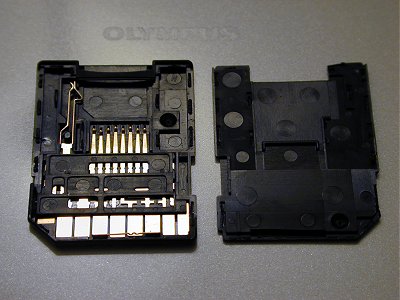
Inside_microSD_Adapter.jpg
rodrigo
Sat, 21 May 2011 15:05:58 +0000
Thank you - - this was the first thing that came up on google - I would have felt even MORE stupid if I spent any longer trying to figure it out!
Lisa
Sun, 22 May 2011 18:21:30 +0000
thank god i googled this and found the answer! thankyou! luckily it didnt take me too long to use my inititive to research it on the internet as i couldnt be bothered to look through my manual ect lol. such a simple thing! and i got really worried! thought ide have to take my camera back to the shop & everything. so relieved :) :)
steph
Thu, 26 May 2011 18:16:05 +0000
Hi! My camera has been working just fine. One day I was trying to take a picture, but my camera said that my SD card is locked. I'v tried everything on my camera to fix this. nothing has worked. Please help me! Thank you.
Michelle
Fri, 27 May 2011 23:54:09 +0000
OMG it worked! THank you soooo much!
songangel0014
Wed, 15 Jun 2011 17:40:06 +0000
My SD Card is locked and the little switch fell off. :( I have a lot of family photos on this card so I don't want to format it. Is there anyway I can unlock it?
Attached Image: 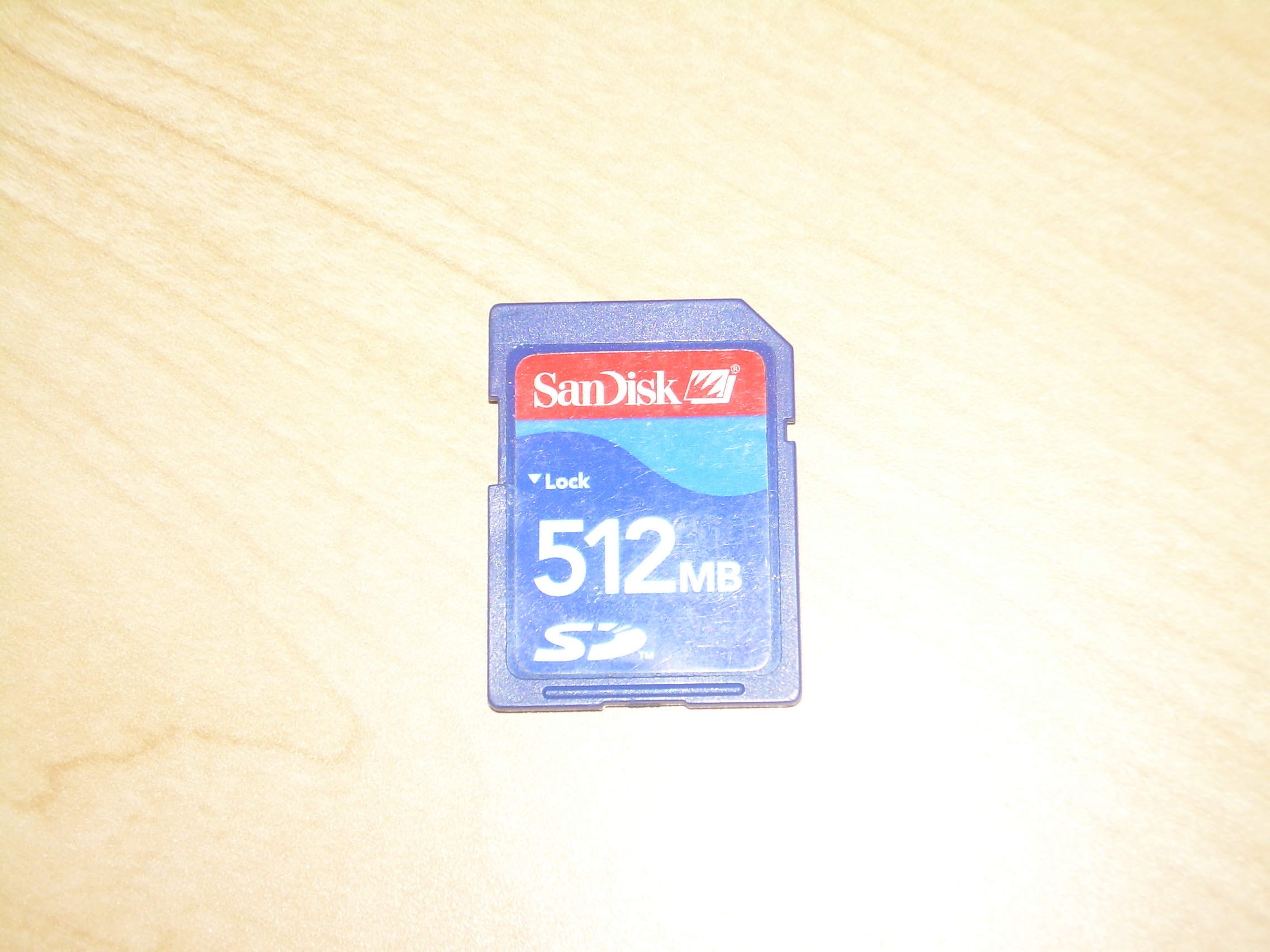
DSCN0092.JPG
Anna
Thu, 16 Jun 2011 00:12:35 +0000
You should be able to read the card even without the switch. The switch is only necessary if you want to write to the card or format it.
Chieh Cheng
Thu, 16 Jun 2011 23:33:37 +0000
oh thanx it worked.......thanxxxxxxxxxxxxx so much
mark mwamburi
Fri, 17 Jun 2011 06:51:10 +0000
Thank you very much, It really worked !
Varun
Fri, 17 Jun 2011 18:15:14 +0000
It worked for me to put tape on the Sandisk 4 gb memorycard.
Thank you for your help!
Anton
Mon, 04 Jul 2011 03:48:48 +0000
I just bought a new sandisk sdhc 8gb card and when i put it into my camera it reads 'memory card error' 'card locked!' its already in the unlock position... what do i do??? :(
Jake
Wed, 06 Jul 2011 05:02:27 +0000
There could be three different problems:
1. SD card has its locked enabled.
What to do:
Take out the SD card from camera. Slide the small tab to 'Unlocked' or to the other end of 'Lock'. Insert in camera and retry.
2. SD card isn't at 'Lock' position when enter, but camera still shows 'Locked' and when SD card removed, the tab is a Lock position.
What to do:
Put a scotch tape on tab. Reinsert SD in camera and retry.
3. SD card's tab is and remains at unlock position when inserted and pulled out, but camera still shows 'Card Locked'.
What to do:
There is a pin or dentil inside the camera slot side wall where SD card fits and the tab pushes that pin. Ensure there is nothing stuck there. Use a toothpick to push on that dentil (backed by a small spring). If that dentil gets pushed inside by toothpick and then comes back, then it is working. If it broken or stuck, then that is a bigger problem that you can handle.
Mohammad Arif
Tue, 12 Jul 2011 02:23:11 +0000
my sd memory card was locked. how to get the unlock code. please any solution send me
rangaraj
Sun, 24 Jul 2011 04:52:10 +0000
So i put tape on the card, now I have tape stuck inside my $700 camera that I have owned for no more than 2 hours.
Hannah
Tue, 02 Aug 2011 00:08:48 +0000
Thanks a million for all your comments, i was really worried my camera wouldnt work again.
Charlotte
Tue, 30 Aug 2011 13:12:13 +0000
found this life-saver website - thankyoooooooo! same cause as another contributor: the little grey switch got pushed downwards when I put it in the pc slot. They say you learn something every day - didn't know it was there.
Patti
Fri, 02 Sep 2011 00:01:34 +0000
Thanks to everyone help in solving my memory card problem. Like somone else said ' you learn something everyday '
Mick
Mon, 12 Sep 2011 19:37:52 +0000
i protected my memory card with a password, but now i can remember the password i used in protecting it.
can someone help me please. i promise to give any thing to that person
all i need is, how to unlock the password.
thanks
you can email me at [email protected]
Attached Image: 
312554_205932969474224_100001725670507_515288_2039264434_n.jpg
ekesnite
Fri, 04 Nov 2011 15:26:46 +0000
thanks a million guys! I did put a tape over mine after you advised me that the tab may be broken off and it was! It still didnt work, then I put another tape over the first one and this made it stiffer so when inserted it did not make an indent in the sd card, works perfect now, thanks for the advice!
nancy
Sun, 27 Nov 2011 05:54:11 +0000
you need to unlock the phone and not the sd card. google how to unlock that phone model or visit this site to unlock your inspire .it is easy
For more information: http://www.techyv.com/questions/how-unlock-my-sd-card
PAuljason90
Thu, 15 Dec 2011 14:23:50 +0000
Mr. Camerahacker - thank you so much for helping me make this simple fix. I am not a techie but I did take out the memory card and saw that little notch and wiped it off...thinking it would work if it were clean! I just moved it and unlocked the memory card. Thank you, thank you!
Sharon
Mon, 19 Dec 2011 04:46:44 +0300
What a great tip. It worked after my memory card decided to lock itself (after my wife use my camera) , broke the locked/unlocked switch off an the old school tape worked. Thanks as it saved me a trip down to the shops 2 days out from Xmas.
DM
Fri, 23 Dec 2011 18:04:14 +0300
My tab snapped off (I remember it happening at the time but I didn't know what it was). I tried sticking selloptape over the gap but it didn't work. So opened the memory card I got an old credit card and cut a small piece the size of the tab and put it at the bottom of the gap. Then I sellotaped it back. It worked!!!
I had to take it out again and make it a bit neater because the card got a bit wedged in my camera :0
Kim
Sat, 24 Dec 2011 18:53:03 +0300
My SD Card toshiba &scn disk is locked and the little switch is broken. iam a electronic tec.
why this problem rectified i open the cover and removed pcb
vinod
Mon, 23 Jan 2012 21:04:59 +0300
OMG, I can't believe the fix was as simple as scotch tape! My card said Card Locked. I tried other cards and they worked so I thought it was the card. I went to the store and bought a new card. The brand new card said Card Locked! Irritating. Then I found this website, tried the scotch tape and it worked! Hallelujah!!!!!!
Tabbatha
Thu, 02 Feb 2012 07:05:09 +0300
thnx a lot man
u saves me..
owe u big tyms...
shubham
Sat, 18 Feb 2012 14:04:05 +0300
When I insert Sandisk card... camera screen displays Memory card locked...the tab is broken...any idea how to fix it ?
I need to click my son's pic ...plz help :(
Kumkum
Wed, 29 Feb 2012 09:37:56 +0300
you are a god! thank you for your logic!
Brian
Thu, 17 May 2012 20:08:34 +0400
my memmary card locked pass word dut i not remember that number but some urgent files have inside the memmory card.how solve this problem.plzzzzzzzzzzzzz reply very urgent,,,,,,, plz plz plz plz plz
arun nair
Mon, 04 Jun 2012 11:32:42 +0400
ohmygod! it actually worked! thankyou soooooooo much! i was actually thinking of getting a new one.
anonymous
Mon, 23 Jul 2012 13:57:54 +0400
ty so very much i found one plastic piece but my other 3 r gone plus i was getting frustrated trying to put them back in lol so happy we have internet and ppl who share their solutions or i would've been up for another 3 hours. thanks so much!
kelsie
Mon, 10 Sep 2012 12:56:31 +0400
Funciona!!! he recuperado mi sd de 8 gb de mi c�mara submarina ( una vez debajo del agua YA NO se puede hacer nada ).
Gracias
jose
Tue, 25 Sep 2012 00:44:04 +0400
Thanks Thanks Thanks Thanks Thanks Thanks Thanks Thanks Thanks Thanks Thanks Thanks Thanks Thanks Thanks Thanks Thanks Thanks Thanks Thanks Thanks Thanks Thanks Thanks Thanks Thanks Thanks Thanks Thanks Thanks Thanks Thanks Thanks Thanks Thanks Thanks Thanks Thanks Thanks Thanks Thanks Thanks Thanks Thanks Thanks Thanks Thanks Thanks Thanks Thanks Thanks Thanks Thanks Thanks Thanks Thanks Thanks Thanks Thanks Thanks Thanks Thanks Thanks Thanks Thanks Thanks Thanks Thanks Thanks Thanks Thanks Thanks Thanks Thanks Thanks Thanks Thanks Thanks Thanks Thanks Thanks Thanks Thanks Thanks Thanks Thanks Thanks Thanks Thanks Thanks Thanks Thanks Thanks Thanks Thanks Thanks Thanks Thanks Thanks Thanks Thanks Thanks Thanks Thanks Thanks Thanks Thanks Thanks Thanks Thanks Thanks Thanks Thanks Thanks Thanks Thanks Thanks Thanks Thanks Thanks Thanks Thanks Thanks Thanks Thanks Thanks Thanks Thanks Thanks Thanks Thanks Thanks Thanks Thanks Thanks Thanks Thanks Thanks Thanks Thanks Thanks Thanks Thanks Thanks Thanks Thanks Thanks Thanks Merry Xmas!!!
hellen
Tue, 04 Dec 2012 12:23:15 +0300
It didn't work for me.
Card was locked and lock came off.
So I tried to use tape as mentioned.
The case is same, its still write protected.
So this doesn't work everyone... pfff...
Chris
Sat, 15 Dec 2012 23:17:13 +0300
my memory card on my camera samsung i7 says its locked bt i ddnt lock it
xolani
Mon, 16 Sep 2013 22:52:06 +0400
Help!, memory card is locked, move the switch and even put scotch tape on it. Nothing is working, have a lot of family pics. Please help!
Lisa
Fri, 25 Oct 2013 21:34:50 +0400
Add Comment
|
Related Links
|
TrackBack
Related Content
Did your message disappear? Read the Forums FAQ.
TrackBack
TrackBack only accepted from WebSite-X Suite web sites. Do not submit TrackBacks from other sites.
Send Ping |
Spam Control
Title: microSD card and adapter write protection problem
Weblog: Camera Hacker
Excerpt: I've got a very strange problem with the microSD card + adapter from Toshiba. The adapter *does not have* the "lock" switch, that means you can't enable/disable write protection. At first I loaded some music from my PC to the card and then used the card in a Nokia cell phone and since then the card . . .
Tracked: Tue, 12 Sep 2006 14:45:32 -0700
Title: how to remove lock code from memory card?
Weblog: Camera Hacker
Excerpt: I PUT A LOCK CODE ON THE MEMORY CARD AND NOW I CANT REMEMBER IT WHAT DO I DO
Tracked: Thu, 01 Feb 2007 10:55:07 -0800
Title: broke my SD Card
Weblog: Camera Hacker
Excerpt: i went to upload the pictures in my computer but i think i pushed the memory card so in that when i took it out and putit back in my camara it says memory card bloqued. I know how to unlock it but i think i broke the little part of it to ubblock it. Is their any way i could fix that instead of buyin . . .
Tracked: Wed, 01 Aug 2007 18:14:24 +0000
Title: Is SD Card Different From a SDHC Card?
Weblog: Camera Hacker
Excerpt: i know it probably sounds really stupid but is a sd card different to a sdhc one- because on my camera it keeps saying the card is locked error- is that because its the wrong card?
Tracked: Mon, 05 Jan 2009 06:56:34 +0000
Title: Getting Data Out of ATP miniSD Card for Nokia 6126
Weblog: GearHack
Excerpt: I've a different problem. I've ATP mini SD card 4 my Nokia 6126. I stored few pics n music files on it. One day I tried to remove old ones to new files. When I inserted in my PC's slot & right clicked my computer icon it says there is no disk in drive. when I put it in adapter, same problm. I tried . . .
Tracked: Mon, 12 Jan 2009 02:10:31 +0000
Title: Inside the miniSD-to-SD Adapter and the microSD-to-SD Adapter
Weblog: Camera Hacker
Excerpt: I've carelessly open my miniSD adapter and I lost something so that the remaining is just 3 part as you can see in this photo. My PC read it as read-only. Some picture on internet could not help me to know what to do to make it write-enable again.. Can U help me?
Tracked: Mon, 11 Jan 2010 22:40:44 +0000
Related Links
- Sandisk MicroMate Reader - for SD and SDHC memory cards
- Amazon User Reviews
- SanDisk Multi Card Express Card Adapter - ExpressCard Adapter - Secure Digital (SD) Card, Secure Digital High Capacity (SDHC), MultiMediaCard (MMC), Memory Stick Duo, Memory Stick PRO Duo - SDAD-109-A11
- Buy Customer Reviews
- SanDisk SDDR-89-A15 ImageMate 12 in 1 Reader (Silver/Black)
- Amazon User Reviews
Add Comment
Messages, files, and images copyright by respective owners.
680 Users Online
|
Get Our
$10000-above 
$5000-$9999
$2000-$4999
$1000-$1999
$500-$999
$200-$499
$100-$199
$50-$99
$25-$49
$0-$24
Gift Certificate

|
|