

 Add Comment
|
Add Comment
|
 Related Links
|
Related Links
|
 TrackBack
 Related Content
converting AIS to mic audio jack
My DCRTRV18 finally died. I'm pissed that many of the upgrades (mine is a DCR - HC42) do not have a MIC input! Is anyone making an (Active Interface Shoe(AIS) with a mini-pin input - specifically for the WCS-999 wireless mics?
Q. Brown
Thu, 29 Sep 2005 19:38:51 -0700
I couldn't find an aftermarket jack so I hacked an ECM-HW1 ("shotgun" microphone) and put an audio jack in that. It works fine.
Michael Dallas
Fri, 10 Mar 2006 08:09:49 -0800
Sorry. It was an ECM-HGZ1 microphone.
Michael Dallas
Fri, 10 Mar 2006 08:12:05 -0800
That's great, Michael. Do you have a picture to show us how it's done? Or which pin on the AIS goes to what signal? Your help would be appreciated.
Chieh Cheng
Fri, 10 Mar 2006 11:23:38 -0800
Yes, Michael!
PLEASE tell us how you did this! VERY interested!
ResDog
Wed, 29 Mar 2006 16:31:12 -0800
Dear Michael I am also looking for a mic input for my HC-90 handycam. Can you give the pin details of active shoe interface? Thank you
Paul Daniel V
Mon, 3 Apr 2006 18:58:57 -0700
Was it Mono or stereo you managed to hack?
Avi
Tue, 11 Apr 2006 04:45:01 -0700
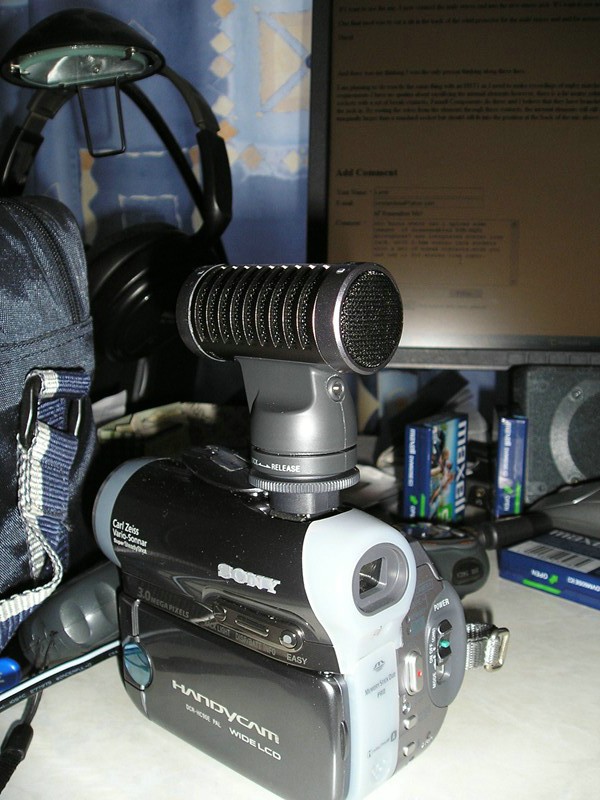
Sony Active Interface Shoe. Shame on Sony for not providing an external mic input. I've found that the easiest mic to sacrifice to mount a jack is the ECM-HST1. You can pop off the front wind screen and get to the stereo elements. There is space enough on the back to mount a mini jack above the switch. There are two elements in MS configuration; front with Black-white and back with Black yellow wiring. I haven't had a chance to figure out the proper connections for a mono lav mike, but believe this should be simple. THe ECM-HGZ1 case is very small and mounting a jack in this mike would be quite daunting.
Dick
Sun, 30 Apr 2006 15:33:33 -0700
I solved this problem (at the expense of a Sony ECM-HST1, which is large enough to mount a mini stereo plug. Unfotunately, I had to remove the internal mic cartridges, but you can pry off the back plate and mount the jack above the phasing switch. The front screen actually rotates to remove and gives you access to the MS circuit board. Wiring the plug (using 3 small wires twisted together to the wires attached to the two mic cartridges is a snap. There are 4 wires, two black a white and a yellow. The two blacks are tied together and go to the jack shield (ground). The white and yellow are the L & R hot leads. The position of the phasing switch makes no difference in my application. For MONO, just use a stereo to mono adapter external to the mike. You still get stereo separation if you use an external stereo mike, or feed from two seperate sources.
An expensive solution, but it works fine and there's room to work in this mike.
Dick Walters
Wed, 10 May 2006 09:06:34 -0700
Michael, Can u pls explain how u put an audio jack in ECM-HW1.... pl pl pl pl...
Jonathan
Fri, 09 Jun 2006 03:29:50 -0700
I doubt it's possible.I bought one and opened it but there was not enought space for me to even consider mounting a jack. That's why used the ECM-HST1, which as internal space to mount a standard 1/8" mini-jack on the back plate.
Dick Walters
Thu, 29 Jun 2006 06:42:42 -0700
Thank you Mr. Walters, I have used a ECM-HST1 and successfully placed a 1/8" mini-jack for my HDR-HC3 sony camcarder.
Venkata
Fri, 07 Jul 2006 13:15:14 -0700
i did this with the hst1 and haven't bought a mic yet, and i was wondering how the mic input works. Does it sound as good as it would if it was a real mic input
gPaul
Sun, 09 Jul 2006 23:31:29 -0700
Hai Walter, can u pls guide me how to fix an external mic input in Sony HC-90...pl...
Jonathan
Tue, 01 Aug 2006 05:50:02 -0700
Thanks guys. I did the Sony ECM-HST1 mod too. However, I didn't sacrifice the mic to do it.
My original plan was to put two panel mount 1/8 jacks on the back of the mic, one to the board and one to the mics and then jumper the two together when I wanted to use the HST1 mics. However, here is only enought room on the back cover for one panel mount 1/8 stero plug.
Plan B, which is what I ended up doing, was to connect a male stero jack to the mic cables and then plug it into the panel jack when I wanted to use the HST1 mics. There is enough room on the back cover for holes for both the panel mount jack and for a cable.
to start, I snipped the white, yellow, and black wires about 1/2 to 3/4 of an inch away from the board. I then cut a 1 foot shielded stero male to stero male cable (got it at radioshack) with about 6 inches of cable (i.e in half).
I drilled holes in the back of the HST1 cover. One for the panel mount jack in the center, just above the phasing switch text, but low enough that the hole touches the 0 in 90 and the 1 in 120. And one for the stero cable to go through, just to the right of the 120.
I removed the mics, ran the cut end of the stero cable through the back cover (male jack on the outside), then soldered the stereo cable ends to the mic wires (white to white, red to yellow, ground to black) and covered the solder connections using a glue gun (works well as insulation). I placed the mics back into the casing.
I then cut off another piece of wire from the remaining stereo patch cable to reach from the front to the back for the panel mount jack. I ended up pulling the wires from the wire jacket as it was too thick. I also cut a black wire from some wiring I had on hand, since the ground wire (shielding) didn't have insulation around it.
I then soldered the panel mount jack connections to the wires (black to ground, red to middle, white to tip), mounted the jack on the rear cover, and ran the wires to the front. I reassembled the mic, with the exception of the front cover.
I then soldered the wires going back to the panel mount jack to the wire ends on the board. I hot glued the solder joints (again to insulate them) and the replaced the front cover.
If I want to use the mic, I now connect the male stereo end into the new stereo jack. If I want to use an external mic, I plug it into the jack instead.
One final mod was to cut a slit in the back of the wind protector for the male stereo end and for access to the stereo jack. My mouse now has a tail... ;-)
David
David
Sat, 19 Aug 2006 12:09:20 -0700
And there was me thinking I was the only person thinking along these lines...
I am planning to do exactly the same thing with an HST1 as I need to make recordings of rugby matches with the voice of the referee via a radio mic routed to the camera. For my requirements I have no qualms about sacrificing the internal elements however, there is a far neater solution if you want the internal/external option. You can buy 3.5mm stereo jack sockets with a set of break contacts, Farnell Components do these and I believe that they have branches worldwide. These contacts act like a switch that is closed until you plug the jack in. By routing the wires from the elements through these contacts, the internal elements will still work until you plug in a jack for your external mic. The sockets are marginally larger than a standard socket but should still fit into the position at the back of the mic above the angle switch.
Nigel M
Fri, 25 Aug 2006 03:47:36 -0700
who knows where can i upload some images of disassembled ECM-HQP1 microphone? and integrated stereo line jack, with 3.5mm stereo jack sockets with a set of break contacts.wich you can use it for stereo line input.
Yes it is possible to mount 3,5mm stero jack, it has some weeknes but i'hope that i'll soon will solve them.
Attached Image:
P8260036_rs.jpg
Lamb
Sat, 26 Aug 2006 00:06:36 -0700
Lamb, I suggest you put them on this wiki: Hacking the Sony ECM-HQP1 Surround Sound Microphone.
You may upload the images to the Wiki here. By the way, I like what you've done.
Chieh Cheng
Sat, 26 Aug 2006 01:12:30 -0700
WARNING: This hack isn't perfect. After getting an HST1 and performing the hack, i was disappointed to find that it isn't a pure LEFT and RIGHT channel input. Let me exaplain.
I have a mixer that lets me pan from left to right. I tried many different tests with left, center, and right. I then opened the waveforms up so that I could see them visually as well.
left - Perception is lower volume audio but you hear it in both channels. If you look at the waveform, the left and right channels look like invesions from each other. What I mean is, as one waveform goes down, the other goes up. Like a mirror image.
center - Perception is that the audio sounds like it is a little on the left. If you look at the waveform, it confirms this. The right channel is about 2/3 the volume of the left.
right - This almost sounds like they are equal, but very very slightly more volume on the right. The waveform confirms this. There is about 10% more amplitude on the curve than on the left.
The solution, it seems to sound best panned almost all the way to the right, but not quite all the way (like 90%). I hate this because I was hoping to have a dumb way of just plugging it up (maybe even using a mono cable) and not have to tweak it on a mixer in order to get a good sound.
Anyone else have the same results? My guess is that they are doing some funky processing to make it sound more stereo. For one thing, there are only 2 mics and one points directly forward and the other just to the side. Confusing. Also, using a voltmeter, there is about 3.x volts DC on both the left and right wires. I'd assume that I should be using a capacitor or something to filter off the DC.
Mike Spice
Tue, 05 Sep 2006 20:27:16 -0700
Hey all, thanks for the useful comments, I am thinking about connecting 2 3.5mm mono stereo jack sockets to accomplish this, however I am not sure which wires to connect to each jack. Should I be connecting the white/yellow/2black wires to the jacks or should I be connecting the wires that lead into the active shoe? Has anyone found a wiring diagram/service manual for the microphone? I asked Sony but they could only give me the e-mail to the servicing/repair place in Texas. Any help is greatly appreciated. Thanks, David.
David Bridwell
Thu, 07 Sep 2006 11:47:51 -0700
"For one thing, there are only 2 mics and one points directly forward and the other just to the side. Confusing."
You are assuming that mic is a 'traditional' L+R stereo mike.
Google M+S....Mid-Side:
"The Mid-Side technique is theoretically equivalent to XY, but the realities of mike design often make Mid-Side more stable and reliable, and easier to set up. The idea is to take one mike (usually a cardioid condenser, though any mike will work) and point it at the sound source. This is your "Mid" mike. Then take a figure-8 mike and place it behind the mid mike, pointing 90 degrees away from the "Mid" mike. This is the "Side" mike. Now, instead of plugging one mike into your left channel and the other into your right channel, you'll need to "decode" the signal by finding the sum and difference of the signals in the two mikes. That is, the left channel on the final recoding is created by summing the signals from the two mikes and the right channel by taking the mid signal and subtracting the side signal. When combined to mono, you are left with the Mid signal, making mid-side inherently mono-compatible."
HTH,
-Shawn
Shawn Hughes
Mon, 25 Sep 2006 18:55:48 -0700
Shawn is correct in that a dual op-amp is used on the small circuit board inside the HST1 to decode the left and right channels. Left is passed through, and right is created by subtracting the left signal from the combined signal of the center mic. I traced through the board layout and found a great place for adding the five connect points of a closed circuit 3.5mm mini stereo jack to get a true L & R channel feed. It requires cutting two traces on the board with an exacto knife or drimmel, then wiring the jack as shown.
Z
Attached Image:

Sony AIS Microphone.jpg
William Zaggle
Fri, 06 Oct 2006 23:06:08 -0700
Is anyone selling these?
Greg Gley
Thu, 19 Oct 2006 20:02:45 -0700
If it's not illegal, someone should market an intelligent shoe/1/8" adapter. Money, money, money...
Will
Tue, 14 Nov 2006 00:29:03 -0800
I'd buy one!
Joe
Thu, 16 Nov 2006 04:59:17 -0800
Check out what this German did...
(copy & paste in URL)
24.08.2006 09:03 Sony HC3 / HC1 XLR
He has successfully created a dual XLR mic attachment that works directly with the intelligent shoe on the HC3!
Will
Mon, 20 Nov 2006 22:58:48 -0800
The Link dont work
Joe
Mon, 27 Nov 2006 01:12:50 -0800
Sorry! Don't copy & paste. Just click on the link.
Will
Thu, 30 Nov 2006 20:19:31 -0800
No, still dont work!
Joe
Fri, 01 Dec 2006 06:16:00 -0800
Sorry ...it worked for me!
The URL is: http://www.fxsupport.de/08.html
Laters
Will
Will
Sat, 09 Dec 2006 19:44:55 -0800
For more complete instructions on modifying the ECM-HST1, look at Sony ECM-HST1 Modifications for External Microphone Connection
TL
Sat, 09 Dec 2006 20:21:38 -0800
Will this work?

Dismantle the ECM-HST1.

Add a 3,5mm stereo Jack socket with this plan.
Simple and you can select between the HST1 and the Jacks.
phex
Mon, 29 Jan 2007 14:30:41 -0800
Look at this Foto:

Got the idea? :) - In some way it is possible to connect a mic via the Sony AV-Connector. Any idas on this?
phex
Tue, 30 Jan 2007 06:21:58 -0800
Here is one Image for all:
Here one image for all:

The purple path marks the Mic_GND. I think you can use wire 10, 9 and 8 simple to connect the jack.
Phex
Wed, 07 Feb 2007 22:42:24 -0800
Is it possible to use a external mic by using the audio inputs of the camcorder?
Sam54myr
Wed, 09 May 2007 15:22:50 -0700
Before purchasing a Sony DCR-HC96 Camcorder, I looked into the various ways to get a mic input via the AIS. The simplest/cheapest way seems to be to purchase the Sony VCM-K100 Microphone Adapter for camcorder hotshoes. It costs $19.95 at B&H Photo. From what I've read, this item might not be available indefinitely, but I ordered one tonight, and the page still says that it's in stock. Here's the link -- hope it helps those looking for a fast, simple easy solution to boost the audio input capacity/options of the HC96.
Sony VMC-K100 Microphone Adapter for Camcorder Hot Shoes
In terms of how to then mount, let's say, a Rode Vidcam Mic, a simple solution would be to use a Sima SVB-1 bracket that attaches via the tripod mount under the camcorder. Mounting the Rode on the left side should keep it far enough away from the tape transport mechanism to prevent it from picking up any incidental transport noise.
Sima SVB-1 2-in-1 Video Bracket
sk
Sat, 19 May 2007 21:50:50 -0700
I have also purchased a Sony HC-96. I would be interested if sk above could tell us if this adapter from Sony really works. Thanks in advance.
Frizby
Fri, 20 Jul 2007 16:50:26 +0000
Thanks, Sam54myr, for your information and link about the microphone adapter at B&H Photo. I think I ordered the last one in stock, according to the "shopping cart"'s in-stock number left. It was certainly a long time in coming. I was surprised that this adapter turned out to be manufactured by Sony, as I fully expected it to be offered by a third party vender. I'm sure B&H Photo is not the only retailer out there selling this. Now that a part number for it exists, it should be easy for others in the same fix to find comparable retailers selling Sony accessories. Thanks again for the link! - dm
dm
Fri, 16 Nov 2007 00:13:08 +0000
Dear VCM-K100 owners,
please, can you clarify if its a stereo one?
I like connecting both lavalier & gun-style mics (not yet bought) to an HC-94 camcorder, but will it accept *both* of channels?
Flyer
Thu, 29 Nov 2007 22:18:36 +0000
I borrowed a Sony DVD 308 to shoot a projected 16mm composite print and want to record the audio from the projectors amp to the camera via a .206 cable which can have a mini or RCA plug and therefore cancel out the 308 internal mic.
Since Sony did not add inputs to the 308 other than the Active Interface Shoe, does anyone know where I purchase an input jack that fits the shoe?
I cannot reconfigure the camera since It doesn't belong to me.
Thanks.
J.P. MARSHALL
Fri, 04 Apr 2008 19:36:46 +0000
Yah, you can get the Sony VMC-K100 Microphone Adapter for Camcorder Hot Shoes that someone mentioned above.
Chieh Cheng
Fri, 04 Apr 2008 22:50:38 +0000
I have an HC-96 and really need the external mic input. The VMC-K100 cannot be found anywhere (US or Europe). I have read on this string about modifying Sony mics. I have also read about purchasing the Sony hot shoe adapter which has a bunch of wires.
What is the easiest method to get the external jack? Is anyone interested in doing this modification work for me?
Thanks,
Tee
Mon, 28 Jul 2008 22:31:30 +0000
I wish I could get the VMC-K100. If anyone can help me convert my HGZ1 to miv input that would be greatly appreciated.
Bamlactaid
Fri, 10 Oct 2008 02:38:49 +0000
hi michael ,
i am in need of your assistace , i serve as a pastor in a church in India ,
i have sony handy cam DCR - DVD 608 E , how do i use this cam to record good interviews ( i want to fix mic ) so what should i purchase or how do i go ahead abouty it
i checked the catalogue it says about active interface shoe , how do i know whether my handy cam has this facility please help me as soon as possible
GOD BLESS YOU
joseph
Tue, 30 Dec 2008 07:03:54 +0000
joseph, I think you should get a Sony Gun Zoom Microphone ECM-HGZ1.
Chieh Cheng
Tue, 30 Dec 2008 21:01:30 +0000
I have successfully converted my ECM-HGZ1 to a mic input. It was not very difficult.
Ryan Toler
Tue, 20 Jan 2009 03:05:31 +0000
Add Comment
|
Related Links
|
TrackBack
Related Content
Did your message disappear? Read the Forums FAQ.
TrackBack
TrackBack only accepted from WebSite-X Suite web sites. Do not submit TrackBacks from other sites.
Send Ping |
Spam Control
Title: Sony Active Interface Shoe
Weblog: Camera Hacker
Tracked: Tue, 2 May 2006 16:26:04 -0700
Title: Creating a Dead Mic for Sony video cameras
Weblog: Camera Hacker
Excerpt: I need to completely disable audio on a Sony HDR-HC3. Do you have any idea how to do this. I have a ECM-HGZ1 Gun mic and can cannibalize it. Any help would be greatly appreciated. Thanks.
Tracked: Fri, 15 Sep 2006 15:43:12 -0700
Title: Adding a 2.5mm jack to the Sony Gun Zoom Microphone ECM-HGZ1
Weblog: Camera Hacker
Excerpt: Hi, Ive recently been looking at modifing a Sony ECM-HGZ1 so as to connect a Audio Technica Wireless mic via the AIS to record on my Sony DV90. After closer inspection and a local trip to Radio Shack, I found a perfect location for a 2.5mm jack to be mounted inside the Microphone, inside the shoe . . .
Tracked: Thu, 30 Nov 2006 10:26:54 -0800
Title: AIS to standard stero input
Weblog: Camera Hacker
Excerpt: There isn't one, but you can easily make one . Sony Part #183064611 is a hotshoe plug with wire leads. It sells for about $65. It's a nicer alternative to hacking a Sony HST1 mic, because, well, it just looks neater. Once you receive it from Sony Parts you'll need to solder an 1/8" stereo jack to th . . .
Tracked: Wed, 13 Dec 2006 10:08:55 -0800
Related Links
- Adorama Universal Cold Shoe Adapter for Sony Type AIS (Active Interface Shoe) Hot Shoe
- Amazon User Reviews
- Adorama Universal Cold Shoe Adapter for Sony Type AIS (Active Interface Shoe) Hot Shoe (FLAT TYPE)
- Amazon User Reviews
- AIS (Active Interface Shoe)
- Sony ECMHW1 Bluetooth Wireless Microphone for DVR-DVD405, 505 & HDR-HC3 Camcorders - Amazon User Reviews
- Sony ECM-HGZ1 Shotgun Microphone for DCR-PC55, DCR-HC96, DCR-DVD 92, 203, 403, 305, 405, 505 & HDR-HC1 Camcorders - Amazon User Reviews
- Sony ECMHST1 Stereo Microphone for DCR-HC42, 90, 96, DCR-DVD 203, 403, 305, 405, 505, DCR-SR100 & HDR-HC3 Camcorders - Amazon User Reviews
Add Comment
Messages, files, and images copyright by respective owners.
377 Users Online
|
Get Our
$10000-above 
$5000-$9999
$2000-$4999
$1000-$1999
$500-$999
$200-$499
$100-$199
$50-$99
$25-$49
$0-$24
Gift Certificate

|
|